
Home > Watch Dogs Legion > How to Recruit People with Negative Opinion of DedSec

How To Recruit NPCs Having Negative Opinion Of DedSec

Updated Date :

Recruiting people and adding them to your army is one of the most core elements of Watch Dogs: Legion. Based on your requirements, you can pick from a wide range of characters. You can choose potential recruits depending on their outfits, abilities, looks etc. While exploring the open world of this game, you will encounter loads of special characters. But how to recruit NPCs who dislike DedSec? Can you add people having a negative opinion of DedSec to your team? Find out in this quick guide.

How To Recruit NPCs Who Dislike DedSec
how-to-recruit-npcs-negative-opinion-dedsec

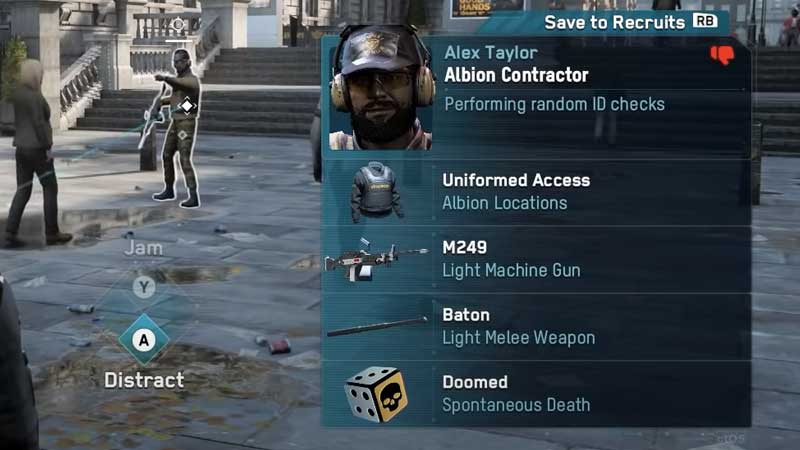
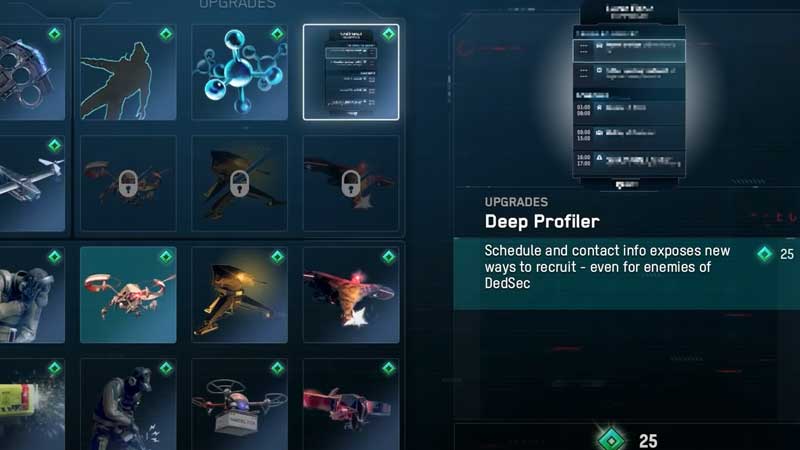
To know if NPCs have a negative opinion of DedSec, check the red thumbs down icon on their profile. Once you find someone you want to hire, you have to use the Deep Profiler which is in the Tech tab.
watch-dogs-legion-deep-profiler-recruitment-leads

So, what you need to do is hold RB and save that person to your Recruits. Next, you have to press Y and investigate their profile and choose a lead. Do all this from the Team app. Now what you have to do is follow the lead to help them out. This is the basic process of how to recruit NPCs who dislike DedSec.

Note that the location where you are looking to recruit NPCs has a great impact on what type of people you come across. Camden is ideal to find artists or hackers while the City of London is for those who are looking for people in the finance department like CEOs and crypto specialists. So be sure to explore places around you well.

This is how to recruit NPCs who dislike DedSec. But what if someone has two red thumb icons instead of one? That means they are fully against DedSec and you cannot recruit them. These antagonists can even try to capture your operatives so be careful.

For more such information, tips and tricks, check out our Watch Dogs Legion wiki. We have guides on how to change operatives, ultimate beginners tips, how to fight, change difficulty levels and more.


  • Clean the Squishies Codes (July 2026)

    Clean the Squishies Codes (July 2026)

    Published Date :

    There’s something surprisingly satisfying about picking up the cute Squishies and putting them back on their designated shelves. If you’re interested in getting some unique rewards including free Squishies, this guide is for you. Here’s the complete list of all the working rewards. Last checked for new codes on July 13, 2026 All Clean the… Read More

  • Scratchy Loot Codes (July 2026)

    Scratchy Loot Codes (July 2026)

    Published Date :

    If you want a little luck boost while playing Scratch Loot, codes come to the rescue! In this experience, you scratch cards, reveal symbols, earn coins, and keep upgrading to get better rewards. To make this journey easier, the developers regularly release codes, and if you don’t want to miss out, redeem the freebies mentioned… Read More

  • My Squishy Box Store Codes (July 2026)

    My Squishy Box Store Codes (July 2026)

    Published Date :

    Every new customer brings another opportunity to grow your business and expand your collection of adorable squishies. To help you even more, the devs release My Squishy Box Store codes that provide free cash and in-game items. These freebies that can help you upgrade your shop faster and earn more while handling a steady flow… Read More

  • GTA 6 Players in Australia May Need Age Verification Due to New Online Safety Rules

    GTA 6 Players in Australia May Need Age Verification Due to New Online Safety Rules

    Published Date :

    Australian players could have an extra requirement to meet before accessing Grand Theft Auto VI’s online features. Under the country’s updated online safety regulations, games classified as R18+ may need to verify that players are adults instead of relying on a simple age confirmation (as per news.com.au). If GTA 6 falls under those requirements, Rockstar… Read More







