
As the lone warrior of all-father Odin, you have to hunt, eat, drink, rest, and sleep like a true Viking. Being in the tenth world in the branches of Yggdrasil means that everything around you is hostile towards you in Valheim. Odin has outcasted all of his fierce enemies into this realm. You have to survive both the creatures and the environment too in this game. The main part of it is to build a house with properly covered walls. Walls are prone to decay and damages like animal attacks and even by being in the rain. So let’s look at how to repair home walls in Valheim.
How to Repair Walls in Valheim?
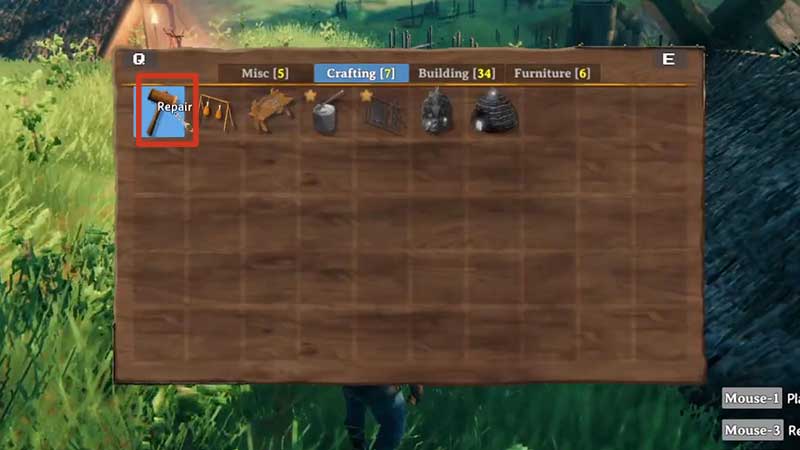
To repair home walls in Valheim, you need to place a Workbench within the range of the building part. Then equip Hammer, select Repair from Crating tab, and LMB to repair anything that took damage. Let’s look at this process in detail:
- Equip your Hammer from inventory.
- Switch to the Crafting tab, select Workbench.
- By spending 10 Woods, now place Workbench within range of damaged house part.
- All house or building part decaying by rain or damaged by any other means can be repaired.
- Equip your Hammer again.
- Switch to the Crafting tab, select Repair.
- Hover the mouse of any building part to see how much damage it took.
- Use LMB to repair each part instantly.
- Repairing does not cost any coins or other resources.
That’s everything you need to know about how to repair walls in Valheim and fix the decay. Honestly, this is the Viking survival game we have all been waiting for and the successful Steam sales have proved this. In thsi game, players can enter a world engulfed in Viking themes and Norse mythology. All of this, along with the ability to build Longhouses, Feast halls, and Longships and the ability to bring your friends into your game, makes Valheim one of the most recommended games of recent times.
While you’re here, check out more tips & tricks that will help you level up your gameplay in our Valheim Wiki, like:
- How To Farm Greydwarf
- Change Controls in Valheim
- How To Make A Hoe In Valheim
- Transfer Items Between Worlds In Valheim
- The Best Valheim Seeds: Great Spawn Locations and Resources
- Can I Play Valheim Solo?
- Valheim: How To Make Healing Potions










