Making an Automatic Outpost for mining in Starfield is essential for gathering and carrying resources to your ship. While you can also carry or transport these resources on the foot, setting up an automated mining can make it effortless. That’s because it allows you to transfer resources without even stepping out of your ship. This can be crucial when you are exploring planets with less O2 atmosphere or extreme weather conditions. But there are some prerequisites you need to complete for automated mining at your outpost. Don’t worry, here’s where you can find out everything about Automatic Outpost Mining and how to transfer resources.
How to Build an Automatic Outpost for Mining in Starfield
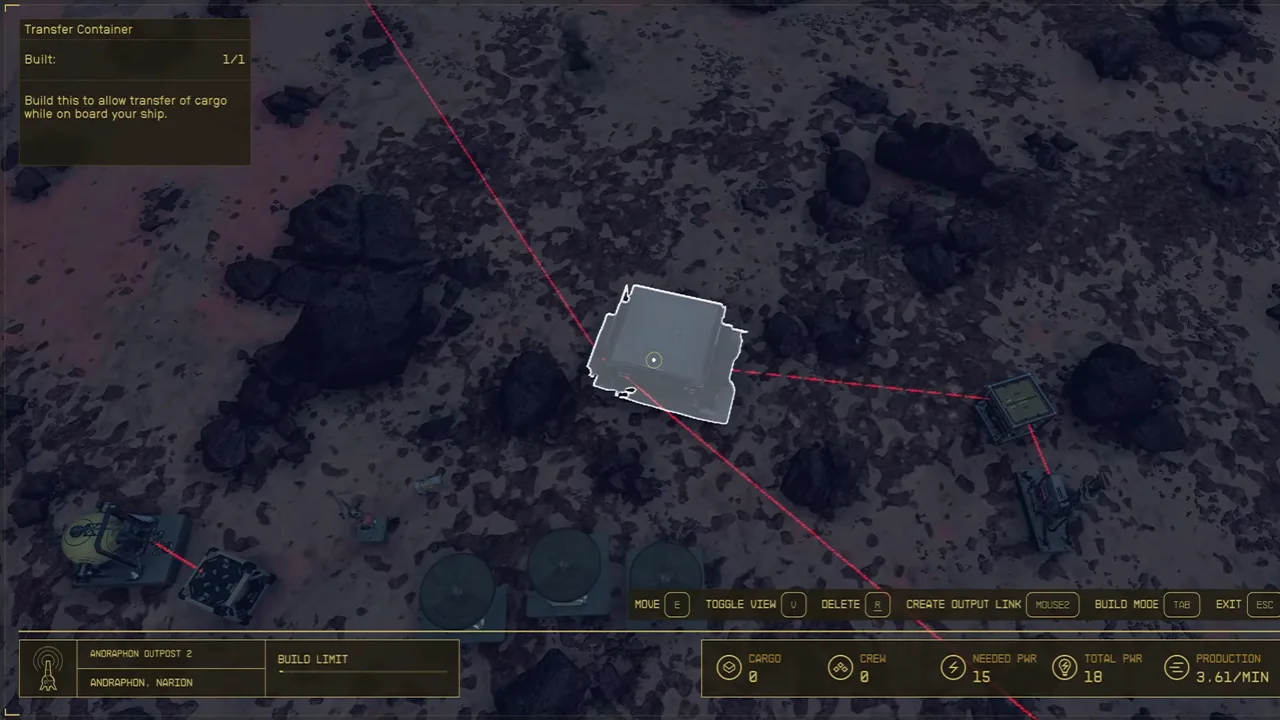
You can build an Automatic outpost for mining once you set up a Transfer container. For that, build your first outpost on a desired planet filled with resources, flora, and fauna (if you haven’t already).
So, here’s how to make an Automatic Outpost for Mining in Starfield:
- Build a Transfer container at your outpost. You will require the following materials:
- 4 Lubricant
- 5 Tungsten
- 8 Iron
- Head to the Build Mode > Storage > select Transfer Container.
- Place the container at a location preferably close to your ship.
- Then, head to the Build Mode and select the Extractor.
- Place the Extractor and connect it to the Power Source.
- Hover over the Extractor and select the “Create Output Link” button.
- Connect the red line and link it to the Transfer container by pressing that button again.
Once you have set up a transfer container in Starfield, it will automatically collect and mine resources using the extractor. You can transfer all types of resources from the Transfer containers to your ship which can be solid, liquid, or gaseous form. And the best part? You don’t have to get out of your cockpit to transfer these resources to your ship. We recommend assigning the best crew members for this role for an optimized automatic mining outpost.
How to Transfer Resources in Starfield
Follow the below steps:
- Head to the in-game Menu and press the Ship tab.
- Select the Cargo Hold and hit the Inventory button.
- Under Inventory, select your Outpost and the preferred category of resources.
- Then, select an amount of quantity and confirm to transfer resources.
- Select the All button to transfer all the resources to your ship.
That’s all about the Automatic Outpost Mining in Starfield. If you liked this guide, check out our guides to find out how to assign crew members, manage crew members, and explore more Starfield Guides right here on Gamer Tweak.