Home > Starfield > How To Assign Crew In Starfield

How To Assign Crew To Outpost In Starfield

Updated Date :

You can Assign your Crew to an Outpost in Starfield and let them take care of it. Adding Crew Members to an Outpost will let you manage them even more efficiently. Moreover, if you assign members with Outpost Management & Outpost Engineering Skills to an Outpost, then you won’t have to spend your own Skill Points in buying these 2 Skill Trees. Sounds intriguing right? Take a look below to get started.

How to Assign Crew Members to Outpost in Starfield

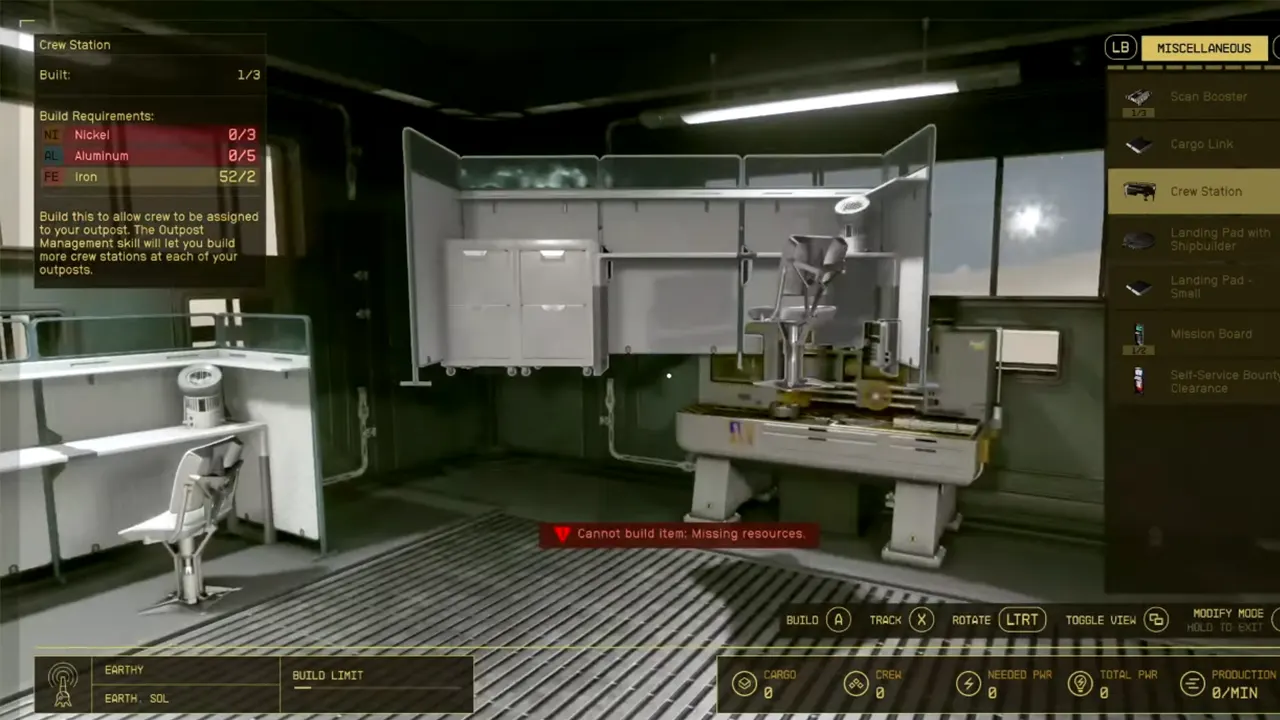
First things first, make sure that you have crafted and installed a Crew Station in your Outpost. Without a Crafting Station, you won’t be able to assign Crew to your Outpost in Starfield. To craft it, follow the steps below:

Crew Station for Crew Members in Outpost
Image Source: Quick Tips
  • Scroll right to the Miscellaneous section and craft a Crew Station with the following items:
    • x3 Nickel
    • x5 Aluminium
    • x2 Iron

Once you have built and placed a Crew Station, here’s how you can assign Crew to your Outpost in Starfield:

  • Enter the Data Menu by pressing Tab (on PC) or Y (on Xbox).
  • From there, enter the Ship Menu > Crew section.
  • Now, you will be taken to a screen with all your available Crew Members.
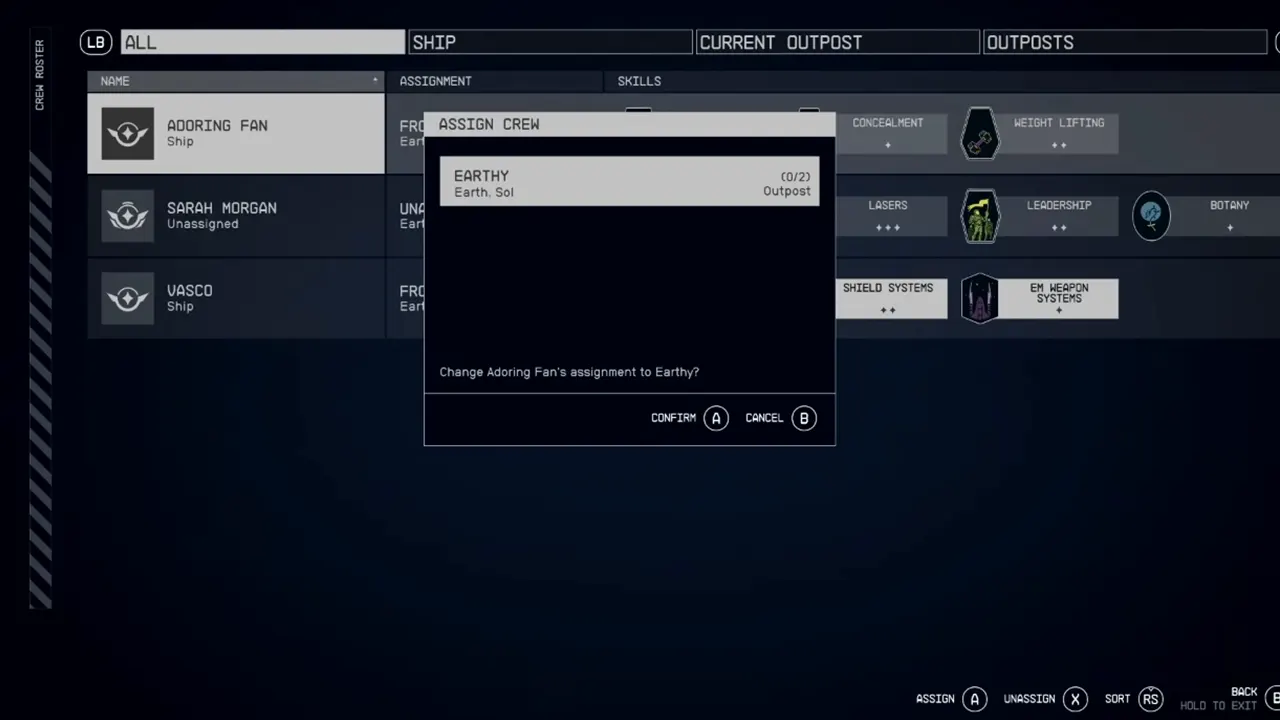
How To Assign Crew Members To Outpost In Starfield

  • Select any Crew Member and click on the Assign option.
  • After this, select an Outpost you want them to assign and hit Confirm.

The assigned Member will now show up at the Outpost and not on your Ship.

Speaking of Crew Members, you will meet one known as Adoring Fan in New Atlantis City. Know if you should accept his offer through our guide on it.

And now that you know how to Assign Crew to Outpost in Starfield, ensure to make the most out of it. Besides this, if you want to Change your Companion, then you can check out our guide on it. And for more such content, you can check out our dedicated section for Starfield Guides at Gamer Tweak.

  • Reclone Codes (July 2026)

    Reclone Codes (July 2026)

    Published Date :

    Reclone is a sci-fi stealth horror game where you get on a research spaceship and survive the dangers that lurk. This means, you need all the boosts you can get which is exactly what Reclone codes provide! If you’re running short of Tokens or cash, make sure to redeem them quickly so that you have… Read More

  • Missile Empire Codes (July 2026)

    Missile Empire Codes (July 2026)

    Published Date :

    Every player on the server is a potential target, so having a strong background of resources is just as important as maintaining a powerful missile arsenal. Missile Empire Codes can give you free Cash, Gems, Lucky Spins, and exclusive rewards, helping you upgrade your base and stay one step ahead before war breaks out. Here’s… Read More

  • Ball Game Codes (July 2026)

    Ball Game Codes (July 2026)

    Published Date :

    There’s something satisfying about watching a lucky roll turn into a massive payout, especially once you’ve unlocked upgrades that make every drop even more rewarding. Ball Game codes reward free potions that boost your Luck, Money, Roll Speed, and Drop Rate, helping you progress faster as you collect rarer balls and invest in better upgrades.… Read More

  • Cooking Chaos Codes (July 2026)

    Cooking Chaos Codes (July 2026)

    Published Date :

    Running a busy kitchen is much harder when every second counts and new orders keep piling up. Cooking Chaos codes help you build up your Gem balance, making it easier to unlock useful upgrades, class rolls, and other items that can improve your performance during hectic cooking sessions. Here’s the complete list of all the… Read More