
If you are looking to wait and pass the in-game time in Starfield, then don’t worry we have got you covered. The day and night cycle in the game not only offers an immersive experience for players but you will also find it affecting missions and different areas in the game. Similar to some of the previous Bethesda titles, Starfield also allows players to wait and pass time. This makes things easy, as you won’t have to wait around the whole time to get through mission objectives. However, you may not find the option to be directly available through controls. Instead, players will find the mechanic somewhat similar to that of Fallout 4. So if you are wondering how to wait and change the in-game time, then check out this guide to know more.
How to Pass Time in Starfield
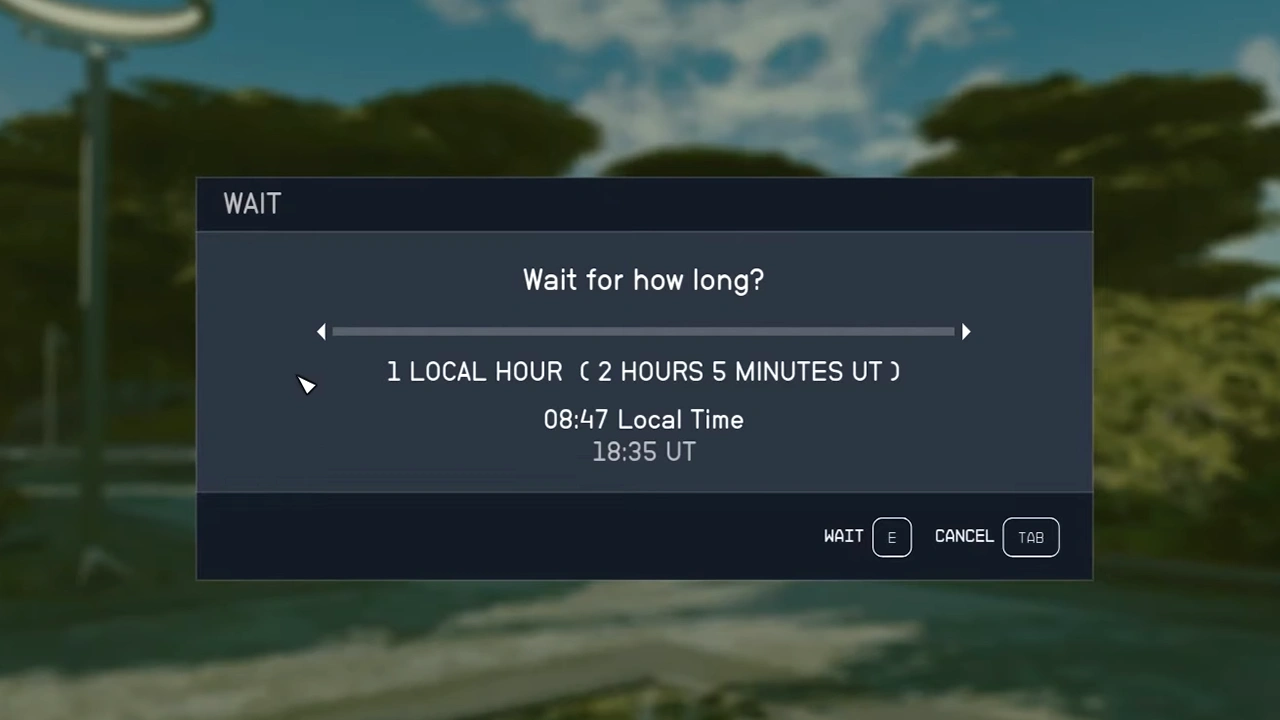
To wait and pass time in Starfield, players will have to find places to sit around in the game. Once you look closely enough, you will come across benches, chairs, sofas, etc. in the game. These places will help you use the wait mechanic and change the in-game time. Here are the steps you can follow to do so:
- Head toward the chair or benches or couch etc.
- Once near, you can press the E key on the keyboard or A on the Xbox Controller.
- After which your character will sit down on the chair accordingly.
- Here you will get the option to Wait at the bottom of your screen.
- Press the B key on the keyboard or hit Y on the Xbox Controller to open the Wait option.
- Once done, you will see the local time displayed.
- After which you can slide in the bar to pass time accordingly.
Players can wait and pass time for up to 24 hours in Starfield. This will be more than enough for you to get through missions accessible only at certain times in the game. You can also change the in-game time by sleeping on your bed at the lodge or on your ship & outpost. It will also give you a boost to farm XP in Starfield.
That’s everything covered on how to pass time in Starfield. Check out our guides on how to rename outpost, where to find titanium, and how to collect gasses in Starfield. For even more interesting ones take a look at our dedicated Starfield section, right here on Gamer Tweak.











