Wondering how to rename your Outposts in Starfield? If yes, then don’t worry we have got you covered. While players may build their outposts around different planets according to how they want, the game will then take some liberty of naming it after the planet. And although you may find it going for a while, the myriad of customization options available in Starfield also lets you rename the outposts. This comes in handy because who would want their main hub on the planet to be named Pluto? Everything considered, with the expanse of options available players can easily miss out on it. And while you will have the liberty to use the creativity it will also help you track down the outposts accordingly. So if you are wondering how exactly to do so in the game, then here is a guide you should check out further.
How to Change Outpost Name in Starfield
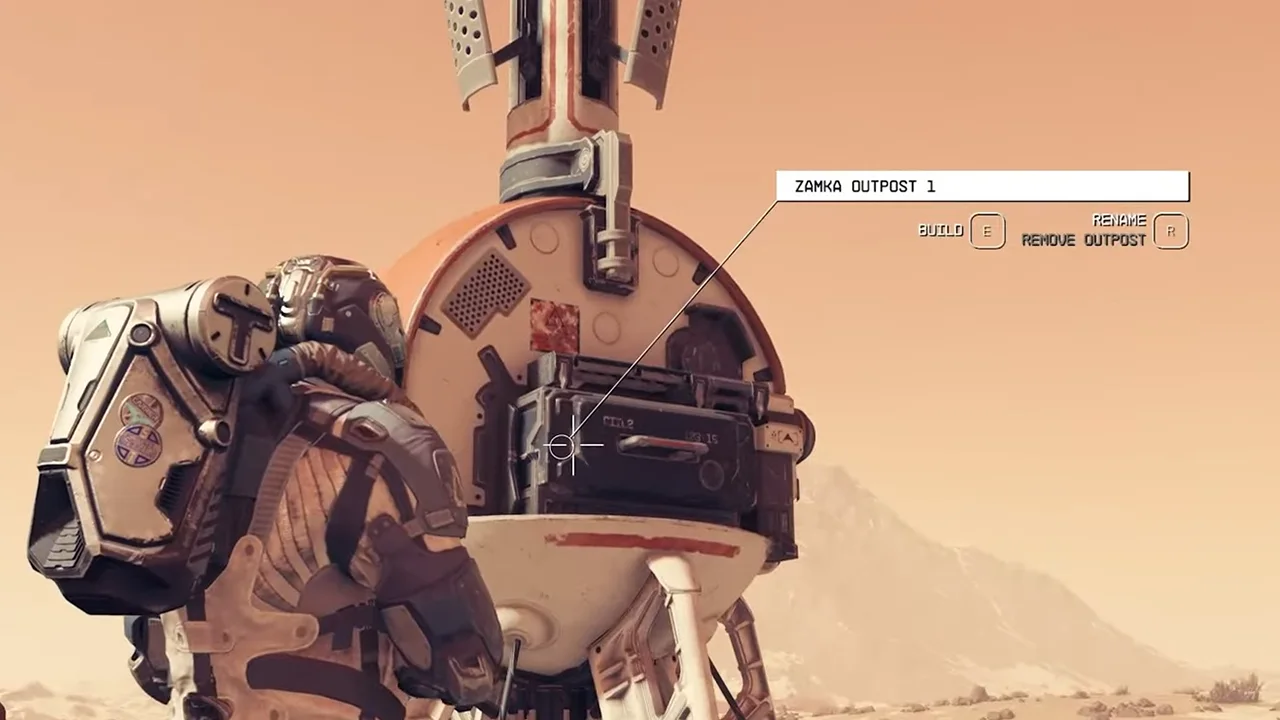
To change and rename the outpost name, players will have to approach the Outpost Beacon in Starfield. After which here are the steps you can follow to change the name:
- Head toward the outpost beacon and you will see the option to build and rename it.
- To rename it, players will have to press the R key on their keyboard or the X on the Xbox Controller.
- Once done, a box will appear wherein you can type in and change the name.
- After which hit Enter on the keyboard or A on the Controller to successfully rename the outpost.
Once done, players will be able to rename any outpost they want in Starfield. All you have to do is interact with the outpost beacon on the specific planet. It is worth mentioning that holding on to the options to rename will delete the outpost in the game. We would recommend you carefully go through the steps accordingly. The last thing you want is to build the whole hub again.
That’s everything covered on how to rename the outpost in Starfield. If you find this guide useful, check out our where to find titanium, how to break down items & how to collect gasses guides. For even more interesting ones, look out for our dedicated Starfield Guides section, right here on Gamer Tweak.