To get an even better experience of Starfield, you should install and use mods. The modding community never fails to come up with interesting things for games, especially for such big titles. You should find several mods that can do things like add or improve quality-of-life features and optimize performance. To get things like a recolor of suits or things that help you make the game easier like easy speech and digipicker mods. So here is how you can get started with them.
How to Install & Use Mods in Starfield
There are two ways to install mods in Starfield, Manually and using Mod Manager. Here is how both methods work:
Manually Installing Mods in Starfield
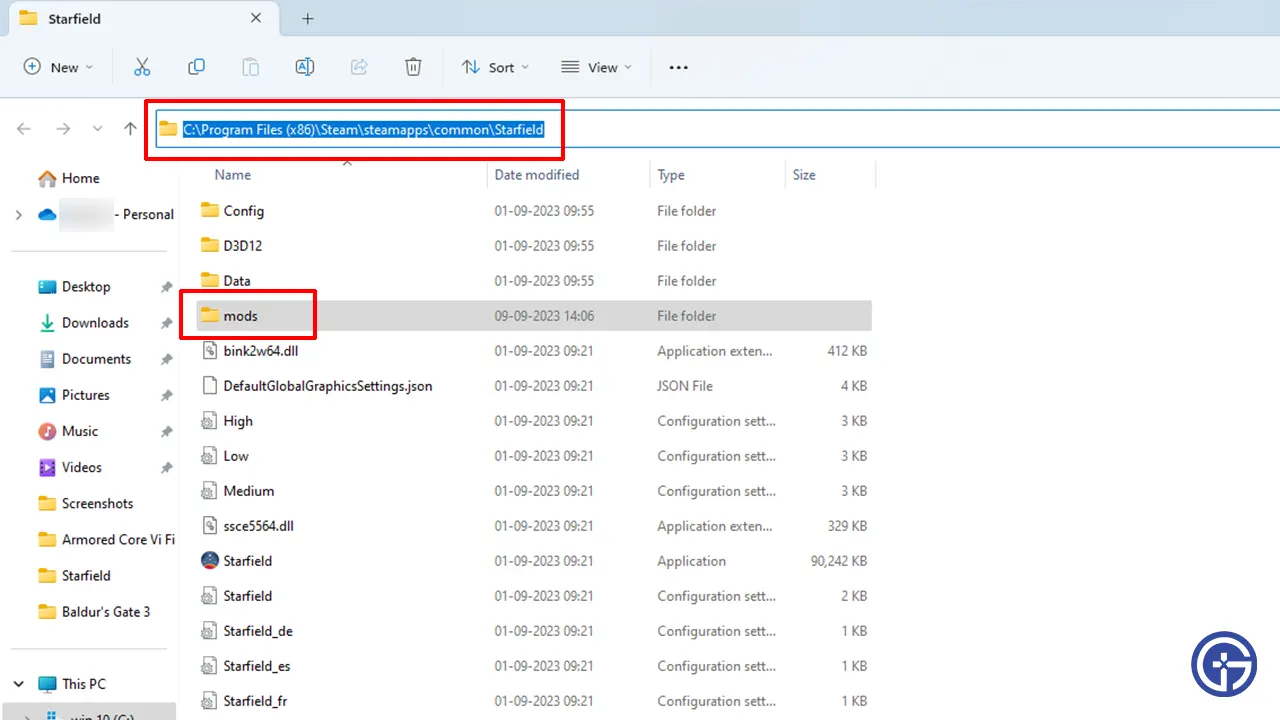
To install mods, you should first make a mods folder in your root directory of Starfield. Here is where you will store most mods for both Steam and Xbox Game Pass versions of the game. Do note that mods usually are more compatible with the Steam version. So there is a chance some mods might be incompatible with the Game Pass version. Typically you should find root folders at the following locations:
- Steam
- C:\Program Files (x86)\Steam\steamapps\common\Starfield
- Xbox Game Pass
- C:\XboxGames\Starfield
After creating the mods folder here is what you do:
- Go to the mod page for the one that you want to install.
- Follow the instructions given by the mod creator.
- Several mods just require you to unzip the downloaded mod file and paste the contents into the mods or root folder of Starfield.
- Other mods can also make you install some other files or DLLs in different locations. Always make sure you get DLL files from trusted sources.
- Launch Starfield and if you followed everything correctly the mods should work with no issues.
Also Read | Best Mods For Starfield
Using Vortex Mod Manager
Vortex is the official Mod Manager of NexusMods, its installation is pretty straightforward. You can check our detailed guide on how to install and use it.
- Open Vortex Mod Manager and go to games.
- Scroll down to Unmanaged Games, look for Starfield, and click on Manage. You can now use mods from here.
- Next, go to the mod page of NexusMods that you want to use.
- Here, click on the Files tab and click on Mod Manager Download.
- Once the download is complete, open Vortex Mod Manager.
- It will now give you the steps you need to follow to install your latest downloaded mod.
- Follow it and install the mod.
- Now, click on Mods on the left side of the screen.
- Next, click on Deploy Mods.
- Here, resolve conflicts if you get any during the installation of mods.
- You can go back to the Games tab and check Starfield to see which mods are active.
- Finally, launch the game and you should have no trouble using them.
That’s all on how you can install and use mods in Starfield. You should also check our guides on how to get cold resistance, change your name, and add workbenches to ships in this game.