Home > Starfield > How To Get Workbenches On Your Ship In Starfield

How To Add Workbenches On Ships In Starfield

Published Date :

Workbenches are something that you should definitely add to your ships in Starfield. Since there are a ton of planets for you to explore in this game. It would be a bummer if you had to go to the Lodge each time, just to access the different workstations whenever you want to craft or mod anything. But why go elsewhere when you can get everything done from your ship itself? So here is how their installation process works.

How to Add Workbenches to Your Ships in Starfield
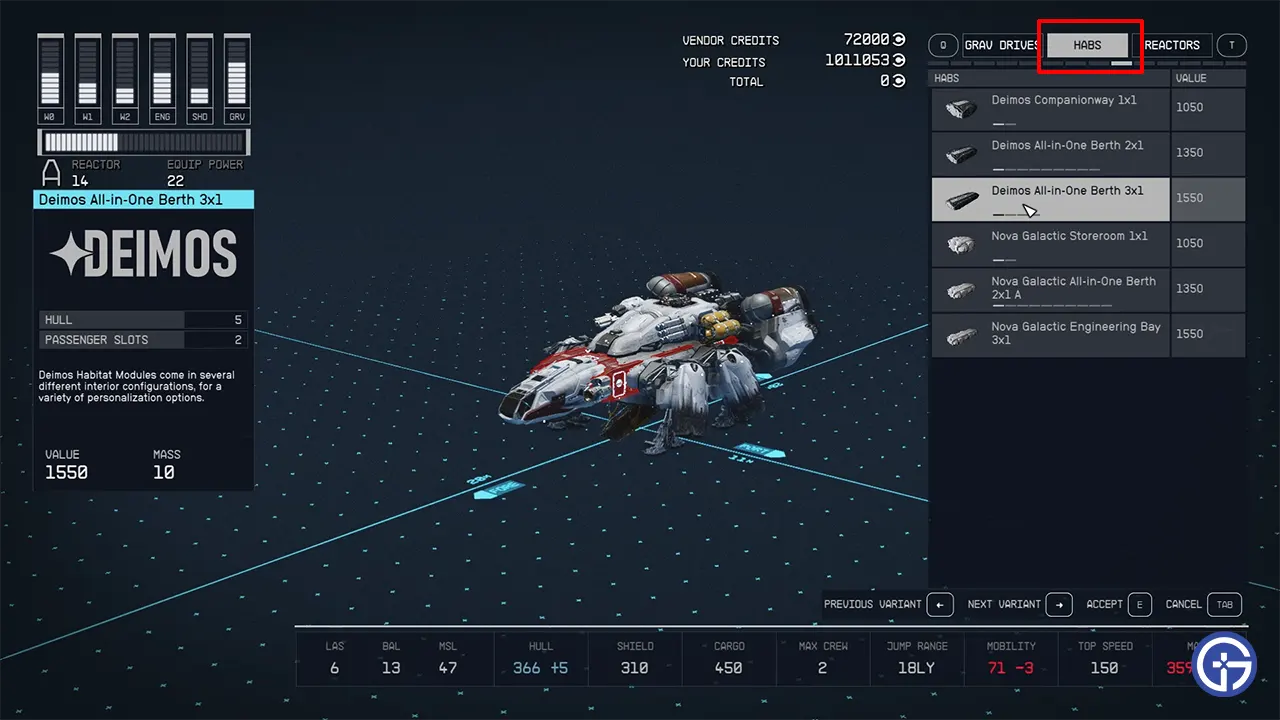
How To Add Worbench To Ship In Starfield

To add workbenches on your ship, you need the help of a Ship Technician or Shipbuilder Control Consoles, depending on where you are. You can find them in most major cities. For this example let us consider New Atlantis.

  1. Go and talk to the Ship Services Technician.
  2. Here, choose “I’d like to view and modify my ships.”
  3. Use the Ship Builder option. Press the B-key on your keyboard for it.
  4. Next, choose the Add option. Press G for it.
  5. On the top right side, you will see several options for the things that you can add to your ship.
  6. Press Q or T to tab over to the Habs section.
  7. Here you will get various workbench options like Deimos Companionway 1×1, Deimos All-in-one Berth 3×1, Nova Galactic Engineering Bay 3×1, and more.
  8. Each costs different Credits and has a different size that it will take up in your ship.
  9. Buy a Workbench and attach it by connecting the blue circles, of the workbench with the ship. This will ensure that it isn’t just attached to your ship but you can also use the doors to enter or exit it.

That’s all that you need to do to add and use workbenches in your ship in Starfield. Don’t forget to check our other guides on this game on how to save Barrett, persuade anyone, and deliver Terrabrew Cappuccino to Donna. For more help on any other topics not mentioned here, you can head over to our Starfield section.
  • Level Your Weapon Codes (July 2026)

    Level Your Weapon Codes (July 2026)

    Published Date :

    Level your Weapon has quite an addictive gameplay – you start with a weak weapon, but you keep adding XP Crystals to it; the weapon gets stronger, helping you take down increasingly powerful enemies. Leveling up slowly is part of the fun; however, free rewards can make that grind a little smoother. If you’re looking… Read More

  • Mine a Planet Codes (July 2026)

    Mine a Planet Codes (July 2026)

    Published Date :

    Getting rich in Mine a Planet requires you to use laser drones to blast apart a giant voxel planet and evolve/upgrade as you go; however, codes can give you a significant boost while you’re at it! If you don’t want to look for the latest rewards everywhere, don’t worry; here’s the complete list as well… Read More

  • Reminiscence Zombies Codes (July 2026)

    Reminiscence Zombies Codes (July 2026)

    Published Date :

    Whether you’re trying to survive longer or strengthen your loadout, free rewards are always worth claiming. Developers occasionally release Reminiscence Zombies codes that give you Z-Tokens and special cosmetics for free, so we’ve gathered every active one in this guide for quick and easy access. Last checked for new codes on July 16, 2026. All… Read More

  • Zombie Island Codes (July 2026)

    Zombie Island Codes (July 2026)

    Published Date :

    Running short of Diamonds? Don’t worry, the devs regularly release Zombie Island codes that give you thousands of Diamonds for free. If you and your squad want to survive much longer, you don’t want to miss out on these rewards. So, here’s the complete list of codes that you can claim right away! Last checked… Read More