Wordle is a viral browser game wherein you have to guess the word of day with the help of hints generated from your own random word guesses. There’s only one puzzle available for a day and then it resets at midnight. If you are wondering how to get Wordle game on iPhone (and iPad), here are the steps to do it.
How to Get Wordle Game on iPhone or iPad
Here’s how to add Wordle to your iPhone/iPad home screen so that you can load it up immediately with one tap of a button.
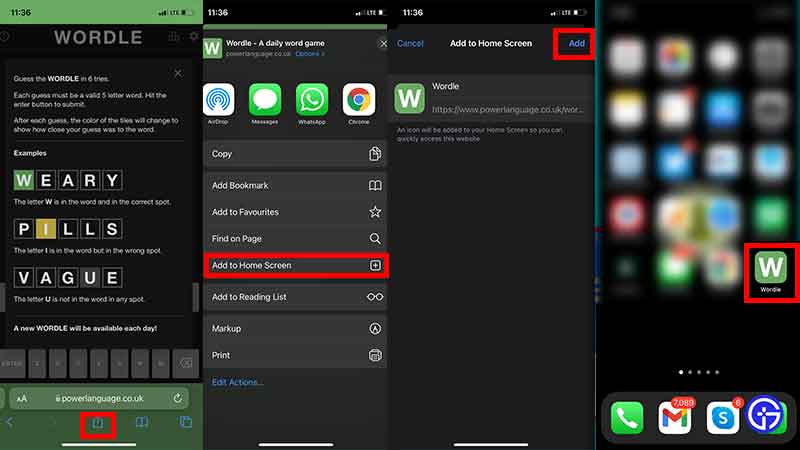
- Open up the browser on your iPhone or iPad.
- Head to the official website of Wordle.
- Tap on the Share button. It’s the icon with an arrow pointing upwards.
- From the menu that opens up, tap on Add to Home Screen.
- Confirm this action by tapping on Add.
- With this, an icon will be added to your Home Screen so you can easily access the website any time you want.
- Check if the icon shows up on your iPhone/iPad and if it did, you can now play Wordle game daily.
Now, the game isn’t available on the app store as an official mobile app download and there seem to be no plans of it happening too. There are a few Wordle game alternatives for iPhone that you can download where you can play more than one word game puzzle a day. Here are some more similar games for PC and Android users too.
How to Share Wordle Result on Twitter?
Want to tell the world that you’ve figured out the answer in the fewest attempts? You can share the result ‘grid’ on Twitter without spoiling the solution for others.
- Once you have completed the daily word puzzle, a pop-up will appear with a SHARE button on it.
- Click on it and the results will get copied to the clipboard.
- Now all you have to do is head to Twitter (or any other social media site), create a post, and paste the items (Ctrl + V) that are copied to the clipboard.
- Voila! You have successfully shared the results with your followers.
In case you need any help with Wordle, we’ve got the list of best starting words to try as well as the compilation of Daily Wordle answers if you’d like to know the solutions (spoiler alert).