Home > Minecraft > How To Use Biome Finder In Minecraft

Minecraft Biome Finder Guide

Updated Date :

Minecraft features a vast and expansive open world that has no end. There are regions known as biomes all over the world with varying geographical features, vegetation, and characteristics. But is there a way to find these biomes? There are plenty of ways to locate a biome. One of such tools is a Biome Finder that searches the biomes in the open world. So, here’s our guide on how to use Biome Finder in Minecraft.

Minecraft Biome Finder

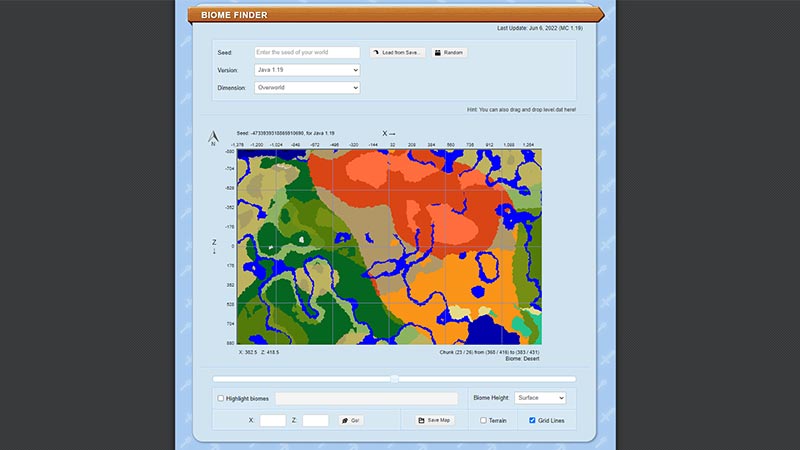
As mentioned, a biome finder is a tool that searches the different biomes throughout the Minecraft world. This tool isn’t a gameplay element or can be found in-game. Follow these steps:

  • Head over to the chuckbase website (link) to use the tool or application.
  • Once you head there, you need to enter the Seed of the particular world.
  • If you are having trouble finding the Seed, check out our guide on how to find the World seed.
  • For that, you need to get back to Minecraft. The method of finding out the Seed is different for each version.
  • For the Java edition, you need to simply type “seed” to find out the unique seed of this world.
  • Then, you need to copy and paste the seed into the Biome Finder.
  • You also need to select the version of Minecraft you are using.
  • As you hit enter, you will get to know where all the biomes around the map are located.
minecraft use biome finder

How to Locate Biomes in Minecraft

While the above method will help you find out the different biomes, there is a simpler method. Follow these steps:

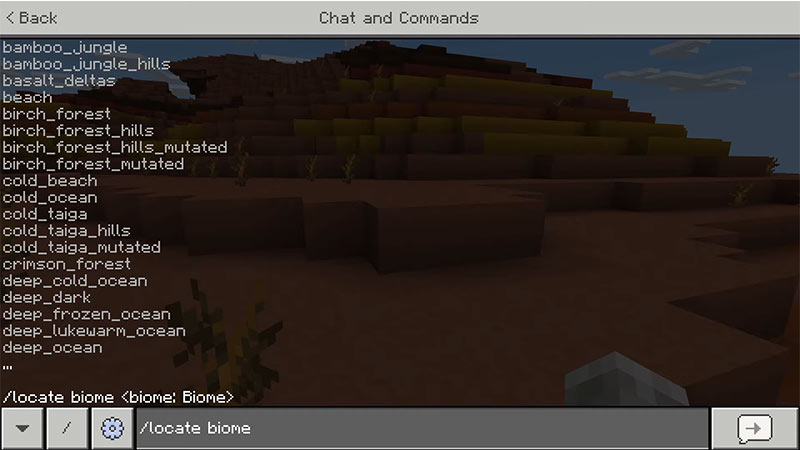
  • Head to the Chat and type “/locate biome (the biome you are searching for)”.
  • Hit the Enter or whichever button executes the command.
minecraft biome finder
Image Source – VIPmanYT on YouTube.
  • You can find the coordinates for whatever biome you searched for.

Make a note that you can use the above method only for all the Minecraft Bedrock Editions & Java Editions.

That’s everything covered about how to use biome finder in Minecraft. If you liked this guide, check out our other guides on how to respawn the Ender Dragon, what does the heart of the sea do, and the villager breeding guide in Minecraft right here on Gamer Tweak.


  • Aura Monster Simulator Codes (July 2026)

    Aura Monster Simulator Codes (July 2026)

    Published Date :

    Climbing an endless staircase might sound simple at first, but the higher you go, the more Aura you’ll need to keep progressing and unlock stronger upgrades. Thankfully, Aura Monster Simulator codes provide free Gems and Aura Boosts, helping you strengthen your character and reach new heights. More specifically, you can use these Gems to unlock… Read More

  • 100 Days At Sea Codes (July 2026)

    100 Days At Sea Codes (July 2026)

    Published Date :

    Surviving in the Bermuda Triangle is a challenging task because you need to keep searching for supplies, expand your raft, and defend yourself against dangers lurking in the ocean. 100 Days At Sea codes can make the journey a little smoother by rewarding free Pearls, giving you the chance to unlock Classes and Companions faster.… Read More

  • +1 Muscle to Arm Wrestle Codes (July 2026)

    +1 Muscle to Arm Wrestle Codes (July 2026)

    Published Date :

    Love those Roblox games where you start small and weak but work toward becoming a more powerful, stronger version of yourself? This one’s for you! Winning arm wrestling matches is easy when you build up your Muscle, collect stronger pets, and unlock more Win boosts and +1 Muscle to Arm Wrestle codes help you get free… Read More

  • Giant Simulator Reborn Codes (July 2026)

    Giant Simulator Reborn Codes (July 2026)

    Published Date :

    If you want some free Gold, you definitely need to redeem these Giant Simulator Reborn codes! These rewards will help you upgrade your giant much faster as you defeat enemies and grow stronger. Since this game revolves around training your character, collecting pets, and increasing your size to take on tougher challenges, every extra bit… Read More