
Home > Age Of Empires 4 > FIX Age Of Empires 4 String Not Found Bug

Age Of Empires 4 String Not Found Error Fix

Published Date :

Players getting the String not found error/bug on Age of Empires 4 need not worry, because the fix is pretty simple. Since all words in the game are showing up as “string not found”, your gaming experience will get hampered to a great degree. It seems that this problem is related to the language and due to some mismatch, you are seeing the ‘code’ text in the game. Let’s look at all the things you can do to potentially solve this issue.

How to Fix Age Of Empires 4 String Not Found Error

Here are a few suggestions that can help you solve the String not found bug in AoE 4.
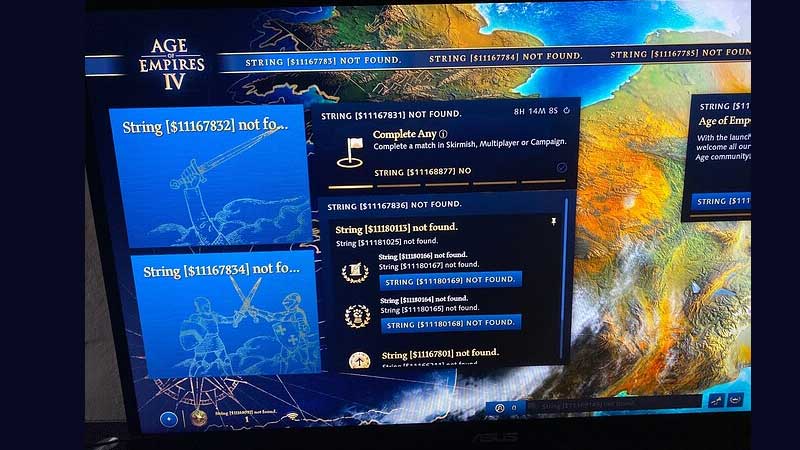
aoe 4 string not found
image credit: ooTNGoo on Age of Empires IV forum
  • Restart Age of Empires IV.
  • Reinstall the game.
  • Verify the Game files on Steam
    • Launch the Steam client.
    • Find AoE 4 in your library.
    • Right-click on it and click on Properties.
    • Click on Local files.
    • Click on Verify integrity of game files.
    • Wait until the verification process is over.
    • Re-launch the game to see if the error persists.

As per a thread in a AoE IV forum, reinstalling fixed the issue for a player since it could be a problem with the installation files.

how to fix age of empires 4 string not found bug

Another user commented that changing your language to English also fixes the issue so you can go ahead and try that out as well. We’ve covered a guide on how to change language in AoE 4, so do check it out to know more.

Also Read | How to Fix No Sound and Audio Issue in AoE 4?

If you are wondering what the devs have to say about it, thankfully, they are aware of this issue. They have posted that they are tracking it and it should be patched out soon.

That’s everything you need to know about the fix for Age Of Empires 4 String Not Found error. In case you come across a black screen while playing or encounter crashinglagging or FPS drop, then check out our other guides to know how you can fix these issues.

  • Fishing Tower Defense Codes (August 2026)

    Fishing Tower Defense Codes (August 2026)

    Published Date :

    Fishing Tower Defense codes can help you build a stronger defense by rewarding you with free Diamonds, Dice, and other useful items. Unlike the usual tower defense games, this Roblox experience has you catching unique fish and deploying them as living towers to stop waves of invading humans. As you unlock rarer fish and upgrade… Read More

  • Cut a Gem Codes (August 2026)

    Cut a Gem Codes (August 2026)

    Published Date :

    Growing your gemstone-cutting business can seem like a task since you have to slowly go from weaker Gems to highly valuable ones, however, Cut a Gem codes will help you speed up this process. In this tycoon game, you’ll build a production line using grinders and other machines to turn rough geodes into valuable gems… Read More

  • Merge a Black Hole Codes (August 2026)

    Merge a Black Hole Codes (August 2026)

    Published Date :

    In Merge a Black Hole, you combine similar black holes to turn them into bigger versions, and then launch them at enemy bases to steal their cash. Meanwhile, you must protect your base before you get raided by someone with a deadlier black hole collection. Want to get an edge over players while you’re at… Read More

  • Coin Flip Codes (August 2026)

    Coin Flip Codes (August 2026)

    Published Date :

    Coin Flip is an incremental coin-flipping game where you flip your coin, hit crits, unlock rebirth tiers, and progress even further. As you keep going, stronger boosts and rarer rewards make the game much more fun and redeeming the latest Coin Flip Codes is the fastest way to claim free Exclusive Chests, Potions, Luck Boosts,… Read More







