
Warhammer 40K Space Marine 2 players have faced several issues since launch like their controller not working, or being stuck on the joining server screen. Apart from this, for some players, the opening cutscene of Space Marine 2 freezes in the first few seconds (but the audio keeps going).
This can be frustrating and the developers have released a hotfix that addresses a ‘rare possible crash that occurs during the first cutscene’ among other crashes, however, many players are still reporting similar issues.
How to Fix Freezing During Opening Cutscene in Space Marine 2
To potentially resolve the freezes while watching the opening cutscene, you can verify file integrity on Steam, install the game on an SSD, disable Steam overlay, limit FPS or lower settings.
Limiting the FPS
You can limit FPS, by heading to the game settings > Video tab and scrolling to FPS limit which can be changed to 30 FPS.
Here are the recommended system requirements shared by the developers:
- Requires a 64-bit processor and operating system
- OS: Windows 10 (1903 min)/11 64-bit
- Processor: AMD Ryzen 7 5800X / Intel Core i7-12700
- Memory: 16 GB RAM
- Graphics: 8 GB VRAM, AMD Radeon RX 6800 XT / Nvidia GeForce RTX 3070
- DirectX: Version 12
- Storage: 75 GB available space
- Additional Notes: SSD required. 60 FPS in 1920×1080 with the “Ultra” preset.
As it mentions, installing on an SSD is required, so if you can transfer your game from your HDD to an SSD, there’s a chance that the cutscene won’t freeze in Space Marine 2 anymore. If you are already using an SSD and upgrading to a better SSD is an option, you can go for it if the other troubleshooting tips mentioned below don’t work out.
Disabling Steam Overlay
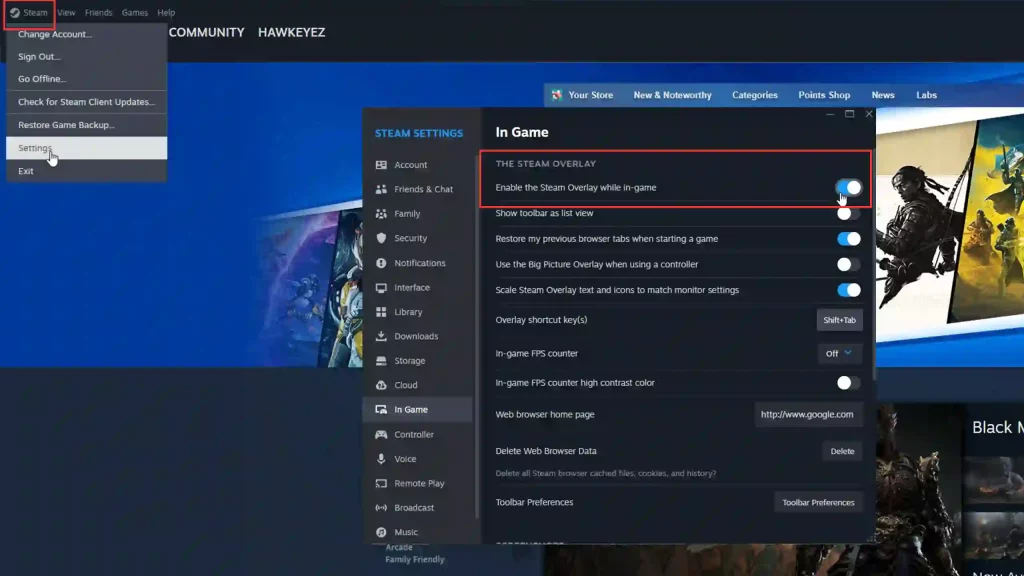
- Click on Steam at the top left corner of the client and go to Settings.
- Under the In-game menu tab, look for ‘Enable the Steam Overlay While In-Game’ and toggle it off.
Verifying Steam File Integrity
- Launch Steam.
- In your Steam library, right-click on Space Marine 2.
- Select “Properties” from the context menu.
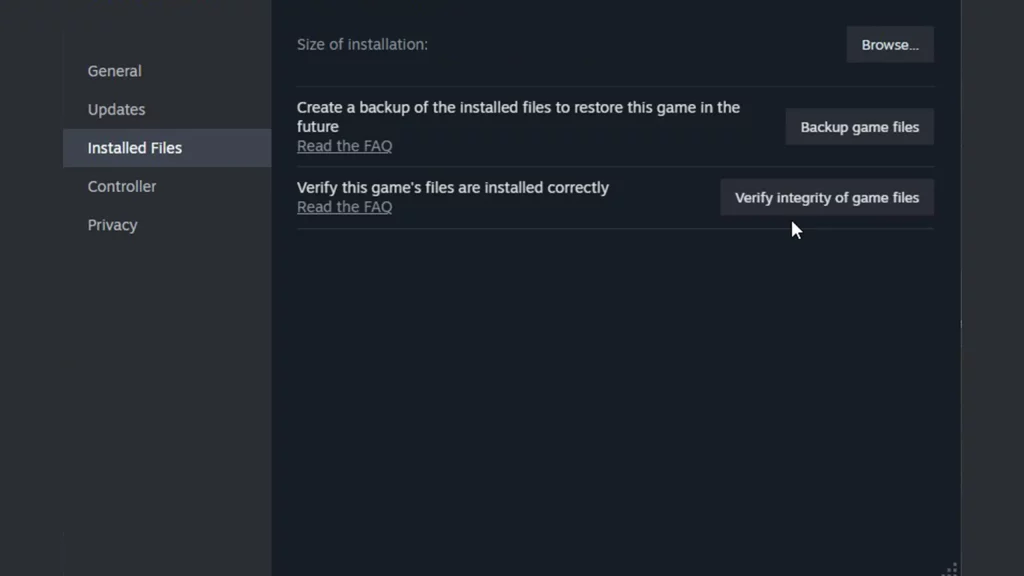
- In the Properties window, click on the “Installed Files” tab.
- Click on the “Verify Integrity of Game Files” button.
- Steam will scan your game files and compare them to the original files. This process may take some time depending on the size of the game.
- Once the verification is complete, Steam will show the results. If any files are missing or corrupted, Steam will automatically download them to restore the game’s integrity.
Close Background Applications
Sometimes, background software, including antivirus and firewall, can block a game from running smoothly. Temporarily disable or close them to check if you’re able to view cutscenes without crashes.
Update Drivers
Updating drivers end up resolving performance, compatibility, and stability issues in games. So visit the website of your graphics card manufacturer (e.g., NVIDIA, AMD, Intel) and look for the “Drivers” or “Support” section. Enter your graphics card model or use their automatic detection tool. Download the latest compatible driver, install it, and launch the game again.
The developers may be working on some more fixes, so hopefully, this issue gets ironed out as well. If you’re playing on a widescreen monitor, here’s what you need to know about Warhammer 40K Space Marine 2 getting ultrawide support.











