If you are looking to play Overwatch 2 on Steam Deck, you might rely on custom versions of Proton for many games. But luckily, you can play OW2 without installing any additional versions of GE-Proton. Instead, you can play the free-to-play shooter game on your hand-held Steam console with a few quick steps. So, check out our guide to find out how to get and play OW2 on your Steam Deck.
How to Play Overwatch 2 on Steam Deck
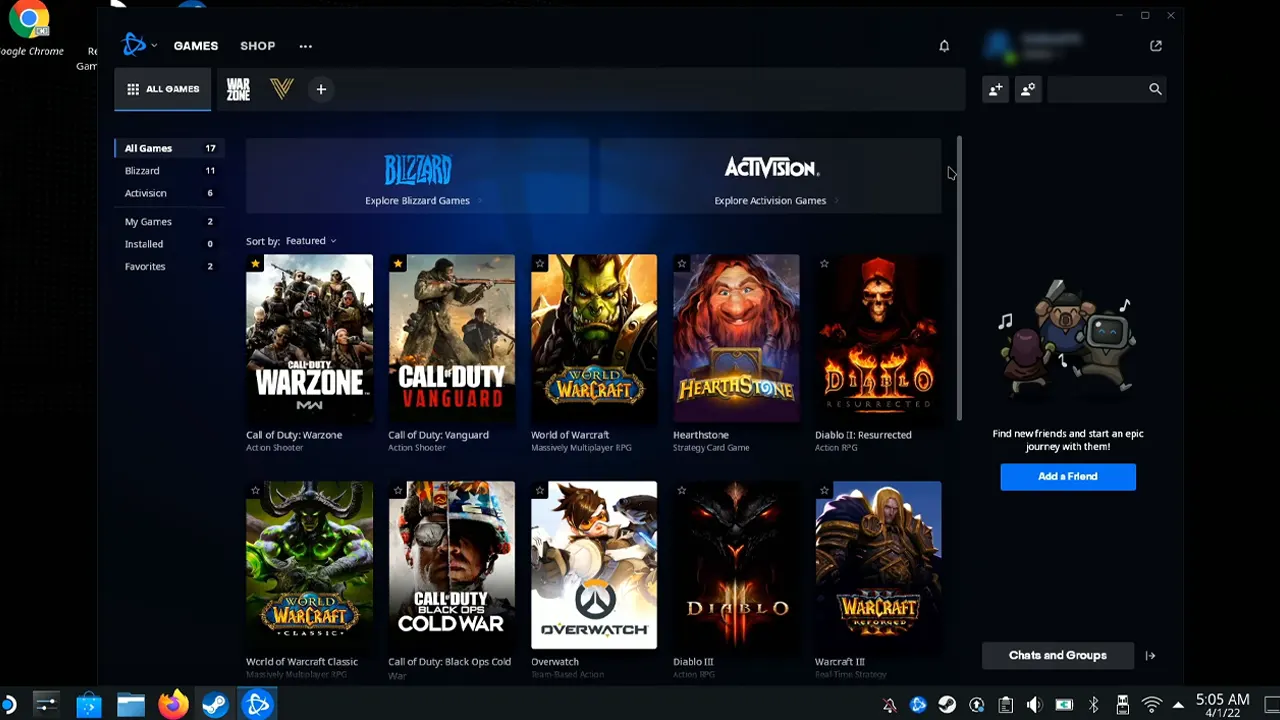
You can play Overwatch 2 on Steam Deck by installing the Battle.net launcher. For that, boot your console into Desktop mode by holding the Power button and choosing the Switch to Desktop option. Before we get OW2 on Steam Deck, ensure that you have a browser installed, already.
So, follow the below steps to install Battle.net and Overwatch 2:
- Using your browser, head to the Battle.net website and download the launcher of the latest version.
- After downloading it, select the Games tab and choose the “Add a Non-Steam Game to My Library” option.
- While browsing, toggle the option for the File Type to All Files. Here’s the default destination for Downloads on Steam Deck:
- /home/Deck/Downloads
- Select the Battle.net setup file and add the selected program.
- Once it is added, head to the setup file and press Settings (gear icon).
- Select the Properties from the drop-down box and head to the Compatibility tab.
- Choose the latest Proton version and toggle the “Force the use of a specific Steam Play compatibility tool” if it isn’t tick-marked.
- Exit the tab and press the Play button to install the Battle.net launcher.
- Follow the installation steps and ensure the file path where you will be saving the games.
- Once Battle.net is installed, launch Battle.net and search for Overwatch 2.
- Then, install Overwatch 2 and launch the game, like installing any other game on your PC.
Similar to installing OW2, you can also install various games like Diablo 4, World of Warcraft, and more Battle.net games using the above method.
That’s all about how to play Overwatch 2 on Steam Deck. If you found this guide helpful, check out our guides to find out how to play Chivalry 2, Battlebit Remastered, and System Shock Remake on Steam Deck, and explore more Steam-related Guides right here on Gamer Tweak.