

Close Menu
    Facebook X (Twitter) Instagram
    Gamer TweakGamer Tweak
    • GT Originals
    • Guides
      • AC Mirage
      • Starfield
      • Wordle
      • Mobile
      • GTA 6
      • AC Valhalla
      • Genshin Impact
      • Honkai Star Rail
      • Minecraft
      • Discord
      • Street Fighter 6
      • Project Slayers
      • The Sims 4
      • Lies of P
      • Zelda TOTK
    • Roblox
      • Roblox Codes
      • Blox Fruits
      • Type Soul
      • Grow a Garden
      • 99 Nights in the Forest
    • Review
    • Roblox Codes
    • BG3
    • CS2
    Gamer TweakGamer Tweak
    Home > Outriders > Outriders: How To Use Mods
    Outriders

    How To Mod Weapons And Armor In Outriders

    Mihir HateBy Mihir HateApril 5, 2021Updated:April 7, 20212 Mins Read

    There is a way to upgrade your weapons and armor in Outriders by using items called Mods. Mods are external attachments that help improve your weapons and armor. Using mods give your items certain boosts. With the help of these mods, you will get certain buffs that increase the usability of your weapon or armor. The game however isn’t too helpful about how to use this mechanic. In this guide, we tell you how to Mod weapons and armor in Outriders and upgrade them.

    How to Mod weapons and armor in Outriders and upgrade them
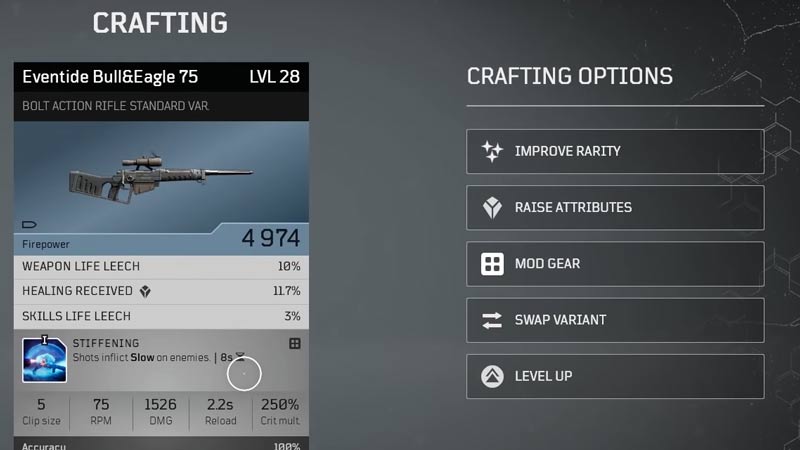
    Outriders how to mod weapons and armor.
    Increase the firepower of your weapon with these special mods.
    • To mod your weapons and armor you will first have to interact with Dr. Zahedi.
    • You can find Dr. Zahedi in your camp.
    • He is seen in the camp once you complete the Salvation Army mission marked by an ‘X’ icon.
    • You can interact with which will open up the crafting option for you.
    • Once the crafting menu opens you will see 5 options.
    • The third option is that of mod gear.
    • Here you can choose what gear in your inventory you want to upgrade.
    • You can even choose what item to mod and what mod to apply.
    • Mods are obtained by dismantling weapons and items.
    • You can add mods as long as you have the necessary resources to do so.

    Mods are a good way to get rid of excessive weapons that populate your inventory. By dismantling them you do get a good chance of obtaining rare and special mods which help in upgrading weapons.

    This is everything you need to know about how you can upgrade your weapons and armors using mods in Outriders. While you are here do not miss out on learning groovy new moves with Emotes. You can also learn more about the Crossplay issues and whether they have been fixed.

    Outriders Guides PC PS4 PS5 Tips and Tricks Xbox One Xbox Series X
    Share. Facebook Twitter Pinterest LinkedIn Tumblr Email Reddit
    Mihir Hate

    Decided to become a writer because he started getting good at writing Instagram captions for his friends. Would be better at playing the games he reviews if he didn't spend so much time looking at shoes.

    Related Posts

    Players Are Spending More Time in Virtual Worlds Than Ever Before, Showcasing the Largest Surge on Record

    December 3, 2025

    Unwritten Helldivers 2 Rules – Don’t Make These Mistakes!

    November 20, 2025

    Where Winds Meet Codes (December 2025)

    November 19, 2025

    User Experience in Quick Online Games – How to Retain Players

    November 11, 2025
    Latest Codes

    Last Letter Codes (December 2025)

    December 3, 2025

    The Forge Codes Roblox (December 2025)

    December 1, 2025

    Inazuma Strikers Codes (December 2025)

    November 26, 2025

    Deadly Delivery Codes (December 2025)

    November 26, 2025

    Roblox Hypershot Codes (December 2025)

    November 26, 2025

    SLAP Codes Roblox (December 2025)

    November 25, 2025
    Trending
    • Players Are Spending More Time in Virtual Worlds Than Ever Before, Showcasing the Largest Surge on Record
    • Last Letter Codes (December 2025)
    • Where to Find Tomo’s Cat in The Forge
    • Discover the Best Casino Games at Greatwin Casino for UK Players
    © 2025 Gamertweak.
    • Advertise With Us
    • About Us
    • Team
    • Contact Us
    • Privacy Policy
    • Terms
    • Open Critic

    Type above and press Enter to search. Press Esc to cancel.