
Home > Gaming Guides > Transfer Save Data in MHST2

Monster Hunter Stories 2: How To Transfer Demo Save Data

Updated Date :

If you have tried out the MHST2 demo, then you can transfer your previous save data to the full game easily. You can then continue your game right from where you left off. Doing so will also give you a Kinship Talisman in Monster Hunter Rise too. This can be used to enable Master Mounter and Wide-Range skills. So here’s how to Transfer your Monster Hunter Stories 2 Wings of Ruin save data from the demo to the full game.

How to Transfer Demo Save Data in Monster Hunter Stories 2?
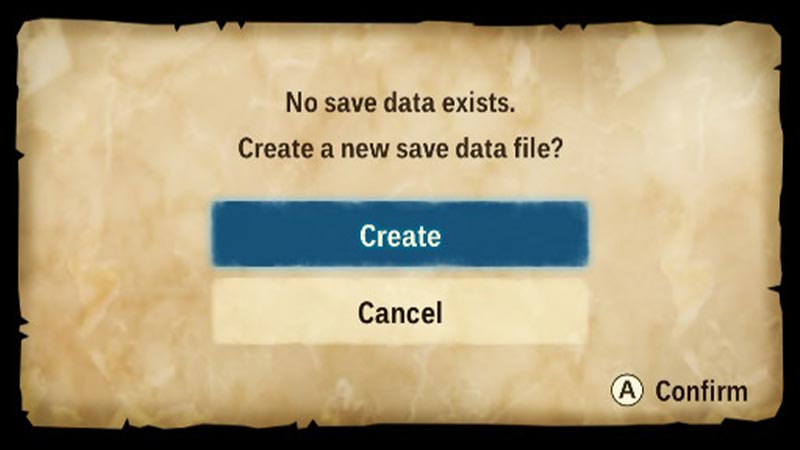
How to Transfer Save Data in Monster Hunter Stories 2

To transfer your Save Data in Monster Hunter Stories 2, you need to be logged in to the same user account you used to play the trial demo version. Once you are logged in, here’s how to transfer the save date:

  1. Start the full game using the Trial Version’s save data.
  2. The following text will show on the screen: “No save data exists. Create a new save data file?
  3. Please continue to the title screen by selecting “Create.”
  4. You could be certain that your Trial Version save data will not be lost if you choose “Create.”
  5. Pick up where you left off in the Trial Version by selecting “Transfer from the Demo” on the title screen.
  6. The Trial Version’s save data from Slot 1 will be loaded.
  7. In the full game, the options you modified in the trial version will restore to their default defaults.
  8. If required, go to the Options menu in the complete game and adjust these settings again.
  9. If you’ve changed your language settings, go to the Options menu on the title screen and make the necessary changes.

Also, no slot in the full game will be overwritten unless you explicitly save this data to one after selecting “Transfer from the Demo” and importing your Trial Version save data.

That’s everything you need to know about how to transfer save data in Monster Hunter Stories 2 Wings of Ruin.  While you are here, make sure to check out more of our MHST2 Guides, for more tips & tricks like How to SwimFarm Monster Parts, & Earn Zenny Fast.

  • Evolve and Survive Codes (August 2026)

    Evolve and Survive Codes (August 2026)

    Published Date :

    Evolve and Survive is a Roblox survival game where you fight, stay alive, and work toward unlocking stronger forms. Losing can get you back to square one, which makes Gold, Revives, and other resources useful when you’re trying to keep progressing. In this guide, you’ll find all the working Evolve and Survive codes available right… Read More

  • Runaways Codes (August 2026)

    Runaways Codes (August 2026)

    Published Date :

    Runaways puts you in the shoes of someone who is guilty of their crimes and your mission is to make it to the border without getting caught. You can rob locations, sell stolen items, buy better gear, and find a way to escape while staying ahead of the police. Extra Credz (currency) and a free… Read More

  • +1 Drain Water per Click Codes (August 2026)

    +1 Drain Water per Click Codes (August 2026)

    Published Date :

    +1 Drain Water per Click is an interesting Roblox clicker where every tap helps remove water and reveal the fish underneath. As you keep going down, you can collect rarer fish that give you more money upon selling. This needs a lot of money in itself because you need to purchase upgrades like more Backpack… Read More

  • Bending Grounds Codes (August 2026)

    Bending Grounds Codes (August 2026)

    Published Date :

    Bending Grounds is a Roblox fighting game where you use different elemental abilities, complete quests and take part in PvP battles. You can experiment with various bending styles, and improve your character as you keep playing. Spins are useful for getting new options, so redeeming the available codes can give you a few extra chances.… Read More








