
If your arm weapons keep running out of ammo then you can use Weapons Bay in Armored Core 6 to compensate for it. When it comes to your AC unit customization, this game truly has a lot to offer. This even applies to the different guns that can you carry. For certain missions, you might find that the shoulder weapon options aren’t of much use. So here is how Weapons Bay works in AC6 to help you out in such a situation.
How to Get & Use Weapons Bay Expansion in Armored Core 6
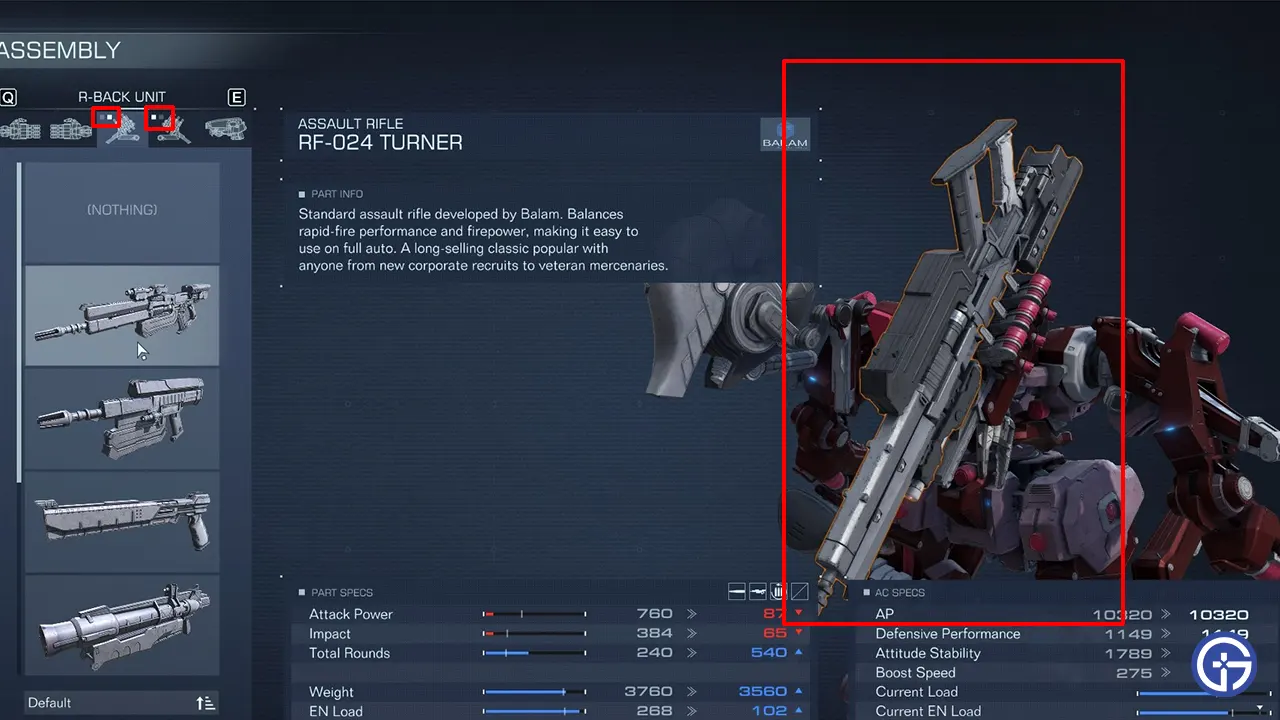
To use Weapons Bay, you first have to unlock it by purchasing it for 2 OST Chips. After buying it, you can notice a UI change in Assembly.
- Go to Garage and click on AC Design.
- Click on Assembly and go to any shoulder weapon.
- By default, you will see the Shoulder weapons first.
- A new white box will be available. Click on Q or E to change the tab, and your Hand weapons will be shown.
- Q: Switch Left Hand Weapon
- E: Switch Right Hand Weapon
- Equip one of the hand weapons and it will replace it with the respective shoulder weapon.
Now, when you exit the Assembly your mech unit will carry extra Arm weapons instead of Shoulder weapons. But there is a catch here, trying to use them will swap it with your arm weapon instead of firing it.
How Weapon Bay Works in AC6
Normally, using the right shoulder weapon should fire, but with the Weapon bay installed. When you carry an Arm weapon on your shoulder it gets swapped by the respective arm. For example, if your build is as follows:
- Right shoulder: Gatling Gun
- Right arm: Burst Rifle
When you happen to fire both at the same time, instead of using both guns, you will switch between them. So now your right shoulder weapon becomes Burst Rifle and your arm weapon becomes Gatling gun.
This seems like an underwhelming feature. But one of its possible uses is to switch the weapon when one is reloading or has been overheated. You can also try experimenting with other builds to find out better uses for this expansion.
That’s all on how to use weapons bay in Armored Core 6. Since you are interested in this game you should also check out our other guides on how to stagger enemies, input share ID codes, and beat Juggernaut.










