Whenever you die in Palworld, whatever you carry will be dropped by the character. This is a Death Penalty you incur for taking a risk on the Palpagos Island. Depending on what difficulty you have selected, you will face a Death Penalty. It goes without saying that higher difficulty will bring serious penalties. However, if you are just not ready to lose items from your Inventory, you can change the Death Penalty Settings in Palworld. All you have to do is use the steps we have mentioned. Let’s get started.
All Death Penalty Settings in Palworld
As I said, your Death Penalty is decided by the level of Difficulty you have chosen in Palworld. Here are they:
- Casual: You will lose nothing after dying
- Normal: You will lose all of your items, including Gear after dying
- Hard: You will lose all the items and your Pals after dying
- Custom: You can choose any Death Penalty of your choice
If you die, you can retrieve the lost items by going to the place where you died. Your place of death will be marked with an “X” on the map. Even if you die while trying to get back the dropped items, they’ll remain in the same place until you come and pick them up.
How to Change Death Penalty Settings in Palworld
Now, if you want to change the Death Penalty, you can do that by entering the World Settings. For a better understanding, simply follow these steps:
- Select the World you have created and click on the Change World Settings button below.
- From there, click on Custom Settings in the Custom Difficulty section.
- Next, scroll down and navigate to the Death Penalty option.
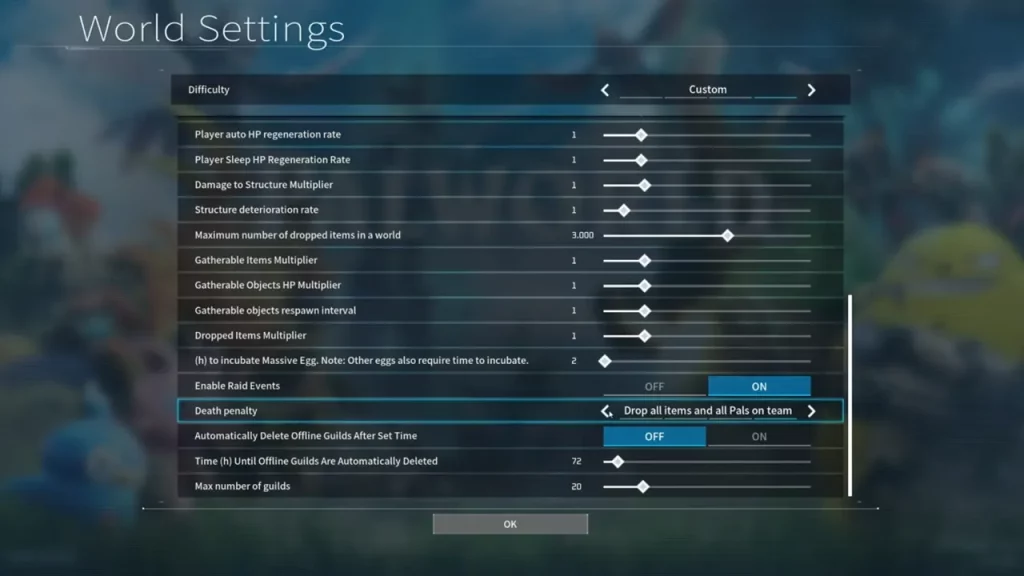
- From there, you can choose to keep any of these 4 Death Penalty Settings in Palworld – No Drops, Drop all Items except Equipment, Drop all Items, and Drop All Items and all Pals on Team.
By the way, you can change Death Penalty Settings before and even after creating a World in Palworld. So you don’t have to worry about losing items. For more information, be sure to check out our dedicated section for Palworld Guides on Gamer Tweak.