
Home > Splatoon 3 > How To Change Between Inkling & Octoling in Splatoon 3

Splatoon 3: How To Change Between Inkling & Octoling

Published Date :

Splatoon 3 is a third-person shooter video game by Nintendo that revolves around the Inklings and Octolings. These two races are pitted against each other for the control of land disputes. For this installment, you can switch between these two species according to your preference. Although it won’t affect several in-game mechanics, it can change their appearances. But how to do so? Check out our guide on how to change between the Inkling and Octoling in Splatoon 3.

How to Change Between Inkling & Octoling Species in Splatoon 3

If you have chosen to play Inklings and want to change it to Octoling, follow the below steps:

  • Hit the X button to head over to your Map menu.
  • Scroll down to select the Options tab.
  • Then, you need to navigate to Other and select the Player settings option.
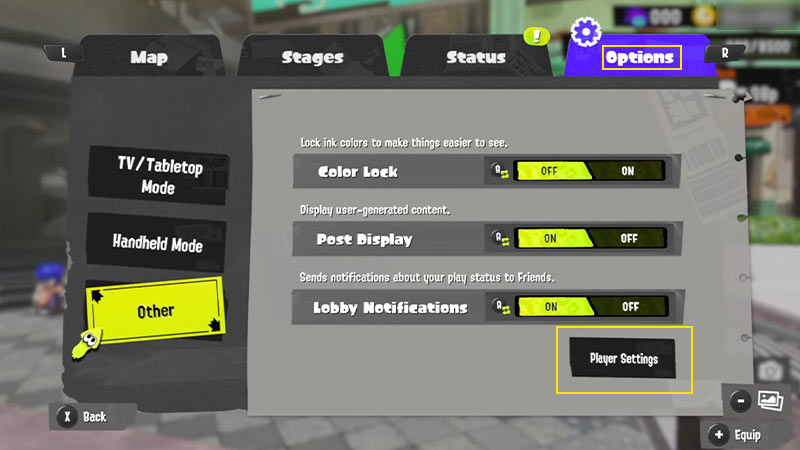
change between inkling octoling splatoon 3
Image Source – MonkeyKingHero on YouTube
  • You will be prompted with a confirmation message asking if you want to change your look.
  • Hit the “Yeah” option to change to an Octoling or an Inkling.
  • You can also customize your character’s hair, eyes, eyebrows, body tone, and Legwear.
  • On top of that, you can also customize the appearance of your little companion. Check out our guide on how to customize and change your character’s appearance for more insight.

As mentioned before, there’s not much difference in their mechanics or gameplay elements. While the Inklings are squid humanoids, the Octolings are the different octopus humanoids. These races or species only vary in appearance. If you are confused about choosing either, check out our guide on whether you should pick Inkling or Octoling. We leave the rest of the decision for you to choose.

That’s everything covered about how to change between Inkling and Octoling in Splatoon 3. If you liked this guide, check out more guides on how to play Table Turf Battle, how to get more Emotes, and how to change your gear in Splatoon 3 right here on Gamer Tweak.


  • Throw a Coin Codes (July 2026)

    Throw a Coin Codes (July 2026)

    Published Date :

    Throw a Coin’s gameplay loop is very addictive – you start by throwing a coin into the fountain, and it gives you a random item of a certain value. The fountain can drop anything from a Guitar, a TV, a Trophy, a Magnet, a Wheel, to the rare Treasure Chests. Your goal is to upgrade… Read More

  • Rintama High Codes (July 2026)

    Rintama High Codes (July 2026)

    Published Date :

    Rintama High codes can help your journey by providing free cash (Yen), Reroll Tokens, with more freebies to come in the future. They can expire at any time without warning, so, if you don’t want to miss out, this guide is for you! Last checked for new codes on July 27, 2026. New Rintama High… Read More

  • Roll Anime to Fight Codes (July 2026)

    Roll Anime to Fight Codes (July 2026)

    Published Date :

    In Roll Anime to Fight, the fighters you get make all the difference, and to build the strongest team, you need resources. Thankfully, the developers frequently share codes that provide free Gold, Trait Shards, Godly Essences, and more, which make the process much easier. If you don’t want to miss out on these boosts, redeem… Read More

  • A Guide to CS2 Trading Tools and Pro Trading Tips

    A Guide to CS2 Trading Tools and Pro Trading Tips

    Published Date :

    Successful CS2 trading is rarely based on guesswork. Experienced traders rely on data to compare prices, track market trends, and identify good opportunities before making a trade. With so much information available, keeping up with the market without the right tools can be difficult. That’s where CS2 trading tools come in. In this guide, we’ll… Read More







