Sims 4 provides players with an Entertainer Career option where Sims can pursue their career either as a comedian making jokes in a club or a musician writing their songs. And while being a comedian can seem fun, being a musician and sharing your tunes with other people will let you in on the limelight in-game. Players can also license their work in the game and earn some Simoleons simultaneously. So if you are wondering how to write songs in Sims 4, read this guide further to know more about being a talented musician in the virtual world.
How to Write Songs in Sims 4
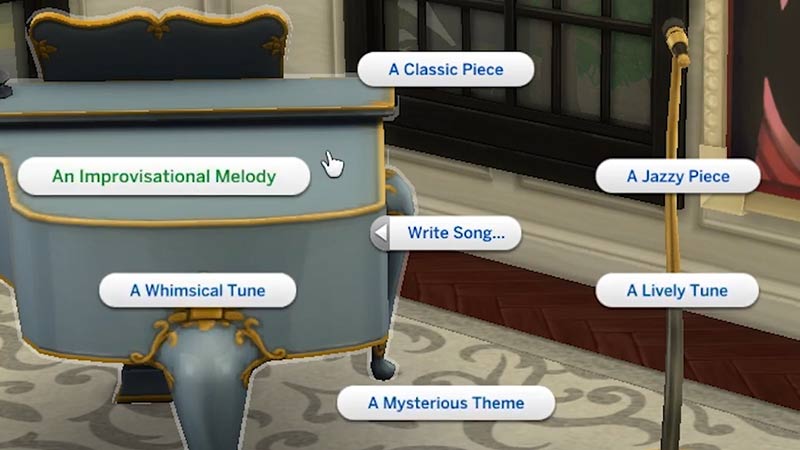
To write songs in Sims 4, players will have to first buy a musical instrument i.e. guitar, violin & piano by using the catalog. Once you have the instrument of your choice, you will have to learn it by practicing it in-game. After you reach level 8 for the specific instrument you will be able to write a song. Follow the steps given below:
- Send you Sim towards their musical instrument.
- Interact with it and you will see the option to Write Song.
- There will be a few options available according to their instrument like A playful tune, A Whimsical tune, etc.
- More options can be unlocked once your practice and reach higher levels in the game.
It will take about 12 hours for your Sim to construct and write a song in Sims 4. So unless you have provided with all of your Sim’s needs, hold the thought of doing it continuously. You can pause and start the song at any time in the game. Once done, you will have to name the song accordingly and you can listen to them through your roster.
After reaching level 9 for the instrument, you will be able to license your song and earn some Simoleons in the game. Just head over to the mailbox and select the License Song option. You will start earning the royalty payments every morning, although you can only license one song a week.
That’s everything covered on how to write songs in Sims 4. Check out our guides on how to send your child to daycare & how to build a treehouse and for more guides like these look out for our dedicated The Sims 4 section, right here on Gamer Tweak.