With recent AAAs adding this new theme, players often wonder if there is Photo Mode in the game they are playing. If you are wondering if Armored Core 6 has Photo Mode or not, our guide has all the answers for you. Yes, the Photo Mode does exist in the game and it is quite simple to access as well. In this guide, we will show you how to use the Photo Mode in AC6 and click all the moments you want to.
How to Use Photo Mode in Armored Core 6
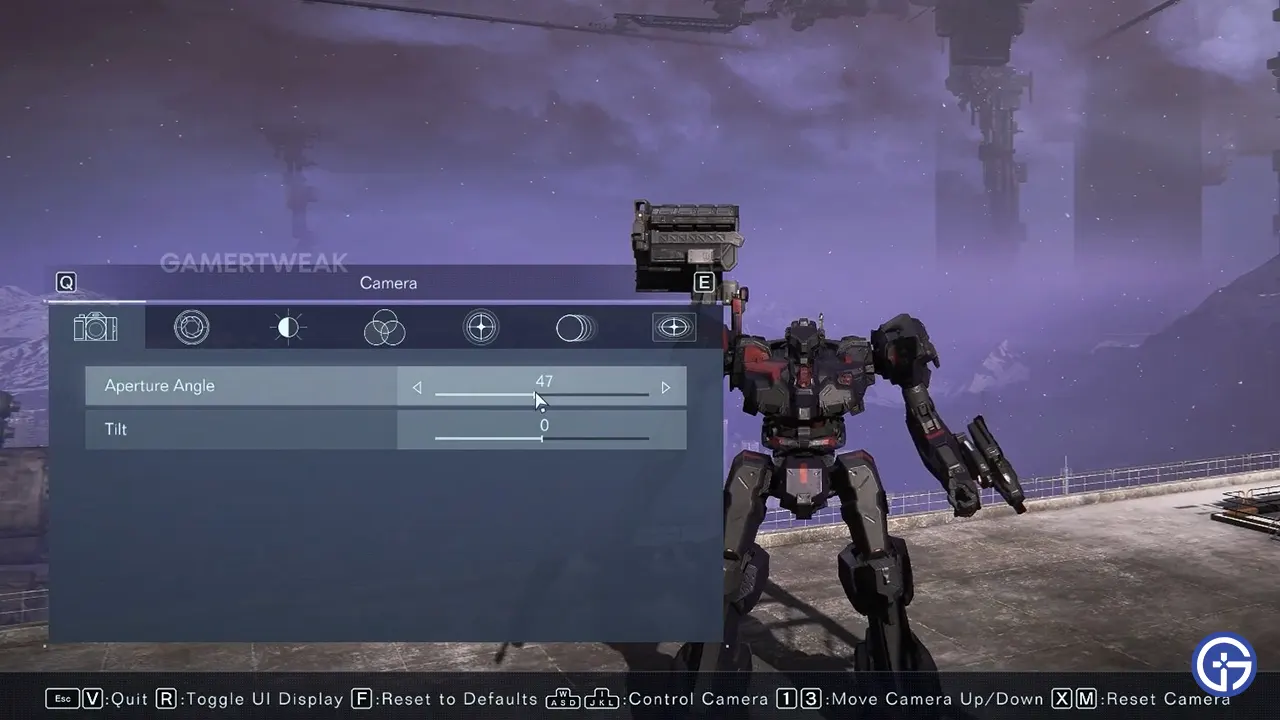
Since the graphics have increased ten folds compared to the games earlier, players often want to take screenshots of outstanding fights, scenarios, or other moments. Or, you might have used the Decal ID Codes and changed some parts on your mech that you want to show the world. The Photo Mode is a feature that has received an absolute blast because of this and players want to have this in every game they play. Since Armored Core 6 is the one in subject here, we will show you all the steps to use Photo Mode in the game:
- While performing any mission, simply Pause the game.
- At the bottom of the screen, you can find the dedicated button to open the Photo Mode in AC6 (V on PC).
- After that, a menu pops up with numerous options including how to hide the Photo Mode UI Display. This allows players to get the entire screen dedicated to the screenshot that they need.
- Now, simply press the screenshot button assigned normally to your device and then you can get the picture you are looking for.
While the process is entirely simple, new players can get stuck. As such, we have a video showing exactly what to do that you can check out right below.
That’s all we have on how to use Photo Mode in Armored Core 6. If you found this guide useful, you might want to check out our guide on Hard Lock vs Soft Lock if you are new to AC. Also, we have more AC6 Guides on our dedicated section that you might want to check out here at Gamer Tweak.