Gotham Knights offers the players 56 suits so many are wondering how they can unlock transmogs and colorways for them. 56 suits means each character gets 14 suits for themselves. And with the ability to change your Cowl, Symbol, Gloves, and Boots for each suit you get a ton of customization. So in this guide let us check how to unlock Transmogs for each suit and colorways in Gotham Knights.
How to Unlock Transmogs in Gotham Knights
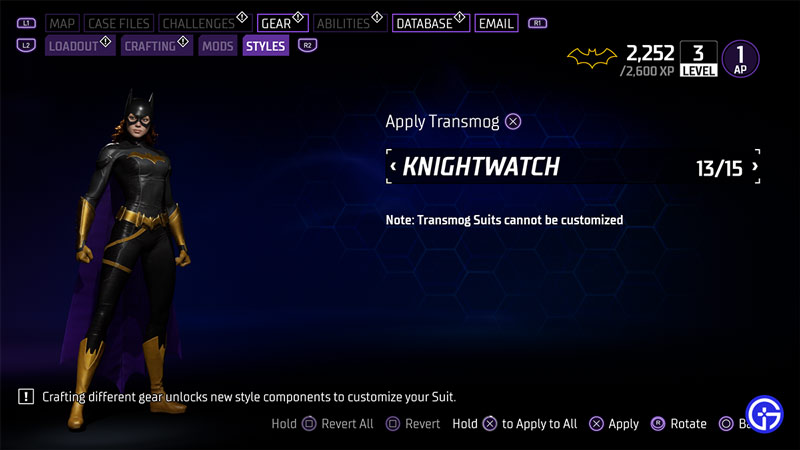
Depending on your suit, the method to unlock its Transmog will also change. Before we get into the details it is important you know what Transmog does. When you apply the transmog of a suit on another you are basically wearing that suit in its default mode. For example, if I have equipped the Titan suit on Batgirl and I choose to use the transmog of the Knightwatch suit. Batgirl will now be wearing the default Knightwatch suit without the ability to customize it. This is important as it can confuse a lot of new players as to what happens when they apply a transmog of a suit to another.
Now that you know what transmog does, here is how you can unlock it for all the 14 suits in this game:
- New Guard: This is the default you start with so its transmog is also available to be applied from the start.
- Beyond: You can either buy the Visionary pack for it or buy the Deluxe edition of the game.
- Knightwatch: Just like Beyond suit, there are 2 ways to unlock this transmog. You can either buy the Deluxe Edition of the game or purchase the Visionary Pack DLC for it.
- Eternal: After unlocking the suit you need to complete its crafting challenge of Lucius Fox.
- Talon: You get the Talon Transmog after unlocking the Talon suit.
- Metal: After unlocking the suit you need to complete its crafting challenge of Lucius Fox.
- Neon Noir: After unlocking the suit you need to complete its crafting challenge of Lucius Fox.
- Knight Ops: You have to find all the secret caches of Batman.
- Privateer: After unlocking the suit you need to complete its crafting challenge of Lucius Fox.
- Year One: Collect all 60 Batrangs spread throughout Gotham to unlock this transmog.
- Titan: You unlock this transmog by unlocking the suit
- Demon: Craft the Thrillseeker suit, its style says Demon.
- Shinobi: Craft the Stealth suit, its style says Shinobi.
- Knighthood: You can unlock its transmog by completing the main story of the game.
How to Unlock Colorways
You can unlock colorways by either getting their blueprints or solving crimes. There are no specific unlock criteria for a certain colorway. So the best way to unlock them all is to keep playing until you have them all. This has one exception though. There are 3 colorways that you can only get when you buy the Deluxe Edition of the game or the Visionary Pack. These colors are:
- Chroma Frost
- Tribute Asylum
- Ultra Zur-En-Arrh
How to Use Transmog or Colorways in Gotham Knights
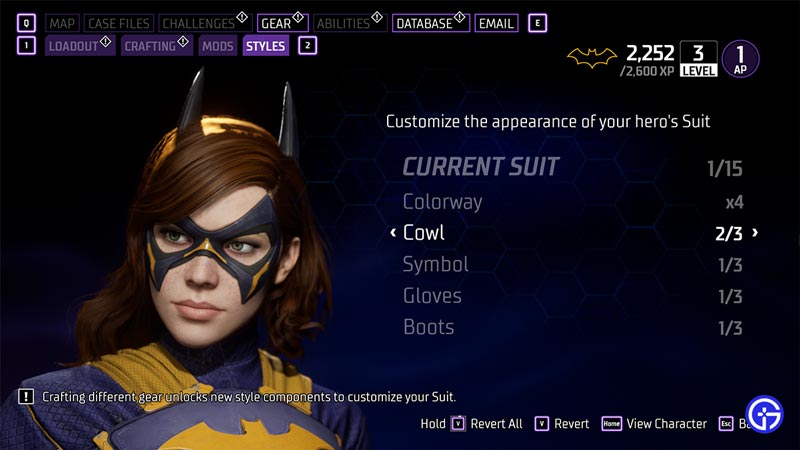
- Open the Batcomputer menu.
- Go to the Gear tab.
- Here, go to the Styles sub-tab.
- Using Transmogs:
- Select the Transmog of the suit that you would like to apply to your current suit.
- Click on the Apply button.
- PlayStation: X button
- Xbox: A button
- Using Colorways:
- You can only use colorways to the Current suit under styles. It should be 1/15.
- Here you can also change the following things for your current suit:
- Cowl
- Symbol
- Gloves
- Boots
- Once you are happy with the changes go back and your character will be wearing the new suit.
That covers this guide on how to unlock and use Transmogs and Colorways in Gotham Knights. I suggest you also check our guides on how to find the Biodecryption key, solve the owl puzzle, disarm pressure plates, and find promethium in this game.