
Splitgate is a “Portal meets Halo” FPS game with Crossplay and Cross progression functionality. Crossplay allows players from different game systems like PC, Xbox One, PS4, and so on to play together and against each other. Due to certain reasons, you don’t want to play with crossplay so you want to switch it off. This guide will help you with how to turn off crossplay in Splitgate.
How to Turn Off Crossplay in Splitgate
Crossplay in Splitgate will be enabled by default. To disable it, follow the steps given below:
- First click on the icon at the top right corner or you can press the “Esc” (Escape) button.
- Once you can access the Options Panel, Click on the “Settings” option.
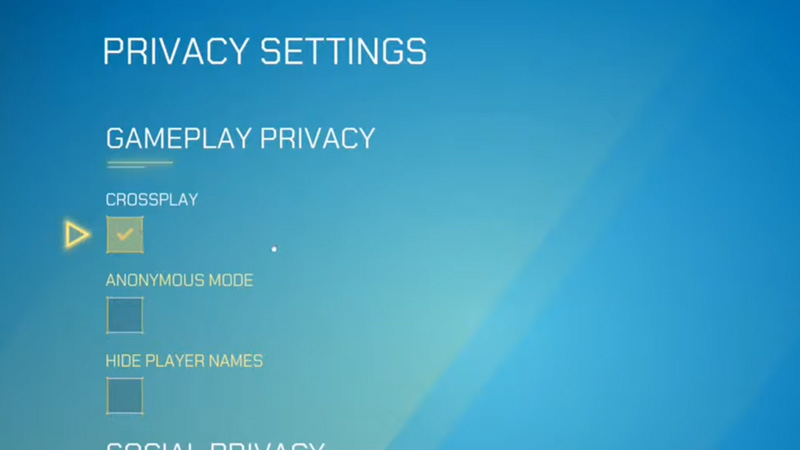
- Under Settings, go to the Privacy Tab.
- Within the Privacy Tab, the option of Crossplay will be under the Gameplay settings.
- It will be checked, so to disable it just uncheck the box near crossplay.
- This should disable crossplay in Splitgate.
Why disable Crossplay?
Crossplay in games usually is a good thing as the game can connect to a broader, larger player base. But there are reasons to not opt for the Crossplay Functionality. FPS games on Consoles usually have an option of Aim Assist. This is fine as long as there is a balance to it. In Splitgate, the guns have minimal to no recoil, and running/jumping inaccuracies are negligible. In such a case, Console players will outperform PC players as it will be easier for them to aim and kill. If you are a PC player and like the difficulty level then you can leave Crossplay On, but for those who don’t, I would recommend keeping it closed till some balancing is done.
As of 13th August 2021, the ability to disable the Crossplay option is not available. When the option is brought back we will update this article right away. In the meantime, you can check out our other guides like getting the Legacy Title, Watching and Saving Replays, or even how to do Melee Attacks. Maybe even see which is better, Valorant or Splitgate.











