Minecraft has a variety of stones that have many different uses. Stone blocks help you achieve greater detail in your builds. These bricks are easy to make in Minecraft and can be done so with a little time and effort. In today’s guide, we will discuss how to make stone bricks in great detail, so keep reading.
Materials Needed To Make Stone Bricks In Minecraft
In order to make stone brick in Minecraft, you will need the following materials.
- Furnace
- 4 x Regular Stone
- Stonecutter (optional)
How To Make Stone Bricks In Minecraft
- The process of making stone bricks will require you to make regular stone blocks first.
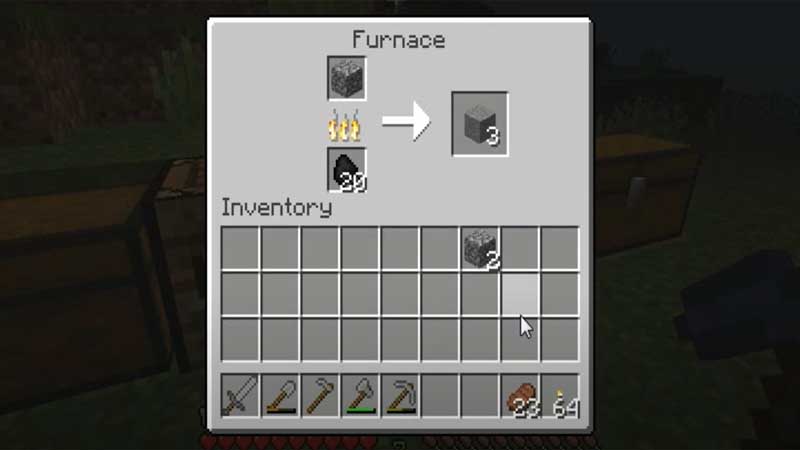
- To do so, you can add cobblestone blocks in the furnace, after which you will receive stone blocks.
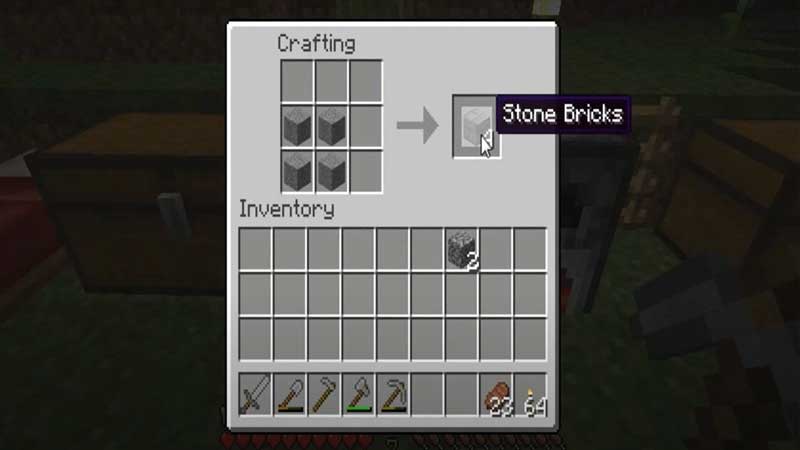
- You can now use these stone blocks to make stone bricks.
- As an option, you can also use the stonecutter to make stone bricks individually.
- As mentioned in the lines above, you will need cobblestone to initiate the process of making stone bricks in Minecraft.
- Cobblestone can easily be mined with a pickaxe.
- After you’ve acquired the necessary cobblestone, you can proceed to build a furnace (in case you don’t have one already).
- You can create a furnace by placing 8 cobblestone blocks in the crafting menu, with the space in the middle left open.
- Once your furnace is ready, place the cobblestone in the topmost slot, with the fuel in the bottom slot.
- The fuel can be any item of your choice like wood, coal or charcoal among others.
- After you’ve picked your fuel, turn your cobblestones into regular stone blocks by smelting them.
- Upon acquiring the necessary 4 stone blocks by the process described above, you can now make stone bricks. Each time you complete this process, you will receive 4 stone blocks.
- You can now place a regular stone block into the left-most slot in the stonecutter UI, after which you will see a few options to your left.
- Choose ‘stone bricks’ and click on the stone bricks to appear to the right of where your regular stone block. This process will yield one stone brick at a time.
Commands To Use While Making Stone Bricks In Minecraft
- If you’re using a newer version of the Java edition of Minecraft (1.13 and above), the command to use while making stone bricks is: /give @p stone_bricks #. In this command, @p is the closest player and the hash-tag (#) determines how many stone bricks you want.
- If you are using an older version of the Java edition of Minecraft, the command is: /give @p stonebricks #. The only difference between the commands for both editions is the syntax.
- If you are using the Bedrock edition of Minecraft, the command to use while making stone bricks is: /give @p stonebrick #.
Uses Of Stone Bricks In Minecraft
As mentioned at the beginning of the article, stone bricks have various uses in Minecraft. In the game, you can make various aesthetic changes to stone bricks. You can also use stone bricks to make stone brick slabs.
How To Make Stone Brick Slabs
- To make stone brick slabs in Minecraft, place 3 stone bricks in a row on your crafting table.
- Doing so will result in the creation of 6 stone brick slabs.
- You can also choose to create just one stone brick slab at a time by using the stonecutter.
How To Make Stairs With Stone Bricks
- You can use stone bricks to make stairs by placing them in an ascending shape, with 1 brick in the top row, 2 in the middle row, and 3 in the last row.
- 6 bricks will make 4 stairs. If you want to quicken the stair-building process, you can use a stonecutter, as every brick will give you one stair here.
How To Make A Stone Brick Wall
Placing 2 rows of 3 stone bricks each in your crafting table will give you a stone brick wall. You can also use the stonecutter method, but it isn’t any quicker.
How To Make Mossy Stone Bricks
- Placing vines with your regular stone bricks will turn your ordinary stone bricks into mossy stone bricks.
- Your bricks will now have a greenish hue.
- You can use these mossy bricks to make stairs and walls with the same steps discussed earlier.
- Additionally, you can also create cracked stone bricks by placing stone bricks in your furnace. This adds a little texture to your bricks.
How To Chisel Bricks
- To chisel bricks, you will need to begin by having 2 stone brick slabs.
- Use these slabs by placing them in a 2×1 column in the crafting menu and voila! You have your very own chiseled bricks.
So there you go. This was an extensive, in-depth article about how to make stone bricks with commands in Minecraft along with its various unique uses in the game. If you liked this article, do check out All Banner Patterns That You Can Make In Minecraft here!