During one of the Act 2 quests of Baldur’s Gate 3, you meet Slack Skinned head that glitches out when talked to and players need a fix. When you get here, you will find her on the podium. But the moment you try to speak to her the game starts acting up. Many are getting issues like they aren’t able to move their characters. For others switching characters is also not of much use because the screen will still freeze. Luckily there is an easy solution to get rid of it. So here is how you solve the Slack-skinned head problem in BG3.
How to Fix the Slack Skinned Head Bug in Baldur’s Gate 3
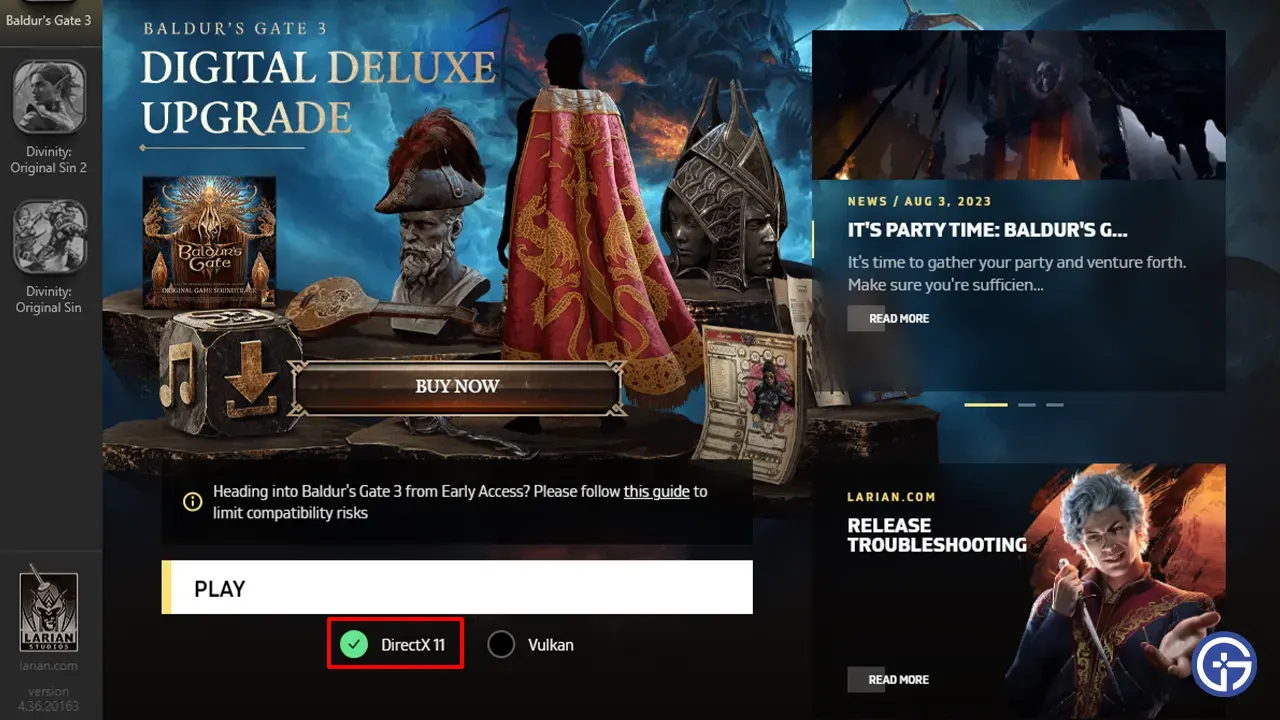
The best way to fix this issue is by switching to DX11. This solution seems to be working for many players, but many can’t get the game to work even after switching so here are all the fixes that you can try:
- Switch to DX11 from Vulkan: As mentioned above, has been useful to many. Save and close the game to not lose any progress. Now launch the game again, from the launcher choose to run the game in DX11 instead of Vulkan. Now, try talking to Slack Skinned head and it shouldn’t glitch out. In case you already play on DX11 then you can even switch to Vulkan for this section to see if it helps.
- Restart the game: This is a general fix that might not work but is worth a shot. Save the game and just restart it without changing DX11 or Vulkan. Simply loading the game might help you fix it.
- Disable Mods: If you use mods and are getting this bug then try disabling it for this portion of the game. Once you are done temporarily removing them, restart the game and try interacting with the Slack skinned head.
- Verify Game files: Another thing you can do to fix this issue is, use Steam or GOG and scan the game files and repair them. Once it removes all corrupt game files restart BG3. You shouldn’t get the bug now and should be able to continue with Act 2.
That’s all the solutions you can use to fix the Slack-skinned head bug in Baldur’s Gate 3. Speaking of bugs, you should also check out how to fix the failed to save game 516 error. If you are interested in more topics of this game then you can also read about the House of Grief location and how to reroll failed perception checks.