Setting up your server to play V Rising can be an amazing experience. You set the parameters, and you set the rules. Want to change the time of the day, change the time it takes to convert a Servant or decide how long a castle can be under attack? All can be done on your server. But many users are having trouble figuring out these settings. So today let’s look at how to change dedicated private server settings in V Rising.
How to Change Dedicated Private Server Settings in V Rising?
To change dedicated private server settings in V Rising you need to edit the “json” named “ServerGameSettings” in “Steam>steamapps>common>VRising>VRising_Server>VRisingServer_Data>StreamingAssets>Settings”. But if you are using a rented private server (like GPORTAL) instead of running your own, then this will be much easier. You can go to the website portal can change this in “Basic Settings” for the server.
Let’s look at this in a bit more detail. So if you a hosting your own server, by using a separate client in Steam Tools:
- Go to your save file location
- Open “ServerGameSettings.json” in a notepad
- Copy the commands from this file to the file in the below location
- Steam>steamapps>common>VRising>VRising_Server>VRisingServer_Data>StreamingAssets>Settings
- You can also use the list we have given in this article for these commands
GPORTAL V Rising Rental Server Settings
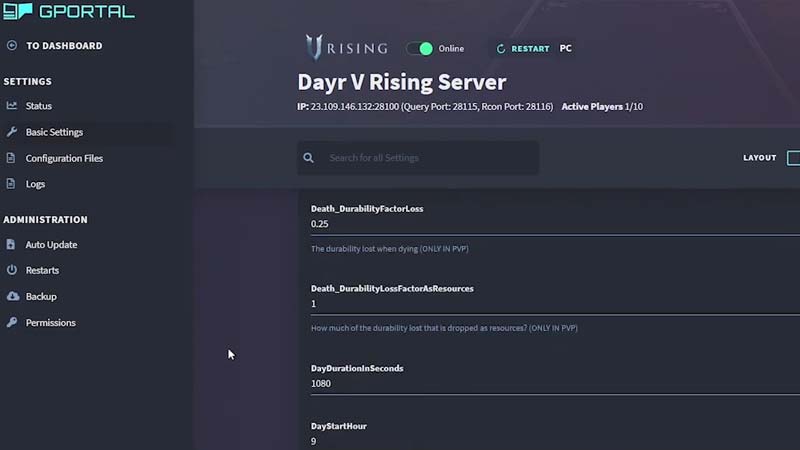
If you are renting your server from GPORTAL, here’s how to change the settings:
- Open GPORTAL webpage
- Click on “My Servers”
- Select your “V Rising Server”
- From the left side tab, click on “Basic Settings”
- Change all the options you like “Clan Size“ here
V Rising String Commands in Server Settings
Here are some of the Server Settings you can change:
- AllowGlobalChat
- AllWaypointsUnlocked
- AnnounceSiegeWeaponSpawn
- BloodBoundEquipment
- BloodDrainModifier
- BloodEssenceYieldModifier
- BuildCostModifier
- CanLootEnemyContainers
- CastleBloodEssenceDrainModifier
- CastleDamageMode
- CastleDecayRateModifier
- CastleHeartDamageMode
- CastleMinimumDistanceInFloors
- CastleSiegeTimer
- CastleStatModifiers_Global
- CastleUnderAttackTimer
- ClanSize
- CraftRateModifier
- Death_DurabilityFactorLoss
- Death_DurabilityLossFactorAsResources
- DeathContainerPermission
- DisableDisconnectedDeadEnabled
- DisableDisconnectedDeadTimer
- DismantleResourceModifier
- DropTableModifier_General
- DropTableModifier_Missions
- DurabilityDrainModifier
- EquipmentStatModifiers_Global
- FreeCastleClaim
- FreeCastleDestroy
- GameModeType
- GameTimeModifiers
- GarlicAreaStrengthModifier
- HolyAreaStrengthModifier
- InactivityKillEnabled
- InactivityKillSafeTimeAddition
- InactivityKillTimeMax
- InactivityKillTimeMin
- InactivityKillTimerMaxItemLevel
- InventoryStacksModifier
- JournalVBloodSourceUnitMaxDistance
- MaterialYieldModifier_Global
- PlayerDamageMode
- PvPProtectionMode
- PvPVampireRespawnModifier
- RecipeCostModifier
- RefinementCostModifier
- RefinementRateModifier
- RelicSpawnType
- RepairCostModifier
- ResearchCostModifier
- ResearchTimeModifier
- ServantConvertRateModifier
- ShowSiegeWeaponMapIcon
- SiegeWeaponHealth
- SilverStrengthModifier
- StarterEquipmentId
- StarterResourcesId
- SunDamageModifier
- TeleportBoundItems
- UnitStatModifiers_Global
- UnitStatModifiers_VBlood
- UnlockedAchievements
- UnlockedResearchs
- VampireStatModifiers
- VBloodUnitSettings
- VSCastleWeekdayTime
- VSCastleWeekendTime
- VSPlayerWeekdayTime
- VSPlayerWeekendTime
That’s all about how to change dedicated private server settings in V Rising. If that helped you out, don’t forget to check out our guides on how to defend your base during raids and how to raid a castle as well. And here are our other V Rising guides with hidden tips and tricks that you might want to know about.