There might be instances where you have selected a player from your friend’s list and sent them something. Although, you might realize, you have never received anything yourself. This might happen because you have not yet enabled the option to Accept Gifts in Fortnite. If you are looking to claim the special gift your friend has sent you, make sure to follow the steps mentioned in this guide and understand how you can get gifts in the game.
How to Receive Gifts on Fortnite
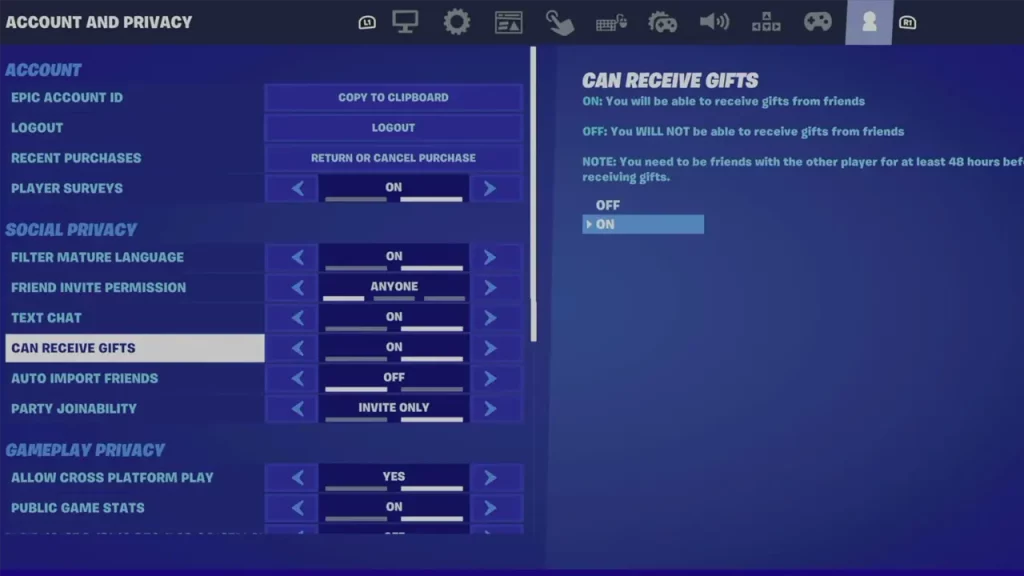
The steps to enable this feature in this game are quite simple. However, it can get frustrating if you are not aware of the correct procedure. Here is how you can take advantage of this option and accept gifts:
- To start this process, go to your in-game Settings.
- Once this opens up, when you go towards the end, you will find the option – ‘Account And Privacy’.
- From here, when you scroll down, you will come across the ‘Can Receive Gifts’ option.
- In order to accept gifts from other friends, make sure you change it from ‘Off’ to ‘On’.
Now that you have learnt how you can enable and Accept Gifts from other player, here is how you can easily send gifts to any of the other players by using a few easy steps.
How to Send Gifts to your Friends in Fortnite
- To do this, go to the Main Lobby and then open the Item Shop.
- You can browse and check which item you want to get your friend. Once you have selected it, you can click on the option, ‘Buy As A Gift’.
- Now you will get the list of all your friends and you can select any player from here.
- You can then go ahead and purchase the gift as well as customize the packaging according to your liking by changing the look of your gift box.
- While gifting, it is important to understand that you won’t be able to gift anything to a player who has not been on your friends list for more than 48 hours.
We have covered everything you need to know about Accepting Gifts on Fortnite. If you are interested in this game, make sure to read about how you can enable Two-Factor Authentication and how you can Sell Fortnite Skins, all available here on Gamer Tweak.