If you happen to play on PC, then you should know where to find your save files for Remnant 2. While the game does support Cloud backup features, these aren’t reliable at times. Especially if you happen to have an unstable internet. Also, one of the worst nightmares would be the game files getting corrupted. As it would mean starting all over again. But when you manually backup your progress you don’t have to worry about coming across such scenarios. So here is the location where you can find your Remnant 2 save files.
Remnant 2 Save File Location
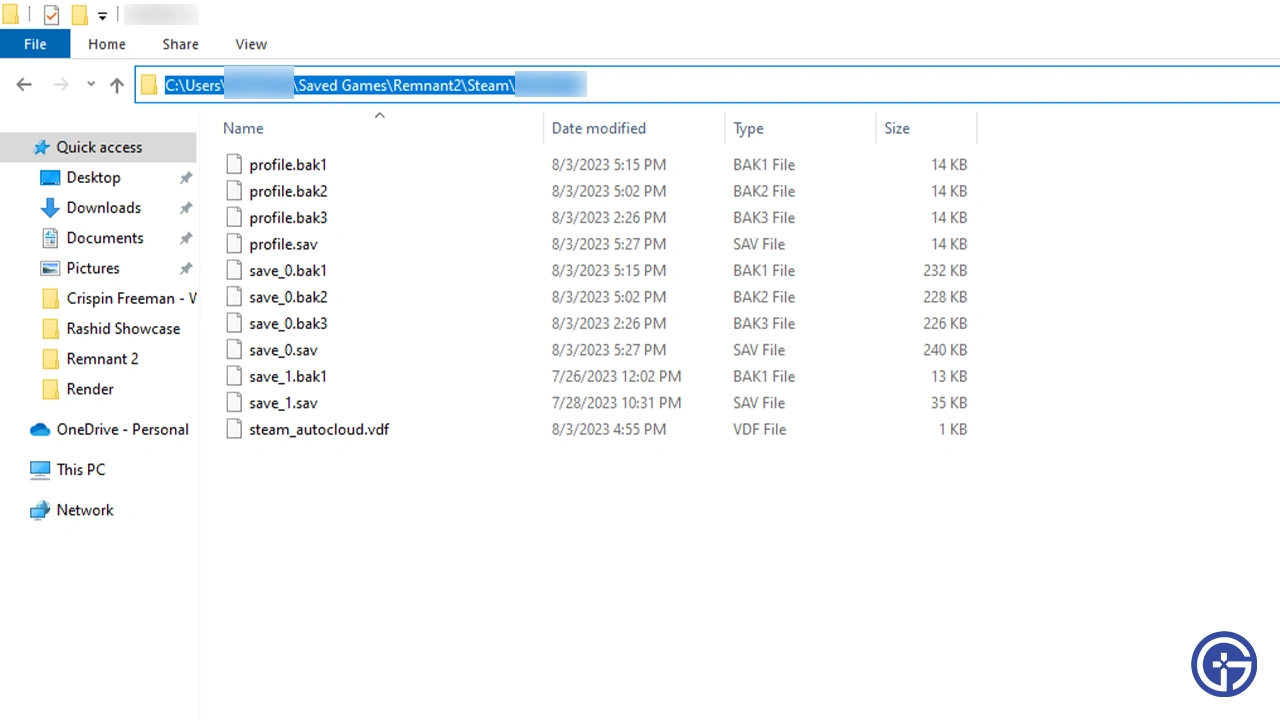
Most users should typically find their Remnant 2 Save files in the following location:
- C:\Users\_your_username_here_\Saved Games\Remnant2\Steam\_string_of_your_steam_id_\
This is because your Saved Games folder will contain a Remnant 2 folder with all your saves.
How to Backup & Restore Remnant 2 Saves
In order to back up and restore the files you first have to get to them. You can follow two ways for it:
- Standard method:
- Press Windows Key and search File Explorer.
- Now, in C Drive, go to Users and then your username.
- Here, find the Saved Games folder and look for Remnant 2 inside it.
- Next, under the Steam and Steam ID folders should be all your relevant save files.
- Faster method:
- If the above method is too tedious then do the following.
- Press Windows + R and enter the following command:
- %USERPROFILE%\Saved Games\Remnant2\Steam\
- Click OK and you should get to your Steam ID folder.
Once you get to your Steam folder:
- Copy and paste it into another location with a new name, something like “Remnant 2 Backups”.
- Now, whenever your game file gets corrupted you can directly paste these files back to the original location given above.
Do remember to regularly back them up else you will have to replay a lot depending on how far you progressed.
With that, you now know the save file location for Remnant 2 and how you can back them. If you would like more help on this game be sure to check out our guides on how to get crescent moon bow, get sorrow handgun, and more.