
If you want the Lies of P Save File location, you would like to back up your files to start a new playthrough or try out different mods. Luckily, its Steam version does have Cloud Support that keeps your saved files secure. But on the contrary, players with a weak internet connection can’t rely on the Steam Cloud to keep their progression safe. As for the players looking for the Save game location, tracing it by yourself can be a bit hassle. Don’t worry, our guide has got you covered with the Save file location for Xbox Game Pass and Steam versions.
Lies of P Save File Location
For the Steam version, you can find the Lies of P Save Files located in the installation folder. You must head to the folder and drive where the game is installed. So, here’s the Save location or path where you can find these files and data:
- Local Disk> Steam Library > steamapps > common > Lies of P > LiesofP > Saved > SaveGames
Once you head to this directory path, you will find a folder with digits that differ for all the Steam accounts. Over there, you will find all the saved game files. You can copy and paste them in a different folder to back up your save files.
Xbox Game Pass Save Location
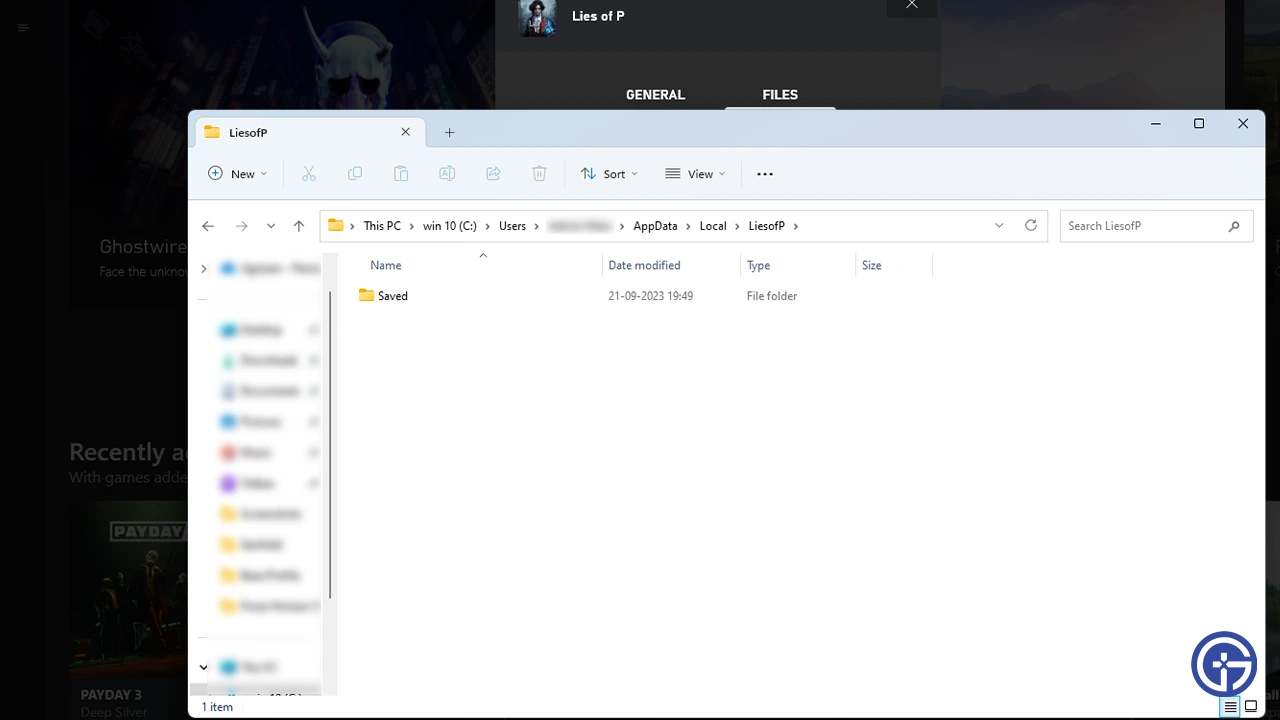
Unlike Steam, locating the Xbox Game Pass saves of Lies of P can be a bit tricky. You need to enable the Show hidden files, folders, and drives option to locate the saved files and data. So, here’s where you can find out the Xbox Save location:
- Local Disk > Users > User > AppData > Local > Packages > Neowiz.(specific digits) > SystemAppData
If you can’t find any saves over there, head to the following location:
- Local Disk > Users > User > AppData > Local > LiesofP > Saved
Over there, you will also find the config files for the Lies of P. You can back them up if you want to save your customization and in-game settings.
That’s all about the Lies of P Save File location on Steam & Xbox. If you found this guide helpful, check out more guides to find out the best path or combat style for Beginners, what to choose between Motivity vs Technique, and explore more Lies of P Guides right here on Gamer Tweak.











