Home > Sons of the Forest > How To Auto Assign Weapons In Sons Of The Forest

How To Quickly Swap Items In Sons Of The Forest (Hotkeys Guide)

Published Date :

Hotbar or Hotkeys are present in most survival games, but while playing Sons of the Forest, you’ll find them missing. This can make you feel that it’s a gimmick by the game to add difficulty to your horror adventure. But in fact, this game has a creative workaround for it. So here is how you can use quick slots to swap your weapons and other items in Sons of the Forest.

How to Hotbar or Quick Swap Items in Sons of the Forest
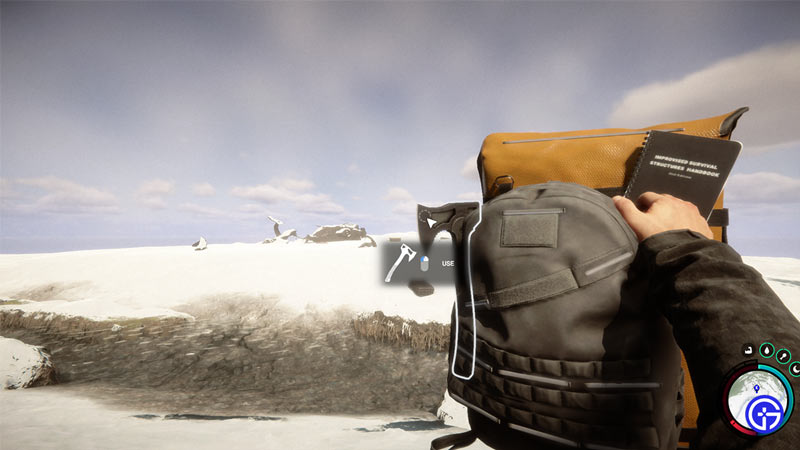
how hotkeys and quick swap works in sons of the forest

You cannot exactly quick swap or hotkey your items in this game in the traditional sense. There is no mini menu on the screen that shows you keybinds for items like most other games in this genre. But in exchange, Sons of the Forest lets you use your bag as an alternative. Your bag acts as hotkeys here. So here is how you can quickly select or change your items:

  1. Press and hold the I-key on your keyboard to bring up your backpack.
  2. Here, hover over the item that you wish to equip or swap.
  3. Next, left-click on it to use it.
  4. Your character will now equip the desired item.

There is a catch though with the backpack. Just like an actual Hotbar system. It can only hold certain items. For example, two weapons, a few healing items, and more. So before entering a cave or any place where you can encounter enemies, make sure you prepare your bag first. To do that:
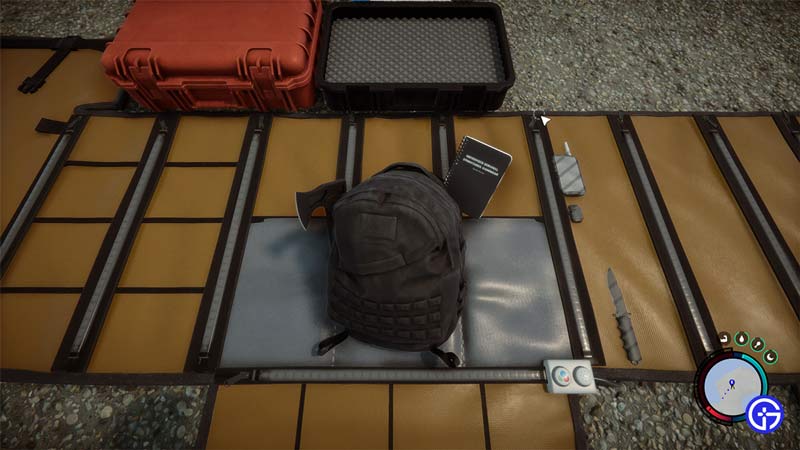
how to hotbar quick slots in sons of the forest

  1. Open your inventory by pressing I.
  2. Hover over the item that you want to add to your bag.
  3. Right-click on it and it will put the item in your bag. Right-click again to remove the items that you don’t want in your bag.

That covers this guide on how to quick slot weapons and hotkey items in Sons of the Forest. Since you like this game you should also find our guides useful on how to get a sled, how to get a shovel, and how to get water. And for other topics for this game don’t forget to check our Sons of the Forest section.

  • Anime Expeditions Codes (July 2026)

    Anime Expeditions Codes (July 2026)

    Published Date :

    Heroes from multiple anime worlds have come together to take on dangerous expeditions filled with powerful enemies. As you summon stronger units, evolve them, and tackle tougher game modes, every free reward can make your team even stronger. That’s why we’ve compiled all the latest Anime Expeditions codes you can redeem right now. Last checked… Read More

  • Flip a Boat Codes (July 2026)

    Flip a Boat Codes (July 2026)

    Published Date :

    In Flip a Boat, your goal is to turn neglected boats into valuable ones. Buy damaged boats, repair them piece by piece, customize them to your liking, and sell them for a profit as you work your way up to larger, more expensive vessels. If the developers release freebies, you’ll find all the latest Flip… Read More

  • Scale Slimy Fish Codes (July 2026)

    Scale Slimy Fish Codes (July 2026)

    Published Date :

    Catching fish is only the beginning in Scale Slimy Fish. To earn more cash, you’ll need to scrape off their scales, feed hungry animals, and continually upgrade your rods (and your knife!) and tools for bigger catches. If you’re looking for a head start, here are all the latest Scale Slimy Fish codes currently available… Read More

  • Level Your Weapon Codes (July 2026)

    Level Your Weapon Codes (July 2026)

    Published Date :

    Level your Weapon has quite an addictive gameplay – you start with a weak weapon, but you keep adding XP Crystals to it; the weapon gets stronger, helping you take down increasingly powerful enemies. Leveling up slowly is part of the fun; however, free rewards can make that grind a little smoother. If you’re looking… Read More