Baserunning is an important facet in MLB The Show 21. A quick base steal here and there might just be what you need to turn the match in your favor. And while we all love to see a massive home run or a close call while sliding onto a base, efficient baserunning gets the job done. Sometimes it might get a bit close for comfort but can make the difference between scoring and losing points. So, let’s dive into some tips and tricks about Baserunning in MLB The Show 21.
Baserunning Controls in MLB The Show 21
The Baserunning controls will actually vary in various modes. RTTS and the Locked Player mode during Diamond Dynasty will be different from your normal matches. However, it isn’t that big of a difference. The basic idea remains the same, just the camera angle changes, which you can change on your own. You can change your view by clicking L2 on PlayStation and LT on XBOX in conjunction with the Right Analog Stick. While baserunning you will have to use the Left Analog Stick to run between bases. If you want to steal a base you can get a slight lead by using L2 on PlayStation and LT on XBOX to advance further from the base and R2 on PlayStation and RT on XBOX to come back to the base.
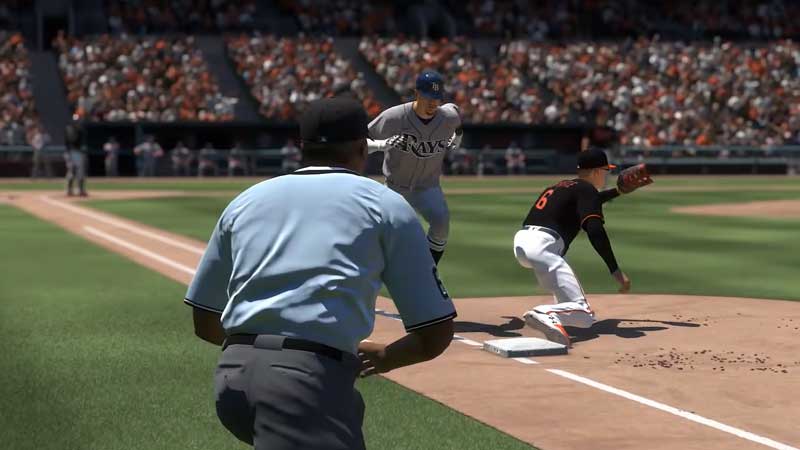
If the bases are loaded and you are playing in the Franchise mode in MLB or the Exhibition mode where you are playing as a team, you can move all the players simultaneously. To do this press L2 on PlayStation and LT on XBOX to advance further from the base and R2 on PlayStation and RT on XBOX to come back to the base. If you want just one player to run ahead, move your left analog stick towards him. The AI will take care of the rest.
When your player/players are approaching the base the AI will see whether it’s feasible to slide onto a base. You can control the type of slide with the Right Analog Stick. If you flick it up, the player will slide onto the base headfirst. Flicking the Right Analog Stick down will have the player sliding in feet first. For your own player, however, you can manually slide by pressing L1 on PlayStation and LB on XBOX.
Change Baserunning settings
- To change Baserunning settings in MLB The Show 21 pause the game.
- Go to the Settings tab.
- In the dropdown menu select the Gameplay Settings option.
- With the Right Key, switch the menu lists till you come onto Batting and Baserunning settings.
- Go to the Advanced options section in the Batting and Baserunning settings.
- Here you will see 2 options, Baserunning Decisions and Baserunning Interface.
- If you want to, you can make adjustments to it.
- However, we suggest that it’s best to leave everything on auto.
Classic Baserunning in MLB The Show 21
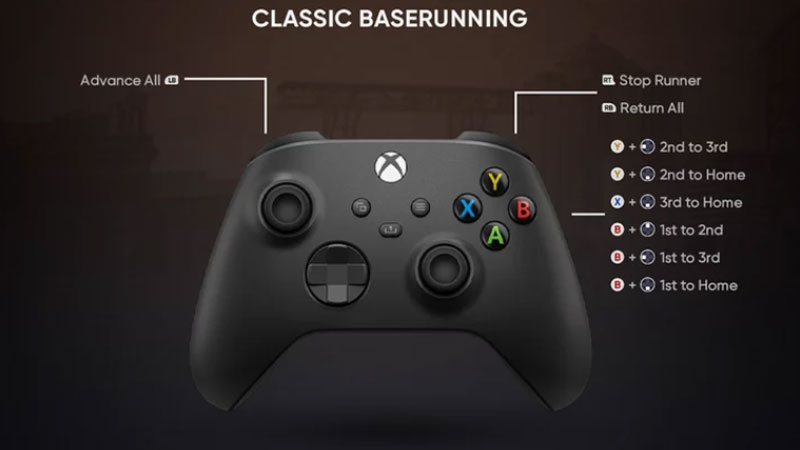
There is something called Classic Baserunning in the game too. This however is pretty hard to get used to as it has manual controls for Baserunning and Stealing. This can become a handful if you are new to the franchise or if your bases are loaded.
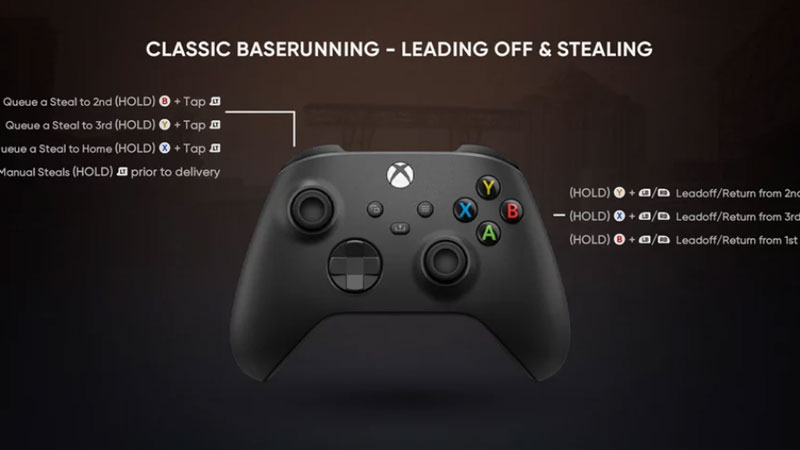
For PlayStation controllers replace the following:
- L2 for LT
- R2 for RT
- L1 for LS
- R1 for RS
- Triangle for Y
- Square for X
- X for A
- Circle for B
This is everything you need to know about Baserunning Tips for MLB The Show 21. While you are here learn how to upgrade your player using Loadouts. If you are facing server issues have a look at some easy Server fixes.