
Ever since the launch of Goose Goose Duck, it has been called out as a clone of Among Us. With some players even calling this game, AmonGoose. Jokes aside, this game offers a plethora of features lacking in other virtual mafia games. One of these includes in-game Voice chat support without installing any third-party app like Discord. But recently, players are unable to use voice chat in lobbies or in-game. Not to worry, check out our guide on how to fix the Goose Goose Duck Mic not working issue.
How to Fix Goose Goose Duck Mic Not Working
You might be encountering this issue if you are using Discord or another voice chat app simultaneously with Goose Goose Duck. This might also result in the Push-to-talk, Mic, or other voice chat features not working as well. You can head over to the Discord Community (link) of Goose Goose Duck for troubleshooting these issues.
But there can also be several other issues for your mic or push-to-talk feature not working in the game. You can also encounter voice chat issues if it’s an issue from your end. So, here are some basic workarounds or check-ups to make sure:
Update Audio Drivers
You need to make sure that your Sound, video, and game controller drivers are updated to their latest version. Follow the below steps:
- Hit the Windows or Start button and search for Device Manager.
- Navigate to the Sound, Video, and game Controller option. And expand or double-click the option.
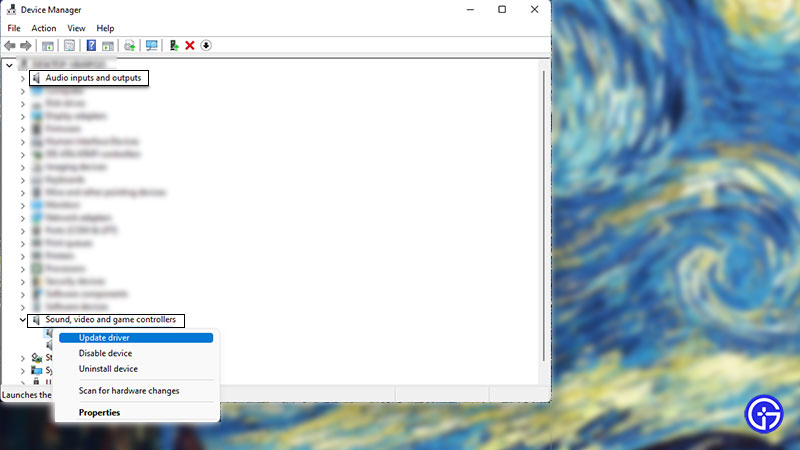
- Then, right-click on your audio device(s) and select the Update drivers option.
- You can also update the drivers of your connected Audio inputs or outputs.
- For that, double-click on the Audio inputs & outputs option.
- Right-click on your inputs and select the Update drivers option.
Also Read | Goose Goose Duck Vs Among Us: Which Is A Better Game?
Check Goose Goose Duck Settings
You can face problems with your mic or voice chat if you have selected the “No Mic mode” option on your PC, Console, or Mobile. Follow the below steps to disable it:
- Hit the Settings option at the top right of your screen.
- Under Sound settings, check if you haven’t enabled the No Mic Mode. If you have enabled it, uncheck the option.
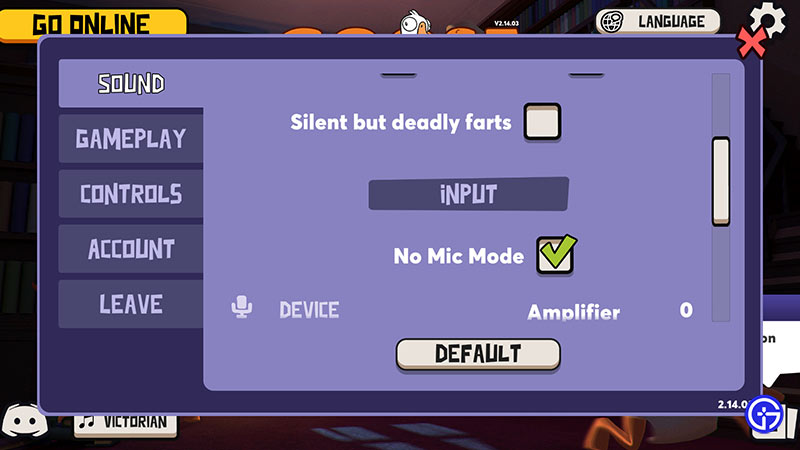
- Then, manually select your mic device and the input mode.
- You can also toggle the values of Amplifier and Sensitivity in this section.
Check your Mic with other Games
You can check if your connected microphone is having issues with other games as well. If your teammates or friends are unable to hear you on other games, it might be a headset or microphone-related issue.
If the problem’s on your end, the above workarounds should resolve the mic or voice chat not working issue. You can head over to their #bugs-and-troubleshooting channel on their Discord to Submit a ticket.
That’s everything covered about the Goose Goose Duck mic not working. If you liked this guide, check out our guides on how to change Language, how to check server status, the best role settings, and more Goose Goose Duck Guides right here on Gamer Tweak.










