Home > Zelda: Tears Of The Kingdom > Zelda TOTK: How To Make Hover Bike

How To Make Hover Bike In Tears Of The Kingdom (TOTK)

Published Date :

The creative possibilities in Zelda Tears of the Kingdom are limitless and one of the coolest vehicles that players have made is the Hover Bike. Not only is it quite fast but also a cool way to explore the vast region of Hyrule. And the best part is making it is also quite easy. So here is how you can make it and its two variations.

How to Make a Hover Bike in Zelda Tears of The Kingdom
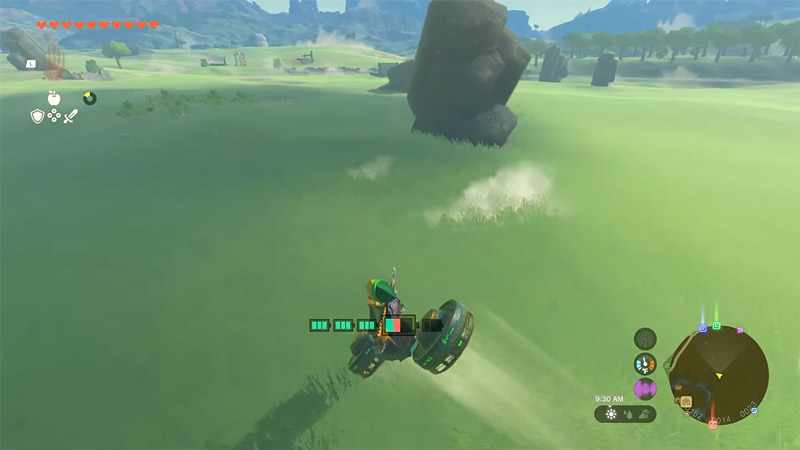
Zelda TOTK how to Get Hover Bike
Image Credit: MysticBGaming

For making a Hover Bike you will always need 2 Fans and 1 Control Stick. There are two different types of bikes that you can make. Here are them both.

Traditional Hover Bike
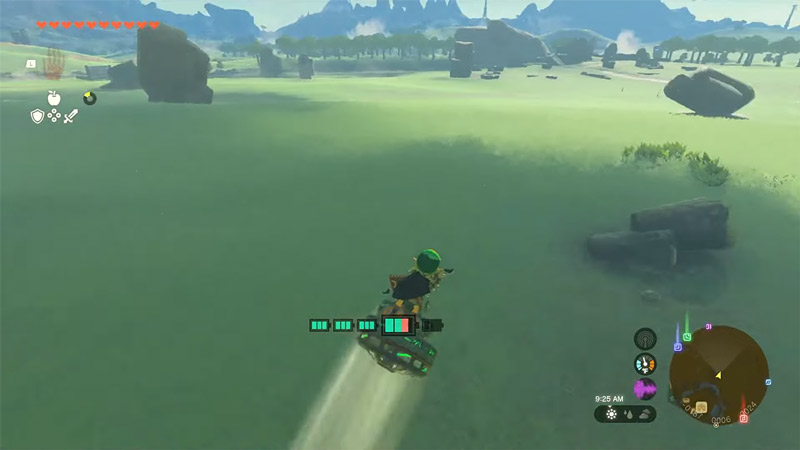
TOTK Traditional Hover Bike
Image Credit: MysticBGaming

In this Hover Bike, the fans will be placed like the wheels on a regular bike. That is one ahead of the Control Stick and one behind it. This is how to make it:

  1. Use Ultrahand and place a fan upside down and flat on the ground. That means the air should flow below.
  2. Next, grab a Control Stick, tilt it 45 degrees upwards, and attach it to the Fan on the ground.
  3. Finally, grab another fan and attach it to the front of the Control Stick.

With its weight, the bike should fall forward. Now simply grab the Control Stick and the fans will start working and you can glide around easily.

Hover bikes do take quite a lot of energy to work so make sure you upgrade your Battery to use it for a long time.

Segway Hover Bike
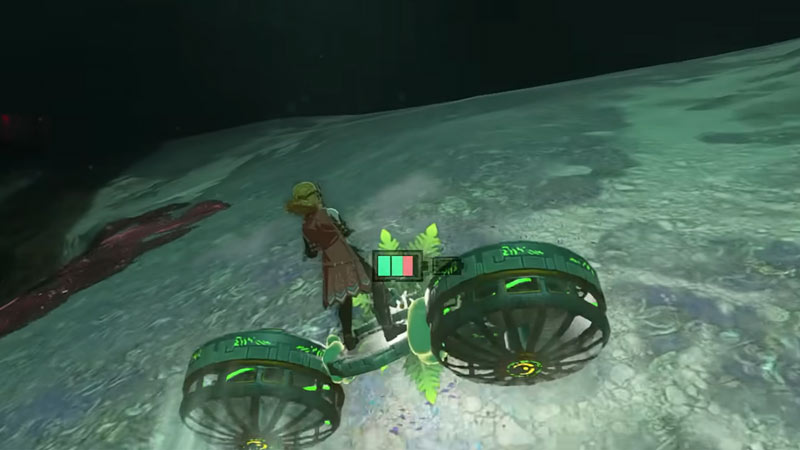
TOTK Segway Hover Bike
Image Credit: Nassi on YouTube

In this Hover Bike, instead of having fans at the front and back, each fan is attached to the side of the Control Stick.

  1. Use Ultrahand and place a fan upside down on the ground.
  2. Grab a Control Stick, tilt it 45 degrees up, and stick it to the side of the fan.
  3. Now, grab another Fan and stick it on the other side of the Control Stick.

Using it is slightly different than the Traditional Hover Bike. When you start it, the bike will start flying up, simply move your left joystick forward to realign it and then use it normally.

That’s all you need to do to make a Hover Bike in Zelda Tears of the Kingdom (TOTK). You should also find our other guides interesting on Obsidian Frox Location, how to do Duplication Glitch, and how to beat Sludge Like.
  • +1 Speed Evolve Codes (July 2026)

    +1 Speed Evolve Codes (July 2026)

    Published Date :

    Speed-based games on Roblox will always stay popular, and this particular experience is quite addictive! Here, you play as an animal and your goal is to evolve into stronger animals, unlock new worlds, and be the fastest player on the server! +1 Speed Evolve codes offer free Speed and Win Boosts that can make your… Read More

  • Yeet a Brainrot Codes (July 2026)

    Yeet a Brainrot Codes (July 2026)

    Published Date :

    If you’re annoyed at the Brainrot trend, this is your opportunity to “yeet” them into the distance! To launch Brainrots farther, you need better pets, potions, and more rewards, and thankfully, these Yeet a Brainrot codes will come to the rescue. You can easily unlock various Divine Relic Chests, Primeval Relic Chests, Coin/Luck/Power potions, exclusive… Read More

  • Build A Soccer Squad Codes (July 2026)

    Build A Soccer Squad Codes (July 2026)

    Published Date :

    To build your dream team, you’ll need plenty of rerolls and shop refreshes, which is how you can get better cards and complete your collection. Build A Soccer Squad codes can help with exactly that, giving you various freebies so you get more chances to improve your lineup without waiting. Here’s the complete list of… Read More

  • Aura Monster Simulator Codes (July 2026)

    Aura Monster Simulator Codes (July 2026)

    Published Date :

    Climbing an endless staircase might sound simple at first, but the higher you go, the more Aura you’ll need to keep progressing and unlock stronger upgrades. Thankfully, Aura Monster Simulator codes provide free Gems and Aura Boosts, helping you strengthen your character and reach new heights. More specifically, you can use these Gems to unlock… Read More