
Home > Gaming Guides > Connect Bungie Account To Twitch

Twitch: How To Link Your Bungie Account With It

Updated Date :

Many Destiny players are looking to connect their Bungie account with their Twitch account. This process is important when you want to get freebies in the game. And while the process is simple, many find it confusing. So in this guide let us quickly check how to link your Bungie account to Twitch.

How to Link Bungie Account to Twitch
how to link bungie account to twitch

First make sure you have a Twitch account, if you have then log in to your account at Twitch. And if you don’t have one then register for a Twitch account. You can register for it by clicking on sign up.

  1. Log in to your Bungie account.
  2. You can log in using your Steam Account for PC, or using your Xbox, or PlayStation accounts.
  3. Next, create your profile if you haven’t already. This will allow you to claim Bungie Rewards.
  4. After logging in go to the Account Settings page.
  5. Here, on the left side of the screen click on Account Linking.
  6. Now, you will get the option to link your Bungie Account to other platforms. You should see Twitch here.
  7. Click on the Link account button beside Twitch.
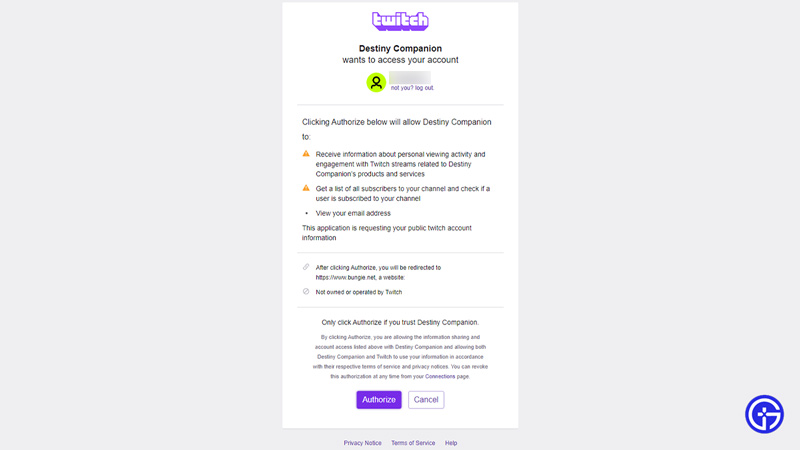
  8. This will bring up a popup that requires you to authorize your twitch sign-in. If you have already logged in then it will show you your Twitch account.
  9. On this popup, you can check the basics about the information that Destiny can collect after you Authorize it. Click on Authorize if you accept.
  10. Once Authorized you will connect your Twitch account to your Bungie account.

Many users that change their username on Twitch can have problems when trying to claim rewards. If that is the case then try unlinking and relinking your account. This should help fix it.

That covers this guide on how to connect your Bungie account to Twitch. Since you use Twitch you might find these guides useful on how to buy Twitch bits, how to link battlenet, most subbed streamers, and the fix for failed to load OBS channel information. And for more things gaming don’t miss out on Gamer Tweak.

  • Roblox Lowball Codes (August 2026)

    Roblox Lowball Codes (August 2026)

    Published Date :

    Buying items below their market value and flipping them for a profit is the fastest way to get rich in Lowball. Every successful negotiation grows your cash, letting you take on bigger trades and expand your inventory even further. If you want an extra boost without waiting for your next big deal, redeeming the latest… Read More

  • Junk Mechanics Codes (August 2026)

    Junk Mechanics Codes (August 2026)

    Published Date :

    Turning piles of scrap into powerful cars is the key to progressing in Junk Mechanics. As you keep playing, you’ll start needing plenty of cash for purchases and upgrades, which is why free rewards are always worth claiming. Be sure to redeem the latest Junk Mechanics codes whenever they’re available and check out this complete… Read More

  • GTA 6’s Extended Look Will Debut on Netflix Before YouTube

    GTA 6’s Extended Look Will Debut on Netflix Before YouTube

    Published Date :

    Rockstar Games has revealed an unexpected way for fans to watch the next major Grand Theft Auto 6 showcase. Instead of heading straight to YouTube, the studio’s upcoming Extended Look presentation will premiere first on Netflix, which means subscribers get an early preview before it becomes available to everyone else. It is set to air… Read More

  • Stream a Mukbang Codes (August 2026)

    Stream a Mukbang Codes (August 2026)

    Published Date :

    Mukbang games are gaining more popularity on Roblox these days, and Stream a Mukbang is where you eat food live, gain views, likes, followers, and earn cash for upgrades. As your live videos become more popular, you’ll need more resources to keep attracting new viewers, and that’s where free rewards can make a difference. Redeeming… Read More







