The Last of Us 2, the highly awaited sequel, is set in a post-apocalyptic world filled with dangerous enemies – infected and otherwise. There’s emotion, there’s combat, there’s stealth attacks – it’s like a complete package for an action-adventure game. But players might want to change the difficulty as per their liking in order to get what they want from the game. Changing the difficulty settings will also determine how long it takes to beat The Last of Us Part 2. So, in this guide, we will tell you all difficulty settings in The Last of Us 2 and how to change them.
The Last of Us Part 2 Difficulty Settings
There are a few options to choose from and they are: Very Light, Light, Moderate, Hard, Survivor and Custom. Each difficulty will offer different adjustments to the game, and you can pick as per your choice. More details on this below.
How to Adjust Difficulty?
To change the game difficulty levels, go the Options menu and change things there.
The Moderate difficulty will give the player a balanced experience and the resources are mentioned as “limited”.
In Very Light, players can go on this adventure with a lighter level of combat challenge. The camera and aim assist will be enabled by default in this mode.
Light difficulty level is less challenging than Moderate. Resources are more readily available and enemies aren’t as dangerous.
The Hard difficulty mode is for those who want to be challenged in the game. The resources will be limited and enemies will be more ferocious.
And then there’s the Survivor difficulty mode, where the skill level of players will be tested. The resources will be very, very scarce and enemies are the most dangerous. If you think you can handle some intense gameplay, this is the mode you should be going for.
Which Difficulty Settings Should You Select?
Players can take a decision about the difficulty level in the game based on the above information. For most players who want a normal gaming experience, Moderate should be appropriate. If you want extreme challenge and bragging rights, take the Survivor level. Players can also attempt to play in the Hard mode for their first playthrough, if they aren’t too sure of going for the highest difficulty of Survivor.
What is Custom Difficulty in The Last of Us 2?
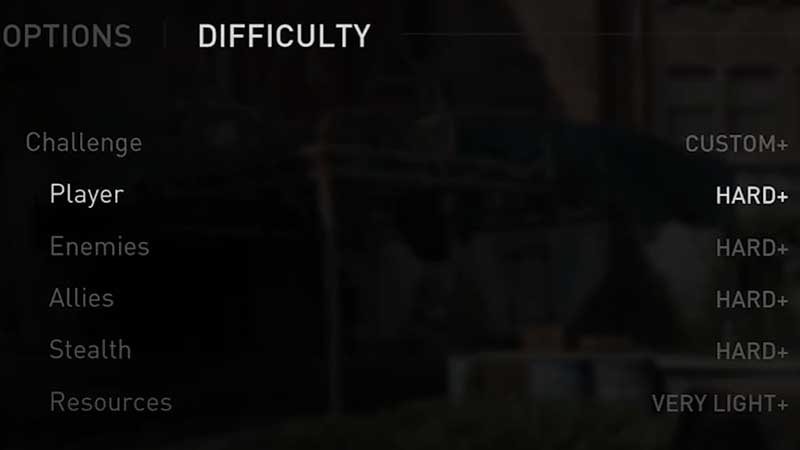
You can also ‘customize challenge’ after finishing the game once. Here, you can modify difficulty on the basis of player, enemies, allies, stealth and resources. This is what you get in each of them.
Player – It modifies the damage taken and the frequency of checkpoints. This means that if you die mid-battle, you can start playing again from between, and not from the beginning of the encounter.
Enemies – This changes how intelligent and fierce your enemies are. It will manipulate their movement speed, aggression and more. The complexity of enemy melee combos and accuracy of enemy gunfire can also be changed here.
Allies – This will adjust the violent behavior of allies during combat and also how often they will kill the enemies.
Stealth – Makes the enemies smarter in terms of catching you while you are stealthy. The grace period of them alerting others, their perception via vision, hearing and smell as well as the conditions for catching your opponents can be modified. It goes from unsuspecting to vigilant.
Resources – This will determine how much ammunition you will find. The easier setting will make it very easy for you to find resources.
So, overall, The Last of Us Part 2 difficulty settings give players great flexibility to tweak the game as they wish. This is perfect to get the experience you want from the game.
Moreover, you can make use of the New Game+ wherein you can play through the game all over again with all the upgrades and equipment that you have previously acquired.
For more tips and tricks to do well in this game, check out our Last of Us 2 guides right away.