Starfield already has a DLSS Mod but installing it can be a bit trickier. This Mod will replace AMD’s FSR2 Upscaling Display Setting. So those with Nvidia’s RTX Graphics Card can now sigh in relief. In this guide, you will learn how to download the latest DLSS Mod and install it easily on your PC. So take a look below to get started.
Note: Installing Mods to exploit a game’s parameter is unethical and we do not promote it. Moreover, it can cause harm to your PC, so we recommend you move ahead at your own risk.
How to Install DLSS Mod in Starfield
Firstly, make sure that you have downloaded and extracted the following files from Nexus Mods:
- Starfield Upscaler (Download Standalone version)
- UpscalerBasePlugin
- DLSS DLL (Latest NVidia DLSS DLL is required)
Once done, follow the steps below to install them in Starfield:
- Head over to your Starfield Install Directory.
- Now, copy and paste all the content from the downloaded Starfield Upscaler folder.
- In the game directory, you will see a folder called mods. Therein, you will be copy-pasting two .dll files, and here’s how:
- Head over to the downloaded UpscalerBasePlugin folder and copy-paste (PDPerPlugin.dll) into the mods folder in the Starfield game directory.
- Copy the downloaded Nvidia DLSS DLL (nvngx_dlss.dll) file and paste it into the mods folder as well.
- You have now successfully downloaded the DLSS Mod in Starfield.
After downloading the DLSS Mod, make sure you don’t mess up with the settings as it may cause a lot of trouble. And to stay out of harm’s way, here’s how you can make the most out of the Starfield DLSS Mod.
How to Use DLSS Mod for Best Performance
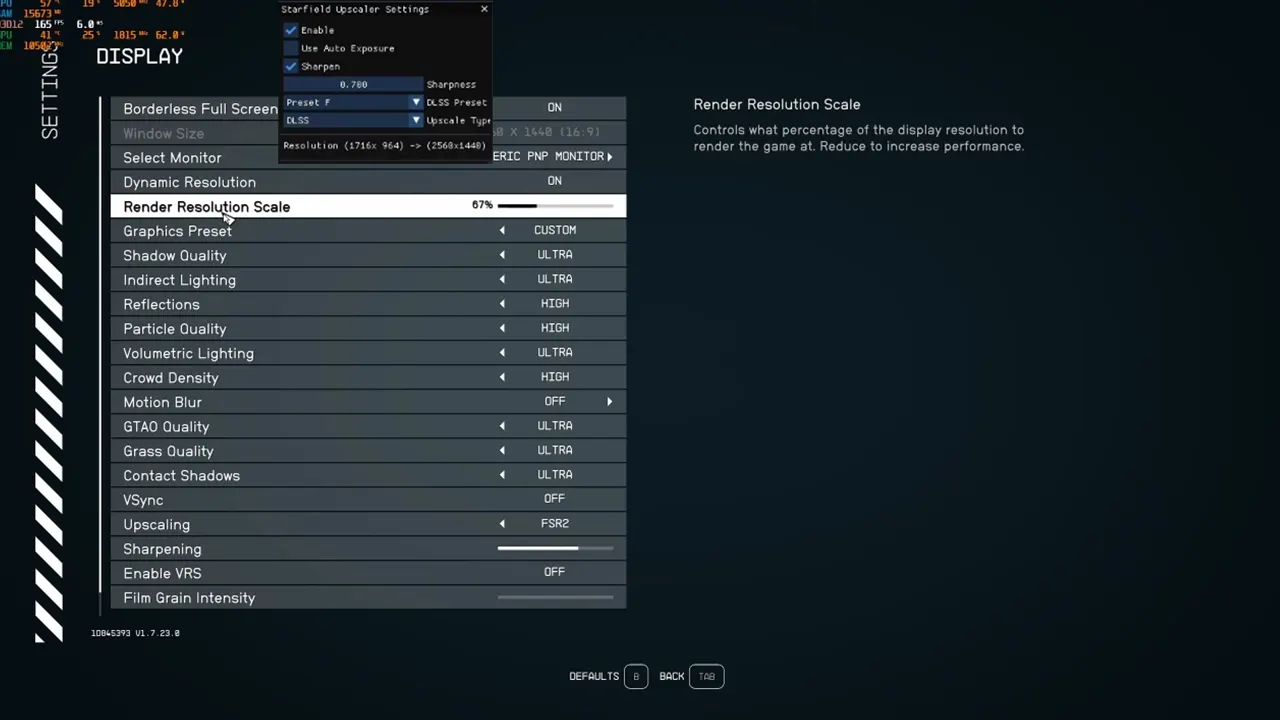
Once you have downloaded the mod, launch the game and press the END key on your Keyboard. Doing so will open up a small menu from where you can switch a few settings. So, in the menu that appears, make sure that the Enable box is checked. Also, set the Upscale type to DLSS. Next, head over to the in-game Settings > Display tab and change the Upscaling option to FSR2. Don’t worry as the FSR2 setting’s functionality will be overwritten by DLSS.
The next thing you would want to do is adjust your Render Resolution Scale until you find your sweet spot. This will help you to gain maximum FPS performance with DLSS On. However, it is just a Mod so do not expect any massive changes in the Graphics.
That’s all you can do to install the DLSS Mod in Starfield. And now that you will be enjoying it better, we can provide you with more help through our Starfield Guides. For example, you can learn everything about Weapon Modding and Status Effects through our guides at Gamer Tweak. And if you are into modding, then we have plenty of Mod Guides stacked up as well.