
Enemies drop various items in Outriders. A stronger one drops more powerful gears and you will have to walk to the item and press E to collect it. This is a manual way of collecting items in Outriders. The game holds a simple option to auto-loot items after you are done killing the enemies. For example, you killed a boss who drops a Legendary Weapon in Outrider, then before leaving the arena it will be added to your inventory. Here is how to turn it on.
Settings to Enable Auto-Loot in Outriders
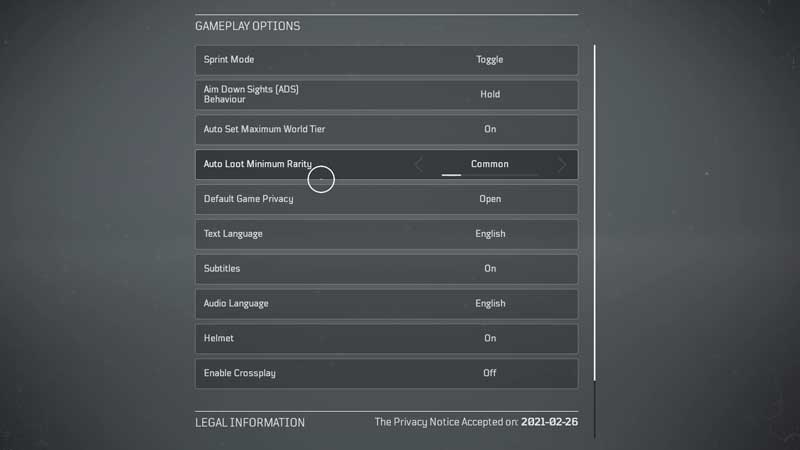
From the main game menu press Z to enter the options menu. Under Gameplay scroll down and look for the fourth option Auto Loot Minimum Rarity. There are five different options under this setting.
- Common
- Unusual
- Rare
- Epic
- Legendary
At the start of the game, you can keep Rare or Epic under auto-loot. So when you are done with a quest before leaving epic or rare items dropped by enemies will be added automatically to your inventory. No need to walk all the way near to the enemy and collect them manually. Later as you progress and unlock more World Tier you will set the option to Legendary. Which is quite tough to find and if you miss it replaying everything is the only option left.
Loots are provided via chest and enemies. Regular one drops ammo or standard items while tougher enemies and bosses drop rare and legendary ones. This will save a ton of your time while moving around without worrying about losing your valuable rewards. Another thing you will need is the list of game controls. We have a guide on Outriders PC and Xbox controls. Refer to the link to keep track of various actions you can perform other than standard movements. Certain things like dodging enemies play a vital role in saving health. Thankfully health regenerates in Outriders, you just need to stay in cover for some time.
So this is how you can enable auto-loot in Outriders. You can collect the items without going near to them or pressing a key. You can check out more of our guides like how to switch class in Outriders or how to customize your character appearance.










