Home > Gaming Guides > Little Nightmares 2: How To Equip Hats

How To Equip Hats In Little Nightmares 2

Published Date :

Little Nightmares 2 has really taken horror games up a notch with its seemingly involving and puzzling gameplay. While it takes a different route as compared to traditional horror games when it comes to scaring tactics, Little Nightmares 2 is still up there in the creepiness department. The main character, Mono, is well recognized due to the paper bag hat. However, the game does allow you to equip Mono with different hats and change them while playing the game actively. Follow this guide to learn how to find, equip and change hats in Little Nightmares 2.

How to Equip Hats in Little Nightmares 2
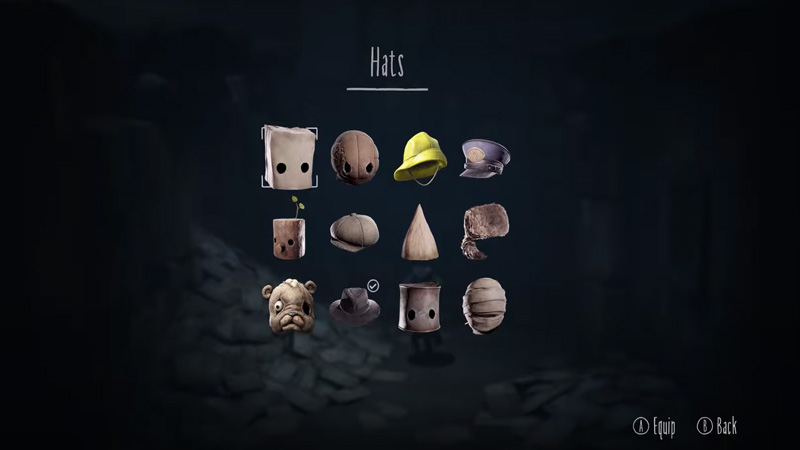
How to equip hats in Little Nightmares 2
How to find, equip and change hats in Little Nightmares 2

As you progress through different levels of you will come across various collectibles which get added to your inventory. Different hats are part of these collectible items in the game. Although there are no in-game instructions that tell you how to access them. Follow the steps written below to equip hats in Little Nightmares 2.

As you come across different collectibles in the game and capture them a hat will be added to your inventory. To access these hats however you need to go through a few steps. First, you need to access the Pause menu. You can do this by clicking on the Options button on PlayStation, Menu on XBOX, and + on Switch. Here you will see an option in the Hats section.

Click on this and you will see a list of various hats that are at your disposal. Go over to the one you like and click X if you’re on PlayStation, A on XBOX, and Y-on Switch to equip the one you like. Now when you go back to the game you will see that Mono will be wearing the hat that you have chosen. You will come across many collectibles in the game and so you should keep checking the Hats section frequently. You can switch between hats as many times as you like and keep trying out different looks.

This was all you had to know about how to equip hats in Little Nightmares 2. You can even look at How to destroy obstacles and barriers in Little Nightmares 2.

  • Spin a Car Codes (July 2026)

    Spin a Car Codes (July 2026)

    Published Date :

    Spinning games are pretty popular on Roblox and rightly so, because they’re very addictive! Spin a Car is where you roll dice to unlock various cars and upgrades – the rarer your vehicle, the more money it makes! Since free rewards are always welcome, the developers share codes that provide Gasoline, Coin Potion, cash and… Read More

  • Build Your Butterfly Garden Codes (July 2026)

    Build Your Butterfly Garden Codes (July 2026)

    Published Date :

    Build Your Butterfly Garden codes let you grow your butterfly sanctuary even faster by rewarding you with useful items like Eggs, Flowerbeds, and Luck Boosts. As you hatch new butterflies, expand your collection, and decorate your peaceful garden, these freebies can give your progress quite a boost! Here are the latest rewards you don’t want… Read More

  • Paint or Die Codes (July 2026)

    Paint or Die Codes (July 2026)

    Published Date :

    Paint or Die Codes can help you build up your Cash balance before you jump back into another round of hiding in plain sight. In this Roblox game, your goal is to blend perfectly with the environment by painting yourself while avoiding the Seeker (similar to the viral Meccha Chameleon). And if unlocking certain character… Read More

  • Monkey Soccer Codes (June 2026)

    Monkey Soccer Codes (June 2026)

    Published Date :

    Monkey Soccer codes can give you plenty of free Bananas and Lucky Spins, making it easier to get a much better experience on the pitch. Since new codes are usually released alongside major updates and milestones, here’s a complete list of rewards to ensure you don’t miss out. Last checked for new codes on June… Read More