
If you are facing the Steam error where your Friends List is black or blanked out, then we will help you fix it. Players around the world use this popular game platform to buy and launch games. As you play multiplayer games, you get to add new friends and chat with them. So it can be frustrating to open Steam and not have access to the friend list. To help you, this guide will tell you how to fix this annoying issue.
How to Fix Steam Friends List Black or Blanked Out Error
Now before jumping onto troubleshooting, first check if your Internet Connection is stable. If there’s no problem with the internet, then you can move on to troubleshooting.
Fix 1. Check if Steam Servers are Down
Sometimes Steam servers will be down due to outages or maintenance. If that is the case, then you’ll have to wait until the servers are up. You can check the Steam server status here to be sure. If that’s not the case, then move on to the next fix.
Fix 2. Restart Steam
While this may seem silly, restarting Steam can be the easiest way to fix the Friends List Blank or Blacked Out error. But do not just click on the Cross icon to shut it down. Instead, follow these simple steps:
- Click on Steam in the top-left corner of the app window.
- Then, click on Exit.
- Open your Task Manager through the Windows Search Bar (Or press Ctrl+Shift+Esc).
- Check if any Steam application process is running. If you find one, then right-click on it and select “End Task”.
Fix 3. Clear Cookies and Cache
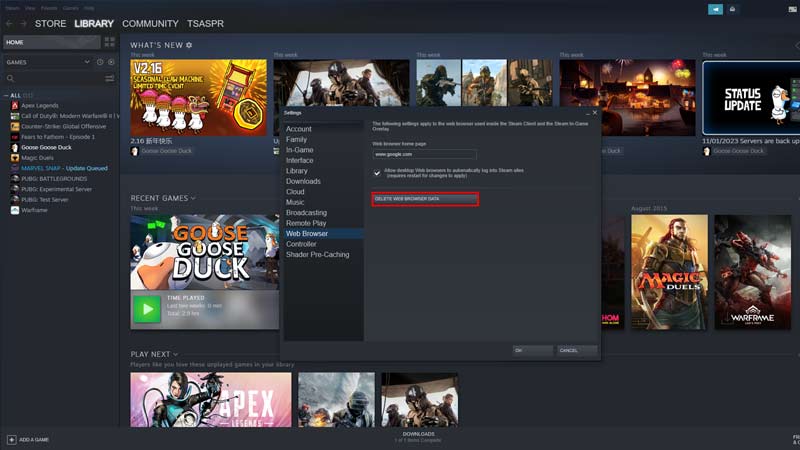
Cookies and Cache are always in a bad light but they are used to make your browsing experience better. If you are using the same pages over and over, then they will help you load faster. However, sometimes they might get corrupted, damaged, or run out of storage space, causing this issue. To fix it:
- Open the application and click on Steam in the top-left corner of the app.
- Click on Settings and go to “Downloads”.
- Then, click on Clear Download Cache.
- Now, click on “Web Browser” and click on “Delete Browser Data”
- Then, restart Steam to check if the glitch is fixed.
That’s all from us on how to fix the “Friends List Black or Blanked Out” Error on Steam. For more helpful guides like How to Fix Error Code E2, check out our Steam guides right away.










