
Many users are recently facing an issue of Discord going grey and are looking for a fix. This problem is rather annoying especially since it happens when you switch tabs or minimize it to go back to your game. Some are even getting it as soon as they start it. As such there is no definite reason for why you may get it or what things you should do to avoid it. However, there are some workarounds that you can try to temporarily resolve it.
How to Fix Discord Screen Keeps Going Gray
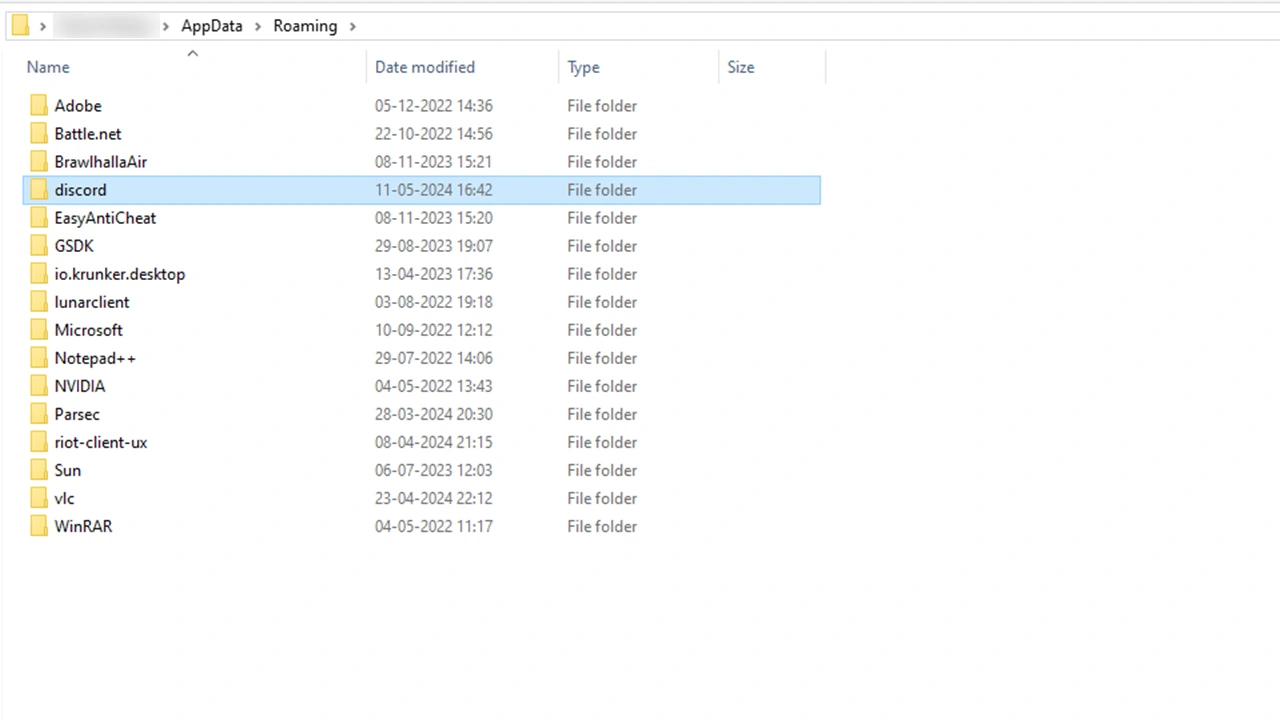
At the time of writing this guide, there is no official fix for this bug. But these are some of the solutions that have worked for others:
- Delete its AppData folder: Deleting app data works by clearing Discord’s cache and can help fix this error.
- Press Windows + R and type “%AppData%”.
- Hit enter and it will open your Roaming folder in the AppData Directory.
- Here, find the “discord” folder and delete it.
- Now, launch Discord and it will start updating itself. Log in if it logs you out and this time it should work properly.
The above workaround has the highest chance of working. Aside from that, you can also try to:
- Disable Hardware Acceleration: Having Hardware Acceleration enabled can in some cases cause this issue.
- Go to Discord Settings.
- Scroll down and click on Advanced.
- Here, toggle off the Hardware Acceleration option.
- In case you already had it disabled you can try enabling it to see if it helps.
- Toggle Game Overlay: Similar to Hardware Acceleration you can try disabling or enabling Game Overlay.
- Go to Discord Settings
- Scroll and click on Game Overlay.
- Turn it off. Or turn it on if it is off.
Do note that the above two fixes have a low chance of working and may not actually resolve it. You can also try some of these generic fixes.
- Restart Discord
- Restart your PC
- Uninstall and Reinstall Discord
- Update your Graphics Drivers
That is all for how you can fix the Discord screen keeps going grey error. Speaking of it, if you frequently use Discord you might find our other guides useful for it on how to fix bad stream quality and embed not working.











