Home > Elden Ring > How To Disable Easy Anti-Cheat in Elden Ring And Play Offline?

Elden Ring – How To Disable Easy Anti-Cheat & Play Offline?

Published Date :

There’s an Easy Anti-Cheat system for players to protect themselves from hackers. Although an anti-cheat system gives you security and minimal risk to hacking, it restricts modding and using any cheat engines. There’s a way to tweak this with some workaround. Playing the game in offline mode has its perks. The game loads faster and there’s no way other players can invade you in offline mode. You can also use mods and different cheat engines. So, here’s our guide that explains how to disable Easy Anti-cheat and play Elden Ring in offline mode.

How to Disable Easy Anti-Cheat in Elden Ring?

Follow these steps to disable easy anti-cheat mode and play the offline mode:

  • Go to the Steam file directory of Elden Ring.
  • That is steam apps > ELDEN RING > Game.
  • You will notice that there are two files in exe format.
  • Steam launches the one named start_protected_game.exe.
  • Rename this file to a suitable name you will remember and change its file format.
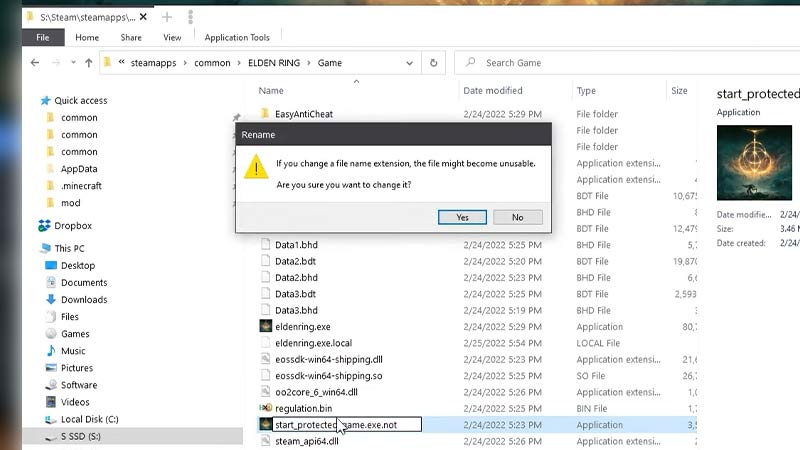
elden ring disable easy anti cheat mode play offline
Image Source – Charmics on YouTube.
  • Then you need to make a copy of another file, eldenring.exe
  • Rename this file into start_protected_game.exe
  • Once you have followed all these steps, launch Elden Ring from the Steam client.
  • The game will be unable to launch in online mode and start in offline mode.
  • It will disable the anti-cheat system and allow you to play Elden Ring offline.
  • If you wish to play the online version of the game, delete or paste the renamed file somewhere else.
  • Then, rename the file that allows you to play online mode back to start_protected_game.exe

That’s all on how to disable the Easy Anti-Cheat mode in Elden Ring and play it offline. If this guide helped you, make sure to check our other guides on how to use the pause mod, best trainers and cheat engines, how to get the ultra-wide mode in Elden Ring right here on Gamer Tweak.


  • +1 Speed Evolve Codes (July 2026)

    +1 Speed Evolve Codes (July 2026)

    Published Date :

    Speed-based games on Roblox will always stay popular, and this particular experience is quite addictive! Here, you play as an animal and your goal is to evolve into stronger animals, unlock new worlds, and be the fastest player on the server! +1 Speed Evolve codes offer free Speed and Win Boosts that can make your… Read More

  • Yeet a Brainrot Codes (July 2026)

    Yeet a Brainrot Codes (July 2026)

    Published Date :

    If you’re annoyed at the Brainrot trend, this is your opportunity to “yeet” them into the distance! To launch Brainrots farther, you need better pets, potions, and more rewards, and thankfully, these Yeet a Brainrot codes will come to the rescue. You can easily unlock various Divine Relic Chests, Primeval Relic Chests, Coin/Luck/Power potions, exclusive… Read More

  • Build A Soccer Squad Codes (July 2026)

    Build A Soccer Squad Codes (July 2026)

    Published Date :

    To build your dream team, you’ll need plenty of rerolls and shop refreshes, which is how you can get better cards and complete your collection. Build A Soccer Squad codes can help with exactly that, giving you various freebies so you get more chances to improve your lineup without waiting. Here’s the complete list of… Read More

  • Aura Monster Simulator Codes (July 2026)

    Aura Monster Simulator Codes (July 2026)

    Published Date :

    Climbing an endless staircase might sound simple at first, but the higher you go, the more Aura you’ll need to keep progressing and unlock stronger upgrades. Thankfully, Aura Monster Simulator codes provide free Gems and Aura Boosts, helping you strengthen your character and reach new heights. More specifically, you can use these Gems to unlock… Read More