
Home > Steam Guides > How To Delete Your Steam Account Permanently

How To Delete Your Steam Account Permanently

Published Date :

For PC gamers who want to quit gaming, it’s important you know how to delete your Steam account. Of course, this isn’t the only platform where you get games – there are others as well like Epic Games Store, GOG, Battlenet, and more.

However, Steam has been around for the longest and is the biggest when compared to them all, so it is only natural you may have started with. But regardless of whether you just gave it a try or have a huge library, the steps for it are quite easy, and here is what you do.

How to Delete Your Steam Account Forever
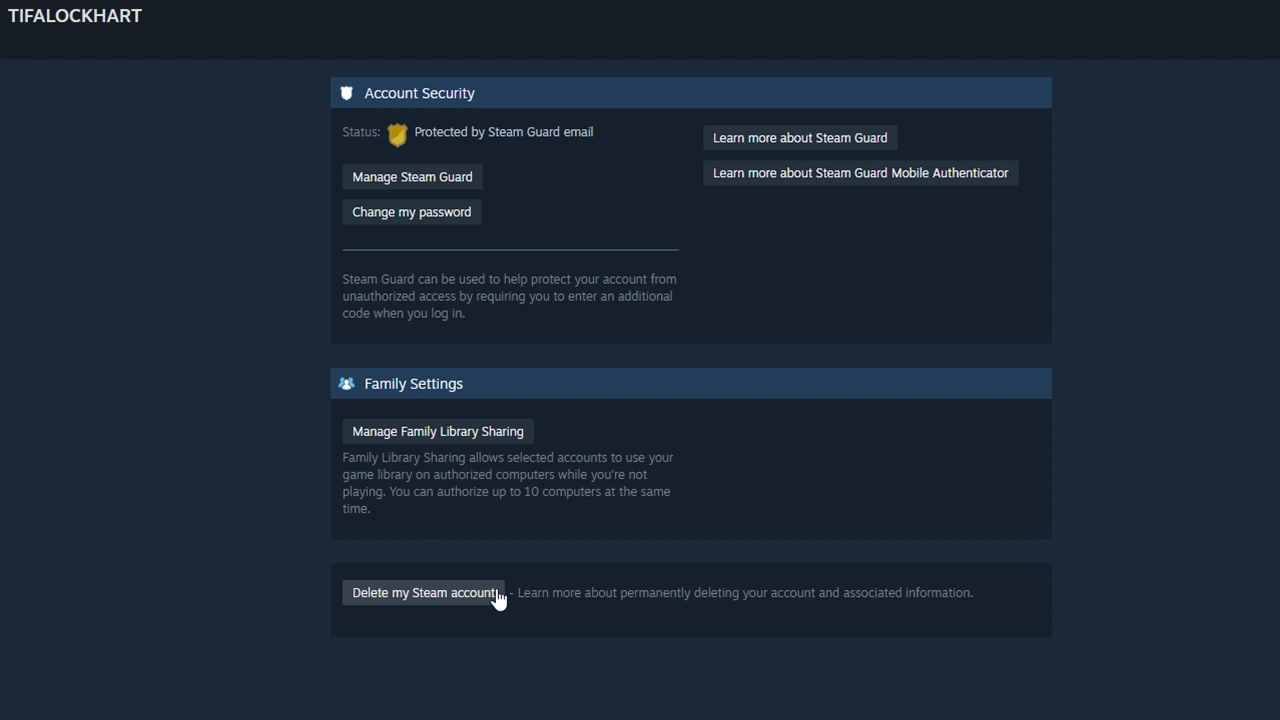
Steps to permanently delete your Steam Account. Screenshot: Gamer Tweak.
  1. Open Steam on your PC. Or you can even log in to your account on a Browser.
  2. Click on the drop-down of your Account name and choose Account Details.
  3. Scroll all the way down and the last option will be “Delete my Steam account”.
  4. Click on it and it will list out the three steps in the process of account deletion. They are as follows:
    • Step 1 – Steam will get you to verify the ownership of your account.
    • Step 2 – Steam will respond to it to confirm your information.
    • Step 3 – Your account will stay locked and will actually be deleted after 30 days.
  5. Click on the “Proceed to account deletion” button.
  6. Next, add your email ID, phone number, and the reason for deletion.
  7. Finally, click on Send.

You should now get an email from Steam regarding it and after 30 days it will be deleted permanently. Do remember that this is not reversible after 30 days. During this month, you cannot play the games that use VAC-secured servers. You cannot make new purchases. Last but not least once deleted you also lose access to:

  • Steam account
  • Game Licenses
  • Community Profile
  • Gifts
  • Inventory Items
  • Wallet Funds

That is all you have to do to delete your Steam account. In case you changed your mind and are back then you should check out some of these guides on how to appear offline, see hidden games, and the fix for games not showing up in the Library.


  • Roll to Defend Codes (July 2026)

    Roll to Defend Codes (July 2026)

    Published Date :

    Roll to Defend codes can reward you with free Units, cash, and luck boosts to summon better Units to fight against zombies. Since upgrading your Backpack and unlocking new zones can take time, codes provide much-needed boosts, which is why we have a list of all the currently available rewards. Redeem them before they expire!… Read More

  • Anime Overseer Codes (July 2026)

    Anime Overseer Codes (July 2026)

    Published Date :

    Anime Overseer codes can give you free Gems, Gold, and Trait Rerolls to help you from the start. Since you’ll be summoning units, evolving them, and taking on challenging enemy waves, every free reward can make progression much easier. So, to help your journey, here’s the complete list of all the currently available codes. Last… Read More

  • Stay For Fortune Codes (July 2026)

    Stay For Fortune Codes (July 2026)

    Published Date :

    Stay For Fortune codes can give you free Cromerium, helping you unlock upgrades and progress without having to wait as long. Since the game revolves around staying in the server to earn rewards over time, every bit of free currency can help you get ahead faster. So, here’s the complete list of all the currently… Read More

  • +1 Speed Evolve Codes (July 2026)

    +1 Speed Evolve Codes (July 2026)

    Published Date :

    Speed-based games on Roblox will always stay popular, and this particular experience is quite addictive! Here, you play as an animal and your goal is to evolve into stronger animals, unlock new worlds, and be the fastest player on the server! +1 Speed Evolve codes offer free Speed and Win Boosts that can make your… Read More







