Once players create a new account in Monopoly Go, the game will hand over a default avatar as a profile picture which thankfully you can change at any point. On the journey of becoming a successful Tycoon and getting rich, you may find the avatar not that interesting. And as you will come across fellow tycoons from all over the world, having a not-so-interesting avatar is not very ideal in Monopoly Go. But as the game doesn’t exactly have a direct option to do so, it can get players wondering. So if you are looking forward to changing out the simple profile picture with something more lifelike then here is a guide you should check out further to know more.
How to Change Monopoly Go Profile Picture
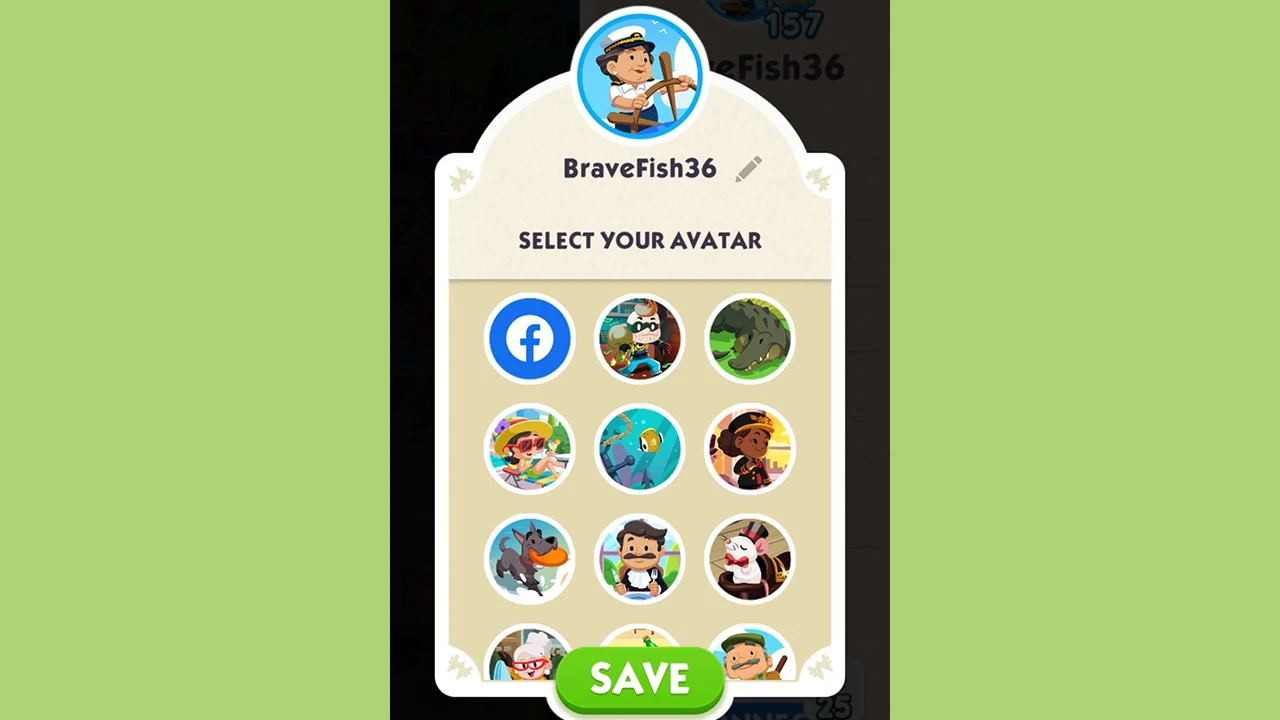
To change the Profile Picture in Monopoly Go, players will have to connect their in-game profile with Facebook. As the game doesn’t exactly have a direct option to change it, players can display their Facebook profile picture in the game. Here are the steps you can follow to connect your Facebook account to the game:
- Launch Monopoly Go on your Android or iOS device.
- Once done, tap on the three lines at the top right corner of your screen.
- Select your profile at the top.
- Here, you will see all the default avatars that you can select for your profile.
- Players can also set a different avatar if they want here instead of Profile Picture in Monopoly Go.
- You will also come across an option with a Facebook icon.
- Tap on the icon and connect your account to the game.
- This will display your Facebook profile picture in-game.
Players can always change their picture on Facebook to display a new one in Monopoly Go. With it, you will also invite your friends on FB and play the game. Not to mention, you will also get some dice for free to continue playing Monopoly Go.
That’s everything covered on how to change Profile Picture in Monopoly Go. If you are looking for more interesting guides, you can check out our dedicated Monopoly Go section and you can start by checking out how to get golden stickers & how to get new tokens guides.