You can create a single Ballplayer in MLB The Show 21 two modes. They are Road to the Show and Diamond Dynasty. In simple words, the first one is an offline player mode and the second is an online mode. You can create a single character that can be used in both modes. So first you will have to build your character and the next important thing is the player’s position in MLB The Show 21. I this guide we will be discussing the same.
How to Change Your Ballplayer’s Position?
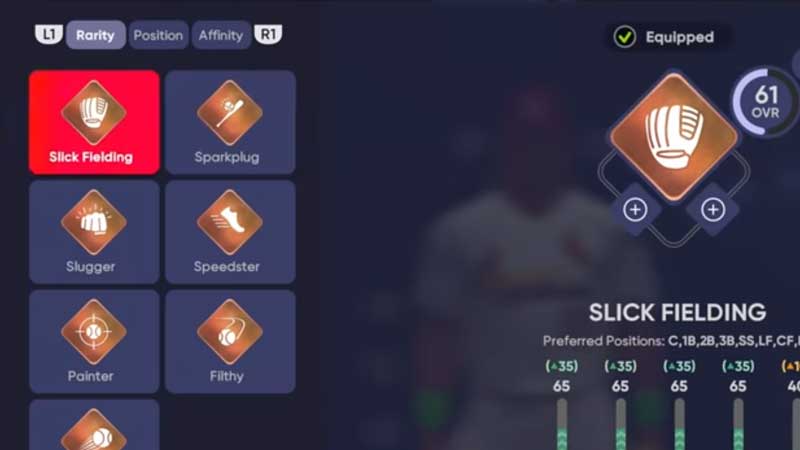
Go to the loadout screen of the Ballplayer and select the biggest ballfield from the left. From here you can manage the positions of the player. Look for the Rarity section and you will see a list of position badges. The position tab here will give you options to move your player on the pitch. Also, the Rarity section will help you with setting up a plan for the pitch.
You can apply perks here to get an additional boost in the game. If you are playing in online mode then here is how to change players’ position in Diamond Dynasty. You will have to focus on the Archetype’s loadout to modify players’ position in the online mode. You can create different and unique loadout to adjust players’ positions on the field. For example Slick Fielding or Sparkplug. Whatever you pick will have an impact on the player’s position.
At the start, you will be on the screen where you will create your Ballplayer first, and then start with detailed customization. You can then carry this player to the online mode and unlock different unique perks. The game also allows you to pick a specific position before you begin your journey. This appears early in the game while talking to the Team Manager. Make sure you do not miss this, from here you can decide your playstyle.
Want more help then here are some guides you can try out, refer to the link for details. Create Your Own Stadium, Rob Home Runs, Batting Guide, etc.