Home > Far Cry 6 > How To Transmog Gears And Weapons in Far Cry 6

How To Change Gear Appearance In Far Cry 6 – Transmog Weapons And Gear

Published Date :

Far Cry 6 has a lot of weapons and gears for you to play around with. But what if you want more from that and change the appearance of these items? Well, the game has you covered even with that. You can change the appearance of your gear with the help of the Transmog feature. It is a feature that allows you to modify the appearance of items without changing their stats. So in this guide let us take a look at how to change gear and weapon appearance(transmog) in Far Cry 6.

How to Change Gear Appearance in Far Cry 6

  1. Open the in-game menu.
  2. Select the Arsenal tab.
  3. Hover the mouse on the gear to want to change the appearance and Press F to inspect it.
  4. Click on the eye-like option available at the bottom of the screen.
  5. All the available skin options can be found here, hover over the one you wish to equip and press space-key or left-click on it.

To unlock the different skins of gears you need to complete the quest specified for each skin. Once you do the above actions you can change your gear’s appearance.

How to Change Appearance of Weapon in FC6 – Transmog guide
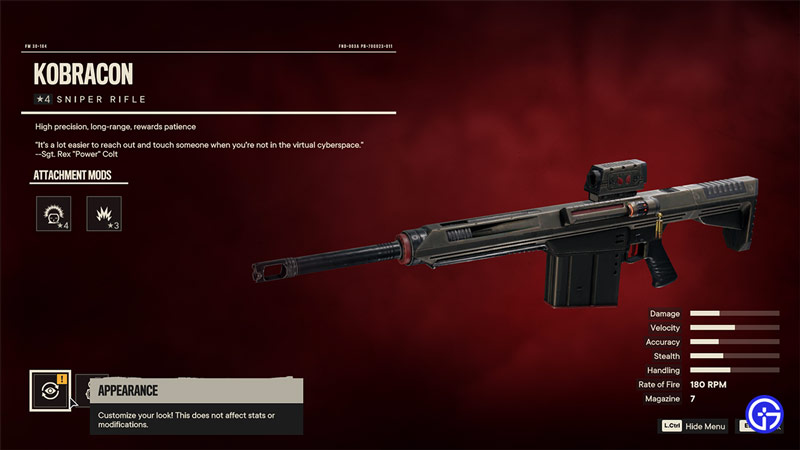
far cry 6 how to change gear and weapon appearance

  1. Press Esc-Key to open the in-game menu.
  2. Click on the Arsenal tab.
  3. Hover the mouse over the weapon you wish to change the appearance of.
  4. Press F to inspect it.
  5. On the bottom of the screen, you can see an eye-like option. Click on it.
  6. Here you can see all the available skin options, hover over it and press the Space-Key or left click on it to equip it.

Remember that you need to have spray cans to purchase these skins. If you follow the above steps correctly, you should have the appearance of your weapon changed.

That sums up everything you need to know on how to change gear and weapon appearance and transmog in FC6. Since you like playing this game be sure to check out our other guides on Aguda cliff checkpoint key, Oluso Location, and All horse locations in Far Cry 6.


  • Power a City Codes (August 2026)

    Power a City Codes (August 2026)

    Published Date :

    Power a City is all about keeping a growing city supplied with electricity. You can build generators, connect your power network, upgrade your equipment, and expand your operation as the city’s energy needs increase. Managing everything well can take time, so free Cash and other rewards can give your progress quite a boost. So, here… Read More

  • Fight in a Streamer University Codes (August 2026)

    Fight in a Streamer University Codes (August 2026)

    Published Date :

    Fight in a Streamer University takes place inside a chaotic streamer-themed campus where players settle rivalries through fights. You can take part in 1v1 battles, crew fights, and other brawls as you try to climb the ranks. Anime Spins can give you extra options between battles, so it is worth redeeming the available codes while… Read More

  • Mog or Die Codes (August 2026)

    Mog or Die Codes (August 2026)

    Published Date :

    Mog or Die starts you off as a weak character and lets you build your stats before challenging NPCs and other players in Mog Battles. You can collect items like Milk, Hammers and Picture Frames to improve your character and work toward taking on tougher opponents. If you don’t want to miss out on free… Read More

  • Evolve and Survive Codes (August 2026)

    Evolve and Survive Codes (August 2026)

    Published Date :

    Evolve and Survive is a Roblox survival game where you fight, stay alive, and work toward unlocking stronger forms. Losing can get you back to square one, which makes Gold, Revives, and other resources useful when you’re trying to keep progressing. In this guide, you’ll find all the working Evolve and Survive codes available right… Read More