
Home > Lost Ark > How To Fix The Card Catalog Is Full In Lost Ark

Lost Ark Card Catalog Is Full Fix

Updated Date :

Lost Ark has quite a complex card system and one of the issues with this system players are facing is the card catalog is full. What this issue does is, let’s say you open a card set and get 7 cards you might be able to add 3-4 cards to your catalog. But won’t be able to add the remaining cards. So in this guide let us check what you can do with the card catalog is full error in Lost Ark and how to fix it.

How to Fix the Card Catalog is Full Error in Lost Ark
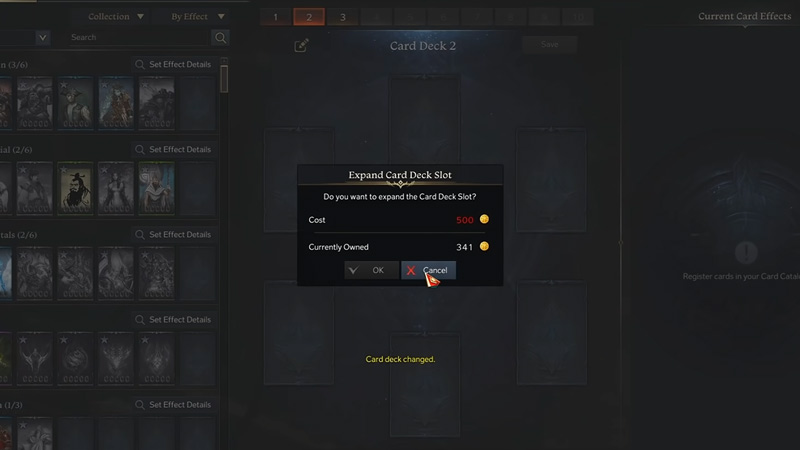
lost ark card catalog is full fix
Image Credit: Kibbles – (Video Game DataBank) on YouTube

You can fix the Card Catalog is full issue by buying card storage or catalog expansion. This is no error as such rather it is a game mechanic. Many people are finding this mechanic infuriating and you can check the reaction of these players in the Lost Ark forums here. It is as NativeGaming on Lost Ark forums has explained. You can solve this problem in three ways.

  • Expand your Card Storage
  • Expand your Card Catalog
  • Destroy the cards

Although you don’t necessarily have to destroy the cards and you can store them in your bank storage. Thanks to user u/Ballistic_78 on Reddit for sharing this workaround. You can check the Reddit thread here.
And as for expanding your storage, you can do that by exchanging your gold for the blue crystals.

How to Expand your Card Catalog

You can expand your card catalog by using blue crystals. You can either exchange gold for blue crystals or directly buy the blue crystals as a premium currency. Lastly, you can also expand your Card Deck slot for 500 gold.

In case you don’t know how the cards work then you should check our detailed guides on the Best Card sets and how to get, equip, & upgrade cards in Lost Ark.

That covers everything you should know about the card catalog is full in Lost Ark and how to fix it. Since you like playing this game be sure to check our other guides on the sea of indolence mechanics guide, how to clear shadespire floor 48, and the uses of the solar, sand, & tide dream instruments in Lost Ark.


  • Will GTA 6 Have First-Person Mode? Latest Footage Leaves Fans Wondering

    Will GTA 6 Have First-Person Mode? Latest Footage Leaves Fans Wondering

    Published Date :

    GTA 6’s latest extended look has given players a closer look at the game’s action, story, driving, exploration, and open world. However, the gameplay steers away from one familiar feature: first-person mode. The new footage shared by Rockstar has brought back questions about whether GTA 6 will let players switch between third-person and first-person perspectives… Read More

  • Who is Jason’s Voice Actor in GTA 6? His Voice Is Already Dividing Fans

    Who is Jason’s Voice Actor in GTA 6? His Voice Is Already Dividing Fans

    Published Date :

    Jason Duval is one of GTA 6’s two main protagonists, but Rockstar Games has yet to reveal the actor behind his voice. That hasn’t stopped fans from trying to figure it out, especially after the latest GTA 6 footage gave players more of Jason’s dialogue to analyze. The discussion has also moved beyond his identity,… Read More

  • Fly Your Wings Codes (August 2026)

    Fly Your Wings Codes (August 2026)

    Published Date :

    Fly Your Wings lets you glide across the map and earn Coins as you improve your equipment. You can upgrade your wings and fireworks to travel farther and free Coins from codes can help you get those upgrades without waiting as long. Here are all the codes you can redeem right now. Last checked for… Read More

  • Power a City Codes (August 2026)

    Power a City Codes (August 2026)

    Published Date :

    Power a City is all about keeping a growing city supplied with electricity. You can build generators, connect your power network, upgrade your equipment, and expand your operation as the city’s energy needs increase. Managing everything well can take time, so free Cash and other rewards can give your progress quite a boost. So, here… Read More







