Tracer can be a very powerful character in Overwatch 2 when used with the best crosshair for her. A right crosshair is very important for every character in the game. But in the case of Tracer, it is one of the things that can make or break her for you. With the correct settings, you should be getting kills left and right. So in this guide check out the best crosshair settings to use for Tracer in Overwatch 2.
Best Tracer Crosshair for Overwatch 2
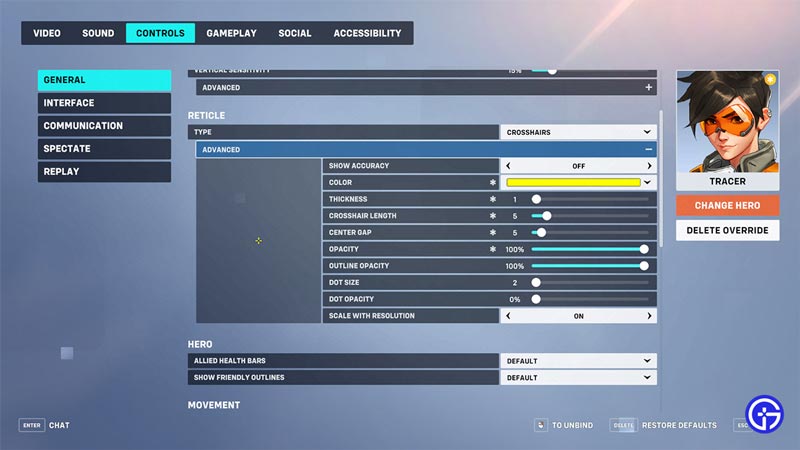
The best Crosshair for tracer uses the Crosshairs type for its Reticle. These are the settings you should use for it:
- Reticle
- Type: Crosshairs
- Advanced
- Show Accuracy: Off
- Color: Yellow
- Thickness: 1
- Crosshair Length: 5
- Center Gap: 5
- Opacity: 100%
- Outline Opacity: 100%
- Dot Size: 2
- Dot Opacity: 0%
- Scale with Resolution: On
Why you should use the above settings?
This DPS Hero is all about speed. So for such a fast-paced character you will need some crosshair that is clearly visible, is not too shakey or distractive, and doesn’t take up too much of your screen. Hence you can see why I selected the above settings.
The Reticle type is Crosshairs because that works best for aiming with her, considering you will almost always be on the move. Show Accuracy must be off because you don’t want your crosshair to move while you run as that can affect your aim negatively by being distracting.
While you can keep any color of your choice. Having a bright color like yellow, green, or pink can make your crosshair not blend with the surroundings. As for the Crosshair Length and Center Gap. Both are 5 as to not make the crosshair big and increase your visibility of the environment, while on the move.
Lastly, Dot is not recommended for her, so keep it as any size and reduce the Opacity all the way to 0%.
That covers this guide on the best Tracer crosshair to use in Overwatch 2. If you are looking for other crosshairs to use with your favorite heroes then be sure to check our guide on the best crosshair for every hero. And for more help on this game don’t forget to check out our Overwatch 2 Wiki.