
Home > Final Fantasy 16 > FF16 How To Assign Shortcut System

How To Assign Items To Shortcuts In Final Fantasy 16

Published Date :

Final Fantasy 16 doesn’t only have an engaging storyline but is also equally combat-heavy. Whether you’re a newcomer or a veteran of the series, there have been quite a lot of changes in the combat mechanics. Your encounter with each enemy will be more difficult than before. And as a result, you might need to use recovery items and buffs during critical moments. But since many players struggle with the menu options, the developers have added a seamless shortcut system. This guide will help you learn how to assign Item Shortcuts in Final Fantasy 16.

How to Assign Item Shortcuts in Final Fantasy 16
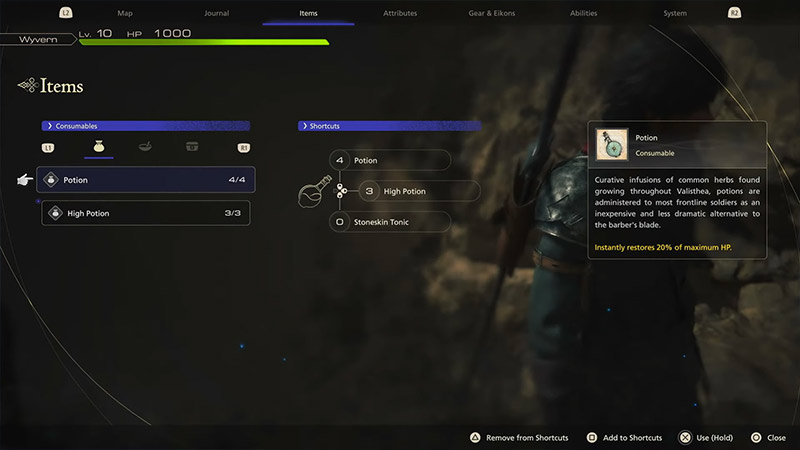
how to assign items to shortcuts in ff16

Item Shortcuts in FF16 allow players to allot three different items which can be accessed straight away by pressing the Up, Right, and Down buttons on your D-pad. This can help players massively during intense fights with enemies. So, in case your HP is low, you can easily access a health recovery item from the Shortcuts menu.

Here is how you can Assign Item Shortcuts in Final Fantasy 16:

  1. Press the “Options” button to open the Menu.
  2. Then, move over to the “Items” tab by pressing the R2 button.
  3. Once here, select the “Consumables” category.
  4. Now, you will need to assign items to Shortcuts.
  5. Choose the healing items and buffs you want and place them in the three slots.

We’d advise you to use Healing Consumables for all your three slots. These recovery items can come in clutch while Clive engages in intense battles with bosses and Eikons.

That’s all you need to know on how to assign items to the Shortcuts menu in Final Fantasy 16. We hope that this guide was able to help you out. If you’d like to read more stuff on the game like how to get Ability Points, parry attacks, and more in our FF16 section.


  • Dog Race Codes (July 2026)

    Dog Race Codes (July 2026)

    Published Date :

    For those who enjoy fast-paced clicker and racing simulators on Roblox, Dog Race gives you quite a fun experience! Training your strength, hatching cute pets to boost your stats, and collecting wins to climb into the top 50 leaderboard takes plenty of effort and to help you rack up trophies much faster, redeeming free potion… Read More

  • Knife Duels Codes (July 2026)

    Knife Duels Codes (July 2026)

    Published Date :

    Knife Duels provides a refreshing spin on the FPS genre by putting pure melee combat front and center. You can step onto duel pads to challenge other players in 1v1 through 4v4 matches, battling it out to see who can score six wins first. Outplaying opponents on the leaderboard requires sharp reactions, but if you… Read More

  • My Greenhouse Codes (July 2026)

    My Greenhouse Codes (July 2026)

    Published Date :

    If you’re looking for a cozy alternative to standard Roblox farming simulators, My Greenhouse is a relaxed take on the genre. Built by a solo student developer, this game combines classic plant-and-sell farming mechanics with tycoon building, foraging mini-games, character customization, and more. Exploring different regions, unlocking hidden NPCs, and decorating your greenhouse takes extra… Read More

  • TR Legacy Codes (July 2026)

    TR Legacy Codes (July 2026)

    Published Date :

    If you’re a fan of motorcycles and how cool they look, TR Legacy is definitely worth checking out. It brings in some good core motorcycle racing concepts and mixes it with better graphics, nice UI, and also added actual manual gear controls if you want to shift gears yourself. And the best part is that… Read More







