
Home > Valorant > How to Change Enemy Highlight Color

Valorant Guide On How to Change Enemy Highlight Color – Important

Updated Date :

Valorant gives you the freedom to view enemy locations using the agent’s special abilities. One of them Recon Bolt, a special ability of Sova who can reveal the enemy’s location to you. But if you are finding hard to spot them then here is beginners tips on how you can change Enemy Highlight Color in Valorant.

Valorant Settings to Change Highlight Color for Enemy
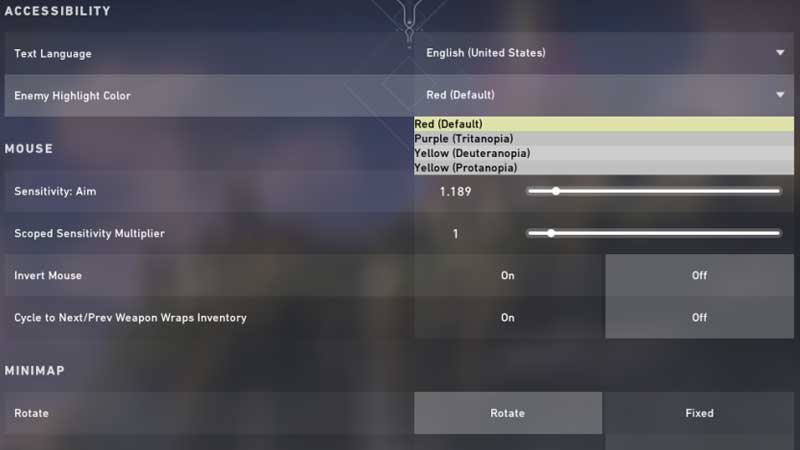
Valorant Game Settings

Launch Valorant and click on the menu on the left side. Go to Settings and click on General Settings. Under the Accessibility, section look for Enemy Highlight Color. You have four options to pick, they are listed below.

  • Red
  • Purple – Tritanopia
  • Yellow – Deuteranopia
  • Yellow – Protanpia

Using the following color settings you can improve enemy visibility in Valorant. Without spotting them at the right time you cannot plan your attack or ping your friends. Using the abilities to fullest plays a vital role in your win and loss.

You can play as an Attacker or Defender in Valorant, similar to Counter-Terrorist and Terrorist in CSGO. The attacker plants a spike, as a Defender you have to diffuse it before time. Using abilities is one way to stay ahead of others in the game. Ample of players are found to stick with weapons only and cannot utilize their special powers.

For example Own Drone, another ability of Sova where you can use a drone view to track and shoot enemies. It may be available for a short time but kind of useful ability if you know their locations. If you are playing as Sova then his abilities focus more on revealing enemy location from a distance. Once you get an update about a guarded region you can use the abilities to track them down.

This is where enemy highlight color plays a big role, it gives you the exact location where they will be. You can then utilize all your abilities at the right time. Checkout Valorant Wiki guide for more tips and tricks.


  • GTA 6 Stephen Root Role Finally Confirmed

    GTA 6 Stephen Root Role Finally Confirmed

    Published Date :

    GTA 6 finally has its first publicly confirmed actor. Stephen Root has confirmed that he is part of Rockstar’s upcoming game, putting an end to months of speculation surrounding one of the characters seen in its trailers. He confirmed his involvement during an interview with the Associated Press at the BAFTA TV Tea Party in… Read More

  • Larp Your Character Codes (September 2026)

    Larp Your Character Codes (September 2026)

    Published Date :

    Larp Your Character is a simulator game where you play character-based minigames to earn money, buy upgrades, and unlock new characters through crates. You can also rebirth for permanent boosts, trade duplicate characters for titles, and compete with other players on leaderboards. If you also want some free boosts while you’re at it, you need… Read More

  • Drive-Thru Empire Codes (September 2026)

    Drive-Thru Empire Codes (September 2026)

    Published Date :

    In Drive-Thru Empire, you build and expand a fast-food drive-thru business. You can roll to collect rare cars, and server high-tier cars to earn more money as your empire grows. Codes can give you bonus Cash and temporary Luck boosts to help with your progress and so, don’t miss out on this list of all… Read More

  • GTA 6 Respawn Mechanics: How Death & Arrests Work Differently

    GTA 6 Respawn Mechanics: How Death & Arrests Work Differently

    Published Date :

    GTA 6 is reportedly changing what happens when Jason or Lucia dies or gets busted. You may not have to deal with respawning at a hospital every single time. Now, Rockstar could be setting up a faster system that drops you right back near where you fell. Here is how death, arrests, and your equipment… Read More








