Pokemon Scarlet & Violet is finally out and now available on Nintendo Switch. Apart from new Pokemon, players will also come across some new and improved features. One such feature players are enjoying is the Multiplayer option as known as Union Circle. With this option, you can join your friends to do several activities with them. If you are new to the game and unaware of this Multiplayer option, then we have got you covered. In this guide, we’ll walk you through all the aspects of how a Union Circle works & how you can use it in Pokemon Scarlet & Violet.
How does Union Circle Work in Pokemon Scarlet & Violet?
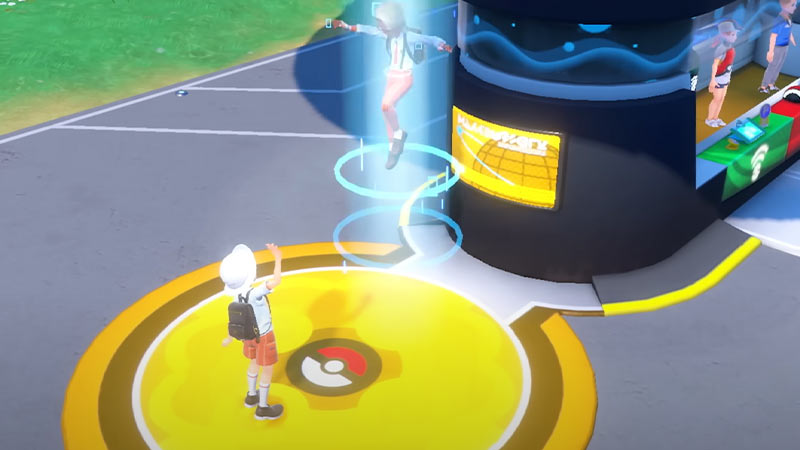
As mentioned earlier, Union Circle is a Multiplayer option in Pokemon Scarlet & Violet. This feature is only available once you play the 1-hour long tutorial and get to your first Pokemon Center. Once you have done that simply head to the Center and link with your friends to play the game. You can not only wander around the Paldea region with your fellow trainers. But also go on Tera Raids, Trade, and even battle against other Pokemon in the game. For those who are unaware, only 4 members can be in one group.
In order to make this happen simply head to your nearest Pokemon Center and interact with the yellow Union Circle. Or you can always visit the Poke Portal and access the Union Circle from there. Players can join the other trainer’s party or even host one by themselves. Apart from the Offline Multiplayer mode for nearby friends you can even link with other players over the globe by using the Online Multiplayer mode. Now you know how a Union Circle works in Pokemon Scarlet & Violet. However, if you are unaware of how you can use the Union Circle in the game, then scroll down for steps.
Steps to Use Union Circle – Online & Offline Multiplayer Mode
Here are the steps to use the Union Circle via Offline & Online Multiplayer Mode. So without any further ado let’s see how you can create a party of your own in the game.
- Online Multiplayer Mode
Before following the steps make sure you have Nintendo Switch Online or else the process won’t work.
-
- First, go to the nearby Pokemon Center.
- Next, step on the yellow Union Circle located beside the Center.
- After that, go Online by pressing the L button.
- Then, select the option to Form a Group.
- And after that, share the 6 digits Link code with your friends online.
- Next, wait for the players to join your group.
- Once done, click on the Set out together option, and it’ll teleport you to the Paldea region.
This is how you can easily play Pokemon SV with your friends in the Online Multiplayer mode. If you are looking forward to joining your friend then select the Join a group option and enter the codes.
- Offline Multiplayer Mode
Before you move ahead make sure you switch to Offline mode. This process is only recommended for the players who are in the same room or sitting right next to each other.
-
- First, go to the nearby Pokemon Center.
- Next, step on the yellow Union Circle located beside the Center.
- After that, select the option to Form a Group.
- Then, share the 4 digits Link code with your friends online.
- And after that, wait for the players to join your group.
- Once done, click on the Set out together option, and it’ll teleport you to the Paldea region.
As mentioned earlier, in order to join your friend’s party simply click on Join a group and enter the codes. That sums up everything about how you can use Union Circle in Pokemon Scarlet & Violet. While you are here take a look at how to level up to 100 quickly in the game.