Home > Gaming Guides > Wuthering Waves (WuWa) > Wuthering Waves: How to Unlock and Use Sensor

Wuthering Waves: How to Unlock and Use Sensor

Published Date :

Knowing how to use the Sensor in Wuthering Waves has several players stuck. This mechanic is an important Utility that when used correctly will prove to be super handy. Not only can you use it for your missions but even in the open world it can be useful when you are looking for some resources. Aside from that it can also help you find enemy weaknesses — so here is how you can scan things with it easily.

How to Use Sensor in Wuthering Waves (WuWa)
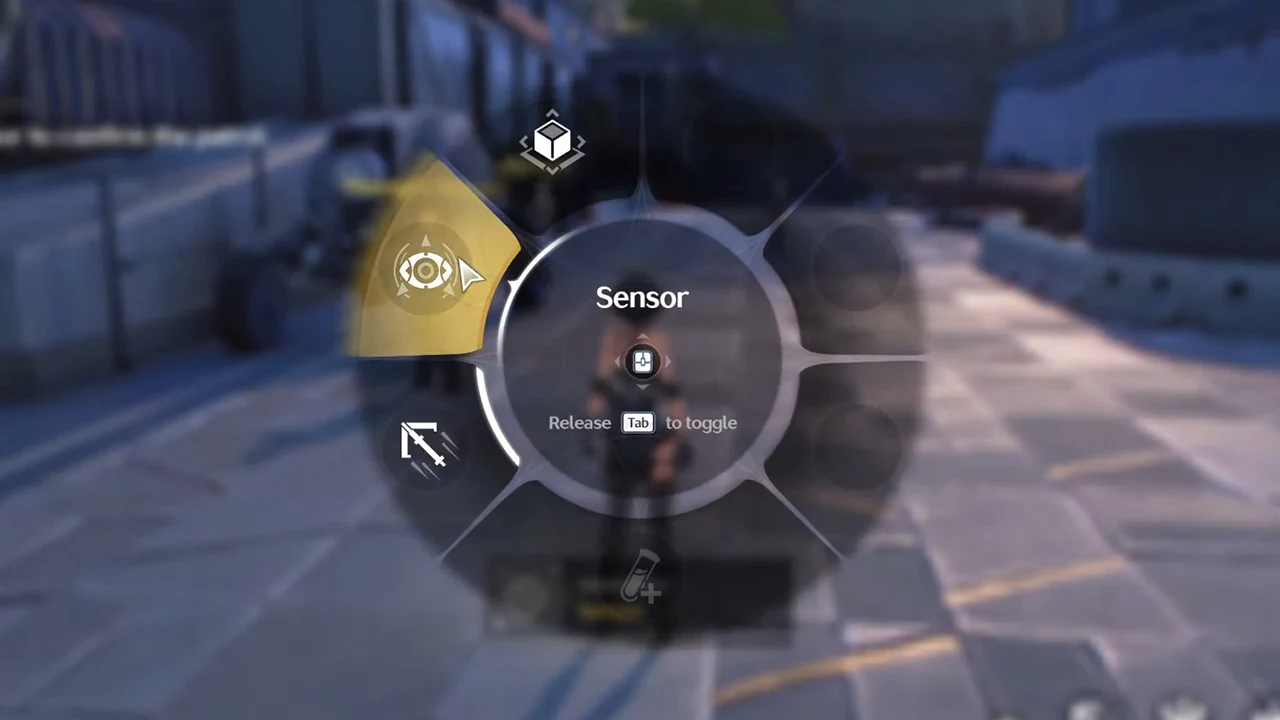
Open the Utility wheel and equip the sensor to use it in Wuthering Waves.

You use the Sensor in WuWa after equipping it from the Utility Wheel.

  1. Press and hold the left button on the D-pad for the controller or the Tab key on the keyboard to open the Utility Wheel. If the Menu shows Utility and Function options, choose the former.
  2. Next, use the right joystick on the controller or your mouse to select the Sensor to equip it.
  3. Now, release the left button or Tab key to release the Wheel.
  4. Finally, to use it you can press T or the assigned button. Similarly, for the controller, you can press L1 + Triangle or LB + Y or whatever button the Sensor gets assigned to.

How to Unlock the Sensor

In case you haven’t unlocked it yet, you get by simply progressing the main story quests. The one that you need to complete to obtain Sensor is Echoing Marche. It is the 4th main quest overall and is Act 2 of Chapter 1.

  1. First, you need to rest until it is Morning (at least 7:00 AM).
  2. Next, go to the Panhua’s Restaurant and meet Chixia.
  3. After talking to her you have to leave the city.
  4. Now, keep following the yellow marker and it will lead you to the Rearguards Base.
  5. Here, your objective will change to Ask the Soldiers about Zhiyuan.
  6. Go and talk to the soldier.
  7. You get to Patrol the route and will obtain the Sensor for it.

With that, you now know how you can get and use the sensor in WuWa. Since you are playing this game you might also find our other guides helpful on how to add and play with friends, change your name, and fix the stuck on verifying file integrity issue.


  • Anime Duelists Codes (July 2026)

    Anime Duelists Codes (July 2026)

    Published Date :

    Anime Duelists follows the tried and tested formula of spinning stars to unlock fighters, sending them into battle and collecting rewards. If you want to get unique fighters, abilities, and progress through various realms, you need these code rewards! You can get anything from free Gems, Trait Rerolls, Stats Reroll, Super Luck, Star Speed potion,… Read More

  • Mini Cup Codes (July 2026)

    Mini Cup Codes (July 2026)

    Published Date :

    In Mini Cup, you open up packs to unlock footballers, build houses, and win matches against rival teams. This makes it a perfect mix of some of the most popular gameplay loops for soccer fans on Roblox. To grow your club, you’ll need cash, as well as special packs, which is where Mini Cup codes… Read More

  • Be The Final Boss Codes (July 2026)

    Be The Final Boss Codes (July 2026)

    Published Date :

    Now you can be the final boss! In this experience, you summon minions to fight for you and take down waves of heroes. To level up, you’ll need plenty of coins and various resources, which is where Be The Final Boss codes come in handy. If you wish to boost your character and stay one… Read More

  • Clean the Squishies Codes (July 2026)

    Clean the Squishies Codes (July 2026)

    Published Date :

    There’s something surprisingly satisfying about picking up the cute Squishies and putting them back on their designated shelves. If you’re interested in getting some unique rewards including free Squishies, this guide is for you. Here’s the complete list of all the working rewards. Last checked for new codes on July 13, 2026 All Clean the… Read More